Maak je geen zorgen meer over extra kosten bij het gebruik van Ear Agent Live : Hearing Aid op je mobiele telefoon, bevrijd jezelf van het kleine scherm en geniet van het gebruik van de app op een veel groter display. Vanaf nu, krijg een volledige schermervaring van je app met toetsenbord en muis. MEmu biedt je alle verrassende functies die je verwachtte: snelle installatie en eenvoudige configuratie, intuïtieve besturing, geen beperkingen meer van batterij, mobiele data en storende oproepen. De gloednieuwe MEmu 9 is de beste keuze voor het gebruik van Ear Agent Live : Hearing Aid op je computer. MEmu multi-instance manager maakt het mogelijk om tegelijkertijd 2 of meer accounts te openen. En het belangrijkste, onze exclusieve emulatiemotor kan het volledige potentieel van je PC benutten, waardoor alles soepel en plezierig wordt.
Meer tonen
Schermafbeeldingen & Video van Ear Agent Live : Hearing Aid PC
Geniet van een fantastische ervaring met Ear Agent Live : Hearing Aid op je pc met MEmu Play. Het is een krachtige gratis Android-emulator die je duizenden Android-apps biedt voor de desktopversie. Geniet van contact met vrienden en verbeter je werk met hogere efficiëntie! Ear Agent: Live Listen – Amplify Your World!
app-info
Ear Agent: Live Listen – Amplify Your World!
Have you ever sat in a crowded lecture hall and felt like you couldn't hear a single word from the back? It is really amusing to see how a simple piece of tech can actually take a faint whisper and turn it into something that only you can hear clearly. Ear Agent: Live Listen is built for those awkward moments when you just want to catch every detail without having to move closer to the source. It is a very handy way to keep your listening experience organized and reliable.
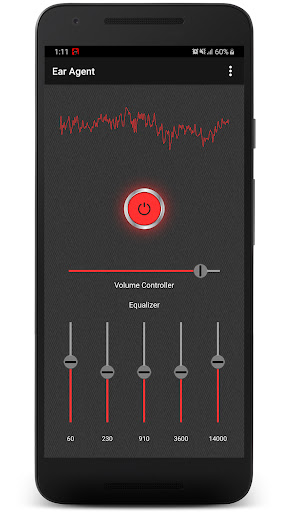
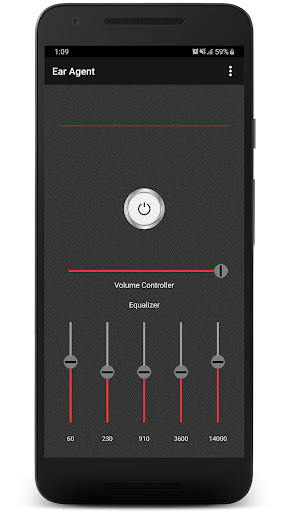
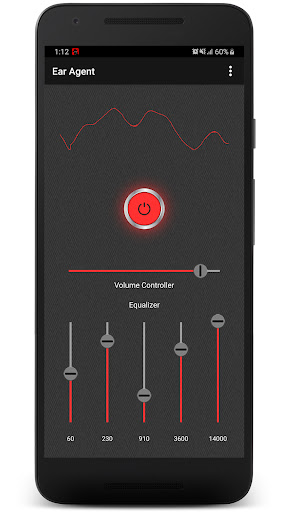
Audio Booster Features : Ear Agent: Live Listen for instant sound amplification; Spy Ear: Hear Through Walls App for mobile acoustic security; Ear Spy: Super Hearing Bluetooth for private listening usage; Hearing Aid: Ear Booster to block out ambient noise; Hearing Amplifier App with customizable equalizer filters; Real-time visualizer to balance visibility and audio input; No-recording policy to ensure your sessions stay safe; Quick toggle button to enable protection from silence in one tap.
How to best enjoy your Spy Ear: Hear Through Walls App!
Life moves fast and honestly it is just nice to have a way to keep the world audible without having to worry about missing important information. Using the Ear Agent: Live Listen to listen to a distant TV show is fun and is streamlined with no hard menus to navigate. People using this software find that the custom equalizer is very easy on the eyes. It is that simple to use the Spy Ear: Hear Through Walls App whenever you are in a quiet public space and want to hear more clearly.
Sound Capture Logic: With the Ear Spy: Super Hearing Bluetooth, magic feels as if it can occur on your device while you adjust the equalizer settings. In just seconds, the app applies a digital boost that makes it nearly impossible to miss feeble sounds in a room. All you have to do is tap the button and let the Ear Spy: Super Hearing Bluetooth do its magic.
Audio Booster Power: The Hearing Aid: Ear Booster feature has great benefits for your peace of mind and your daily social interactions. It even helps you with high quality sound tools that work like a physical device but for your mobile software. Using the built-in Hearing Aid: Ear Booster system, you can highlight natural sounds even when you are sitting in the back row of a large hall. Everyone using this technology enjoys the fact that it works so smoothly without the need for medical hardware.
High Clarity Mode: The Hearing Amplifier App is best shown off when you are using your device to listen to a quiet lecture or performance. Start your amplification so you can hear the speech while the person sitting nearby just hears the ambient noise. It is a great way to stay sharp during a meeting or a project briefing when you are in a rush. The results are often surprising for how much more comfortable you feel about your surroundings. Users love the Hearing Amplifier App for their daily listening sessions to catch every feeble sound.
Fully Custom Controls: What differentiates this Hearing Aid: Ear Booster from others is the way it allows you to change the gain instantly. Within the Ear Spy: Super Hearing Bluetooth, you can find a setting that fits your specific headphone model without any trouble. It is that little extra piece of functionality that helps the Spy Ear: Hear Through Walls App stand out from basic volume sliders.
Start Using Ear Agent: Live Listen Today!
Getting a better handle on the sounds around you should be quick and easy. This app is all about fast amplification and fun ways to manage your audio while you are on your phone. Go ahead and download the Ear Agent: Live Listen now. Experience the Hearing Amplifier App on your own phone today.
Meer tonen
Hoe te downloaden Ear Agent Live : Hearing Aid op PC
1. Download de MEmu-installatie en voltooi de setup
2. Start MEmu en open vervolgens Google Play op het bureaublad
3. Zoek Ear Agent Live : Hearing Aid in Google Play
Install
4. Download en installeer Ear Agent Live : Hearing Aid
5. Klik op het icoon om te starten na het voltooien van de installatie
6. Ervaar Ear Agent Live : Hearing Aid op pc met MEmu
Waarom kiezen voor MEmu om Ear Agent Live : Hearing Aid te ervaren
MEmu Play is de beste Android-emulator, met meer dan 100 miljoen gebruikers die genieten van de superieure Android-app-ervaring. Dankzij de virtualisatietechnologie van MEmu kun je duizenden Android-apps soepel op je computer draaien, zelfs de meest veeleisende.
Groter scherm met betere graphics; Lange duur, zonder beperking van batterij of mobiele data.
Volledige Keymapping-ondersteuning voor nauwkeurige besturing van toetsenbord en muis of gamepad.
Meerdere game-accounts of taken op één PC tegelijk met Multi-Instance manager.