
Historical Chronology
Bijgewerkt
Huidige Versie
4.0.0
Aangeboden door

Maak je geen zorgen meer over extra kosten bij het gebruik van Historical Chronology op je mobiele telefoon, bevrijd jezelf van het kleine scherm en geniet van het gebruik van de app op een veel groter display. Vanaf nu, krijg een volledige schermervaring van je app met toetsenbord en muis. MEmu biedt je alle verrassende functies die je verwachtte: snelle installatie en eenvoudige configuratie, intuïtieve besturing, geen beperkingen meer van batterij, mobiele data en storende oproepen. De gloednieuwe MEmu 9 is de beste keuze voor het gebruik van Historical Chronology op je computer. MEmu multi-instance manager maakt het mogelijk om tegelijkertijd 2 of meer accounts te openen. En het belangrijkste, onze exclusieve emulatiemotor kan het volledige potentieel van je PC benutten, waardoor alles soepel en plezierig wordt.
Meer tonen
Geniet van een fantastische ervaring met Historical Chronology op je pc met MEmu Play. Het is een krachtige gratis Android-emulator die je duizenden Android-apps biedt voor de desktopversie. Geniet van contact met vrienden en verbeter je werk met hogere efficiëntie! # There are two major things you can do with this application.
# There are two major things you can do with this application.
1 Create historical chronology (You can create two chronologies)
2 Study using the created historical chronology
Press the icon at the bottom of the Top screen to proceed!
# Explanation of the screen
[Screen for registering period name]
Register period name. Duplicate period names cannot be registered.
[Screen for editing period name]
Edit period name. You can change or delete period name.
[Screen for listing period name]
Displays a list of period names. You can change the order by pressing and holding the left icon and dragging it.
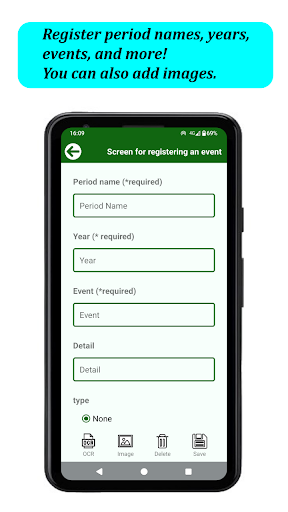
[Screen for registering an event]
Register an event. The registration items are period name, year, event, details, remarks, words that are used in test 2, and image. The period name, year, and event are required fields. (If you select not to use the period name, the period name is not an entry field.) You can register one image taken with the camera or selected from the gallery.
Note: The same year can only be registered with the same period name.
Words that are used in Test 2: In the fill-in-the-blank question in Test 2, select which words in the event you would like to blank out.
[Screen for editing an event]
Edit the event. You can edit the period name, year, event, details, remarks, words that are used in test 2, and delete images and data.
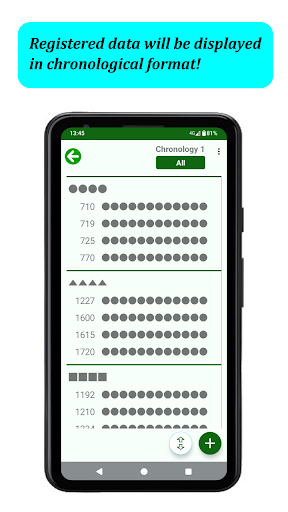
[Historical chronology]
The registered events are displayed in chronological order.
You can select the display format from the options menu in the upper right corner of the screen. Three patterns can be selected. (Two patterns if you select not to use period names.)
By pressing the New button, you will move to the [Screen for registering an event].
You can move within the chronological table by clicking the Move button. There are four ways to move: move to the beginning, move to the end, move by specifying the name of the period, and move by specifying the year. (If you select not to use a period name, you can move to the beginning, end, or year.)
[Screen for detail of an event]
Displays the details of the event.
[Screen for searching]
You can search for characters in year, event, details, and remarks.
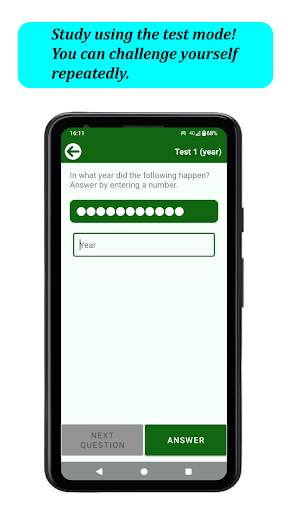
[Test 1 (year)]
The registered event will be randomly selected. Please answer the year in which the event occurred.
You can set the range of questions by year. If you do not set the year, all events will be included in the test.
[Test 2 (blanks)]
The questions will be randomly assigned to the events for which you have registered "the words that are used in test 2". The registered words are left blank, so please answer the words that apply to the blanks.
You can set the range of questions by year. If you don't set the year, all events will be included in the questions.
# Theme color
You can choose your own preferred theme color.
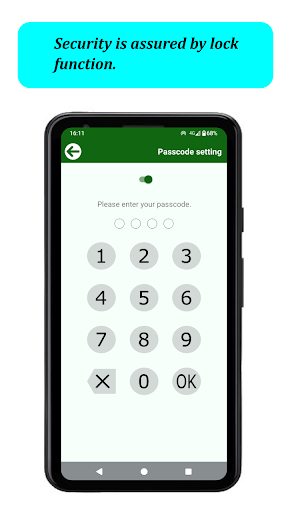
# Lock function
Security is also safe because you can set a passcode and lock it.
# Select whether to use period name
You can select whether to use the period name. It can be changed later.
If you change from "Use" to "Do not use": All registered period names will be deleted.
If you change the name from "Do not use" to "Use": Please register one period name when you change the name. The name of the period will be applied to the events that have already been registered. After that, please register a period name, change the period name, etc.
# Backup
You can back up to an SD card. Data can be inherited even if the model is changed, so you can continue to use it for a long time with peace of mind.
# Languages are available in English, French, German, Italian, Korean, Simplified Chinese, Traditional Chinese and Japanese. Language switching within the app is not supported. The language will switch according to the language setting of the terminal.
Meer tonen

1. Download de MEmu-installatie en voltooi de setup

2. Start MEmu en open vervolgens Google Play op het bureaublad

3. Zoek Historical Chronology in Google Play
Install
4. Download en installeer Historical Chronology
5. Klik op het icoon om te starten na het voltooien van de installatie

6. Ervaar Historical Chronology op pc met MEmu
MEmu Play is de beste Android-emulator, met meer dan 100 miljoen gebruikers die genieten van de superieure Android-app-ervaring. Dankzij de virtualisatietechnologie van MEmu kun je duizenden Android-apps soepel op je computer draaien, zelfs de meest veeleisende.
Groter scherm met betere graphics; Lange duur, zonder beperking van batterij of mobiele data.
Volledige Keymapping-ondersteuning voor nauwkeurige besturing van toetsenbord en muis of gamepad.
Meerdere game-accounts of taken op één PC tegelijk met Multi-Instance manager.
Gebruik Historical Chronology op PC door de volgende stappen te volgen: