Kia Connect
Bijgewerkt
Huidige Versie
2.32.1
Aangeboden door

Maak je geen zorgen meer over extra kosten bij het gebruik van Kia Connect op je mobiele telefoon, bevrijd jezelf van het kleine scherm en geniet van het gebruik van de app op een veel groter display. Vanaf nu, krijg een volledige schermervaring van je app met toetsenbord en muis. MEmu biedt je alle verrassende functies die je verwachtte: snelle installatie en eenvoudige configuratie, intuïtieve besturing, geen beperkingen meer van batterij, mobiele data en storende oproepen. De gloednieuwe MEmu 9 is de beste keuze voor het gebruik van Kia Connect op je computer. MEmu multi-instance manager maakt het mogelijk om tegelijkertijd 2 of meer accounts te openen. En het belangrijkste, onze exclusieve emulatiemotor kan het volledige potentieel van je PC benutten, waardoor alles soepel en plezierig wordt.
Meer tonen
Geniet van een fantastische ervaring met Kia Connect op je pc met MEmu Play. Het is een krachtige gratis Android-emulator die je duizenden Android-apps biedt voor de desktopversie. Geniet van contact met vrienden en verbeter je werk met hogere efficiëntie! Kia Connect: Connected Services.
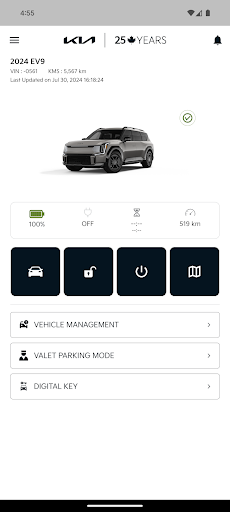
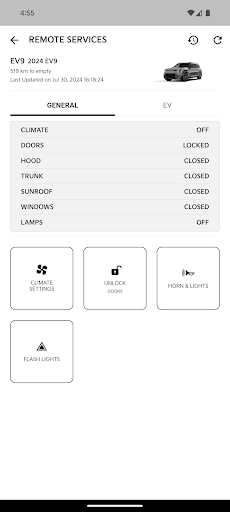
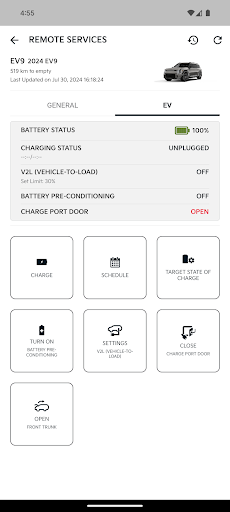
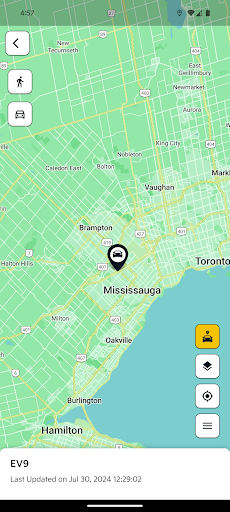
Kia Connect: Connected Services
Advanced connected car services have a new name: Kia Connect. It connects you to a world of support services that enhance your security, comfort and confidence every time you get behind the wheel of your new Kia.
For more details and a list of supported vehicles, please visit kia.ca/UVO
The following vehicles are currently equipped with the Kia Connect system:
• 2018/19 Rio EX and above
• 2018 Optima EX Tech and above
• 2019 Optima EX and above
• 2018-20 Stinger all trims
• 2019 Sorento LX V6 and above
• 2019 Sedona SX and above
• 2019 Niro PHEV all trim
• 2019 Niro EV all trims
• 2019 Forte EX Premium and EX Limited
• 2020 Soul EX 20th Anniversary edition/EX premium and above
• 2020 Soul EV all trims
• 2020 Telluride EX and above
• 2020 Sportage EX Tech and above
• 2020 Optima Hybrid LX and above
• 2020 Optima PHEV EX and above
• 2020 Sedona SX and above
• 2020 Sorento EX+ and above
• 2020 Rio/Rio 5-door Ex and above
• 2020 Optima EX+
• 2020 Forte 5 GT, GT Limited
• 2020 Forte EX Premium and above
Please note that your Kia Connect account must be activated in order to experience the seamless connectivity that the service provides.
Features/Highlights include:
Send remote commands to your Kia vehicle
• Remote start/stop the engine
• Remote climate control function to set the temperature of the cabin
• Lock or unlock the doors
• Find your vehicle in a crowded lot using remote horn and flashing lights
Vehicle Status
Allows you to check the current status of your vehicle right from your app, including status of:
• Doors: Locked/Unlocked
• Trunk & Hood: Open/Closed
• Engine & Climate: On/Off
Get Monthly Health Reports
• Vehicle health reports sent to your email every month or alternatively you can check your vehicle health report though the app and customer web portal.
• Receive important driving information like engine–on duration and total distance traveled.
• Helps you stay on top of your maintenance service schedule.
Find My Car
• Find/Track your vehicle in real time.
Parking Reminder
• Set the parking meter timing and a reminder to notify you before your parking meter time expires.
In-Vehicle Services
On-Demand Diagnostics:
• Access on-demand diagnostics right from your vehicle’s touchscreen display.
Local Search (Navigation equipped vehicle only):
• Simply push the button on your rear view mirror, say your point-of-interest or category, and Kia Connect will quickly provide you with live updated locations and information.
Safety Services
S.O.S. & Roadside Assistance:
• From the touch of your fingertip, roadside assistance and emergency call services are ready to help you out anytime, and are easily accessible through the button on the rear view mirror.
Automatic Collision Notification:
• In the event of a crash or accident, your vehicle will automatically make a call to emergency services on your behalf.
Support
• Get direct access to Kia’s 24-hour Roadside Assistance
• Quick and easy connection to Kia’s Customer Experience Centre
Meer tonen

1. Download de MEmu-installatie en voltooi de setup

2. Start MEmu en open vervolgens Google Play op het bureaublad

3. Zoek Kia Connect in Google Play
Install
4. Download en installeer Kia Connect
5. Klik op het icoon om te starten na het voltooien van de installatie

6. Ervaar Kia Connect op pc met MEmu
MEmu Play is de beste Android-emulator, met meer dan 100 miljoen gebruikers die genieten van de superieure Android-app-ervaring. Dankzij de virtualisatietechnologie van MEmu kun je duizenden Android-apps soepel op je computer draaien, zelfs de meest veeleisende.
Groter scherm met betere graphics; Lange duur, zonder beperking van batterij of mobiele data.
Volledige Keymapping-ondersteuning voor nauwkeurige besturing van toetsenbord en muis of gamepad.
Meerdere game-accounts of taken op één PC tegelijk met Multi-Instance manager.
Gebruik Kia Connect op PC door de volgende stappen te volgen: