latitude longitude & compass
Bijgewerkt
Huidige Versie
gpsLocation_digital_compass v 6
Aangeboden door

Maak je geen zorgen meer over extra kosten bij het gebruik van latitude longitude & compass op je mobiele telefoon, bevrijd jezelf van het kleine scherm en geniet van het gebruik van de app op een veel groter display. Vanaf nu, krijg een volledige schermervaring van je app met toetsenbord en muis. MEmu biedt je alle verrassende functies die je verwachtte: snelle installatie en eenvoudige configuratie, intuïtieve besturing, geen beperkingen meer van batterij, mobiele data en storende oproepen. De gloednieuwe MEmu 9 is de beste keuze voor het gebruik van latitude longitude & compass op je computer. MEmu multi-instance manager maakt het mogelijk om tegelijkertijd 2 of meer accounts te openen. En het belangrijkste, onze exclusieve emulatiemotor kan het volledige potentieel van je PC benutten, waardoor alles soepel en plezierig wordt.
Meer tonen
Geniet van een fantastische ervaring met latitude longitude & compass op je pc met MEmu Play. Het is een krachtige gratis Android-emulator die je duizenden Android-apps biedt voor de desktopversie. Geniet van contact met vrienden en verbeter je werk met hogere efficiëntie! Latitude Longitude & Compass shows your exact GPS coordinates, your current location, and your compass heading in one tap — with a true-north digital compass, your altitude, and easy location sharing.
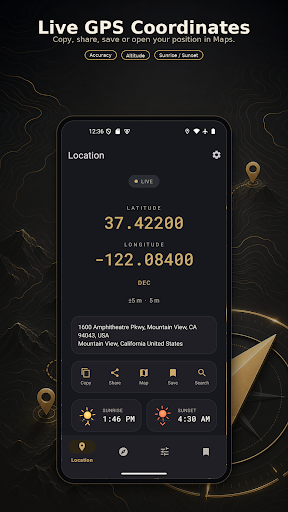
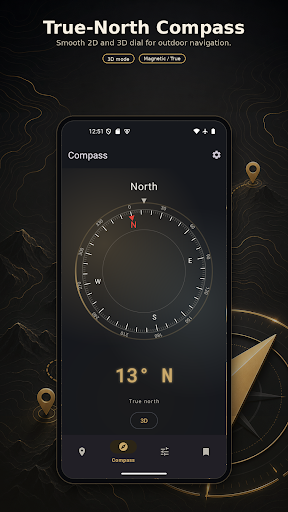
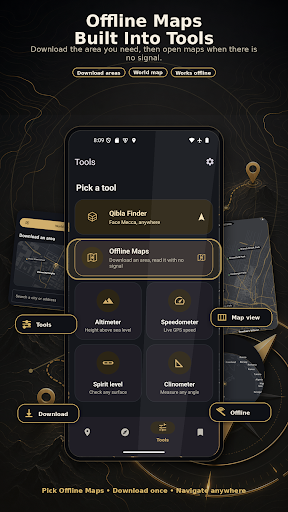
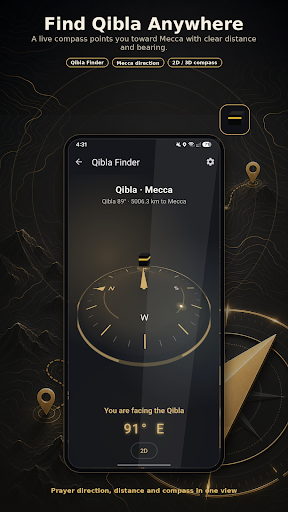
Latitude Longitude & Compass shows your exact GPS coordinates, your current location, and your compass heading in one tap — with a true-north digital compass, your altitude, and easy location sharing. See your latitude and longitude in real time and read your position as decimal degrees, DMS (degrees, minutes, seconds), UTM, or MGRS.
NO INTERNET? NO PROBLEM.
Your coordinates, compass, altitude, and tools run on your phone's GPS and built-in sensors, so they keep working with no internet, no mobile signal, and no Wi-Fi — made for hiking, camping, off-road trips, boating, fishing, hunting, geocaching, and travel far off the grid. (A connection is only needed to look up a street address or place name.)
OFFLINE MAPS
Download a city or area ahead of time, then read its real streets, buildings, and place names with no signal. A continuous world map zooms from countries into the areas you have saved. Vector street maps, not satellite.
A TRUE-NORTH COMPASS
The digital compass uses your device's sensors and corrects for magnetic declination, so it can point to true north, not only magnetic north. Switch between true and magnetic, follow the calibration guide for a steady reading, and pick from several compass dial styles — explorer, modern, minimal, marine, and aviation.
QIBLA FINDER
Find the Qibla direction to the Kaaba in Mecca from anywhere, with a clear needle that lines up when you are facing it — handy at home or while traveling.
GUIDE ME BACK — WAYPOINT NAVIGATION
Save a spot and let the compass point you straight back to it, with live distance and bearing. Great for finding your car, your camp, your tent, or any place you marked.
COORDINATE FORMATS FOR EVERYONE
• Decimal degrees (DD)
• Degrees, minutes, seconds (DMS)
• UTM
• MGRS
Copy your coordinates with one tap, share them as text plus a map link, or open your position in your maps app for directions.
SEARCH AND CONVERT
Look up a place by address to get its GPS coordinates, or turn coordinates into an address. Handy for planning a trip, sharing a meeting point, or converting latitude and longitude to a street location.
AN OUTDOOR TOOLKIT IN ONE APP
• Altimeter — your altitude above sea level from GPS, plus barometric altitude and air pressure on supported phones
• Speedometer — see your current speed on foot, on a bike, or in the car
• Bubble level — a spirit level for flat surfaces, plus horizontal and vertical vials
• Clinometer — measure angle, slope, and tilt
• Saved places — keep your favorite spots with their distance and bearing
• Sunrise and sunset — today's sunrise and sunset times for your location
SHARE YOUR LOCATION IN SECONDS
Send your coordinates and a map link by message or any app you already use. A simple way to tell someone where to meet you, report a spot, or keep a record of a place you want to return to.
MADE FOR EVERY KIND OF TRIP
Hikers, backpackers, campers, climbers, anglers, hunters, geocachers, off-roaders, boaters, drivers, and travelers use it to read coordinates, find their heading, check elevation, and share exactly where they are. If you have ever needed to answer "where am I, and which way is north?", this is built for that.
LOOKS GREAT, DAY OR NIGHT
A clean, modern layout with a dark theme that is easy on the eyes, plus accent colors you can choose.
PRIVACY
Location is used only while the app is open, to show your position, address, heading, altitude, and tools. The app does not track your location in the background.
Latitude Longitude & Compass is supported by ads.
Whether you call it a coordinate finder, a GPS locator, a digital compass, a true-north compass, a Qibla compass, an altimeter, a speedometer, or a "where am I" tool, this app helps you know your spot and your direction quickly — at home, on the road, or far off the grid.
We would love your feedback. If something is not working, or you have an idea to make the app better, get in touch — we read every message and keep improving.
Meer tonen

1. Download de MEmu-installatie en voltooi de setup

2. Start MEmu en open vervolgens Google Play op het bureaublad

3. Zoek latitude longitude & compass in Google Play
Install
4. Download en installeer latitude longitude & compass
5. Klik op het icoon om te starten na het voltooien van de installatie

6. Ervaar latitude longitude & compass op pc met MEmu
MEmu Play is de beste Android-emulator, met meer dan 100 miljoen gebruikers die genieten van de superieure Android-app-ervaring. Dankzij de virtualisatietechnologie van MEmu kun je duizenden Android-apps soepel op je computer draaien, zelfs de meest veeleisende.
Groter scherm met betere graphics; Lange duur, zonder beperking van batterij of mobiele data.
Volledige Keymapping-ondersteuning voor nauwkeurige besturing van toetsenbord en muis of gamepad.
Meerdere game-accounts of taken op één PC tegelijk met Multi-Instance manager.
Gebruik latitude longitude & compass op PC door de volgende stappen te volgen: