Mega Plug
Bijgewerkt
Huidige Versie
1.0.9
Aangeboden door

Maak je geen zorgen meer over extra kosten bij het gebruik van Mega Plug op je mobiele telefoon, bevrijd jezelf van het kleine scherm en geniet van het gebruik van de app op een veel groter display. Vanaf nu, krijg een volledige schermervaring van je app met toetsenbord en muis. MEmu biedt je alle verrassende functies die je verwachtte: snelle installatie en eenvoudige configuratie, intuïtieve besturing, geen beperkingen meer van batterij, mobiele data en storende oproepen. De gloednieuwe MEmu 9 is de beste keuze voor het gebruik van Mega Plug op je computer. MEmu multi-instance manager maakt het mogelijk om tegelijkertijd 2 of meer accounts te openen. En het belangrijkste, onze exclusieve emulatiemotor kan het volledige potentieel van je PC benutten, waardoor alles soepel en plezierig wordt.
Meer tonen
Geniet van een fantastische ervaring met Mega Plug op je pc met MEmu Play. Het is een krachtige gratis Android-emulator die je duizenden Android-apps biedt voor de desktopversie. Geniet van contact met vrienden en verbeter je werk met hogere efficiëntie! **Mega Plug - Your Complete EV Charging Solution**.
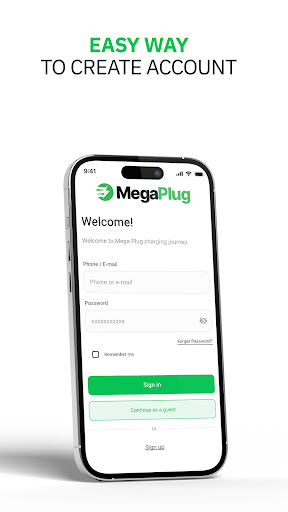
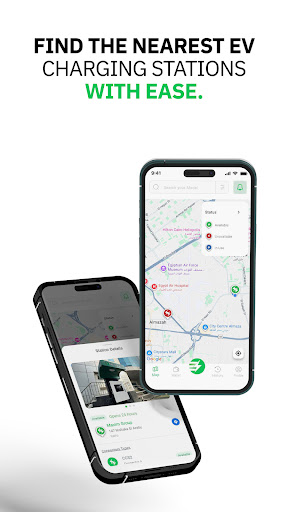
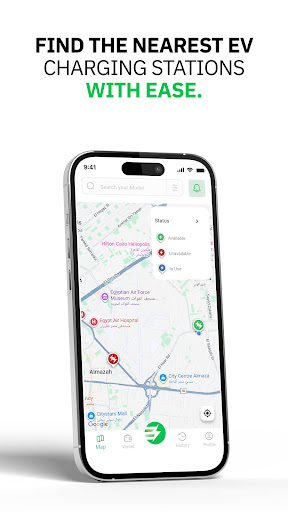
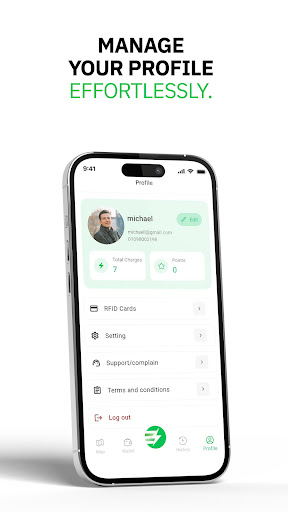
**Mega Plug - Your Complete EV Charging Solution**
Find, connect, and charge your electric vehicle effortlessly with Mega Plug. Discover nearby charging stations, manage your charging sessions in real-time, and enjoy a seamless EV charging experience.
** Key Features:**
** Find Charging Stations**
- Interactive map showing all nearby charging stations
- Search and filter stations by location, availability, and connector type
- Save your favorite stations for quick access
- View detailed station information including pricing, power output, and availability
** Smart Charging Management**
- Start charging sessions instantly with QR code scanning
- Monitor your charging progress in real-time with live metrics
- Track charging speed, energy consumed, and estimated completion time
- Stop charging anytime with a single tap
- Download detailed charging reports as PDF
** Vehicle Management**
- Add and manage multiple vehicles
- Select your vehicle brand, model, and connector type
- Get personalized station recommendations based on your vehicle
- Switch between vehicles effortlessly
** Easy Payments**
- Secure wallet system for seamless transactions
- Top up your balance with multiple payment methods
- Add and manage payment cards
- View complete transaction history
- Automatic payment processing for charging sessions
** Real-Time Updates**
- Live charging session monitoring via WebSocket
- Instant notifications for charging status changes
- Real-time station availability updates
- Stay informed about your charging progress
** RFID Card Support**
- Manage multiple RFID cards for quick access
- Add and remove RFID cards from your account
- Use RFID cards for contactless charging
** Charging History**
- View complete history of all your charging sessions
- Track your charging patterns and expenses
- Access detailed session information and receipts
** Profile Management**
- Manage your personal information
- Update account settings
- Access support and help resources
- Secure account management
** Additional Features:**
- Guest mode for exploring stations without an account
- Offline map support for viewing saved stations
- Multi-language support
- Dark mode support
- Push notifications for important updates
**Why Choose Mega Plug?**
**Comprehensive Network** - Access to a wide network of charging stations
**Real-Time Monitoring** - Track your charging session with live updates
**User-Friendly Interface** - Intuitive design for easy navigation
**Secure Payments** - Safe and secure payment processing
**Reliable Service** - Trusted platform for EV charging
Download Mega Plug today and experience the future of electric vehicle charging. Whether you're a daily commuter or a long-distance traveler, Mega Plug makes EV charging simple, fast, and convenient.
**Perfect for:**
- Electric vehicle owners
- EV enthusiasts
- Daily commuters
- Long-distance travelers
- Fleet managers
Start your journey towards sustainable transportation with Mega Plug!
---
*Mega Plug - Powering Your Electric Journey*
Meer tonen

1. Download de MEmu-installatie en voltooi de setup

2. Start MEmu en open vervolgens Google Play op het bureaublad

3. Zoek Mega Plug in Google Play
Install
4. Download en installeer Mega Plug
5. Klik op het icoon om te starten na het voltooien van de installatie

6. Ervaar Mega Plug op pc met MEmu
MEmu Play is de beste Android-emulator, met meer dan 100 miljoen gebruikers die genieten van de superieure Android-app-ervaring. Dankzij de virtualisatietechnologie van MEmu kun je duizenden Android-apps soepel op je computer draaien, zelfs de meest veeleisende.
Groter scherm met betere graphics; Lange duur, zonder beperking van batterij of mobiele data.
Volledige Keymapping-ondersteuning voor nauwkeurige besturing van toetsenbord en muis of gamepad.
Meerdere game-accounts of taken op één PC tegelijk met Multi-Instance manager.
Gebruik Mega Plug op PC door de volgende stappen te volgen: