MiniMed
Bijgewerkt
Huidige Versie
1.2.2
Aangeboden door

Maak je geen zorgen meer over extra kosten bij het gebruik van MiniMed op je mobiele telefoon, bevrijd jezelf van het kleine scherm en geniet van het gebruik van de app op een veel groter display. Vanaf nu, krijg een volledige schermervaring van je app met toetsenbord en muis. MEmu biedt je alle verrassende functies die je verwachtte: snelle installatie en eenvoudige configuratie, intuïtieve besturing, geen beperkingen meer van batterij, mobiele data en storende oproepen. De gloednieuwe MEmu 9 is de beste keuze voor het gebruik van MiniMed op je computer. MEmu multi-instance manager maakt het mogelijk om tegelijkertijd 2 of meer accounts te openen. En het belangrijkste, onze exclusieve emulatiemotor kan het volledige potentieel van je PC benutten, waardoor alles soepel en plezierig wordt.
Meer tonen
Geniet van een fantastische ervaring met MiniMed op je pc met MEmu Play. Het is een krachtige gratis Android-emulator die je duizenden Android-apps biedt voor de desktopversie. Geniet van contact met vrienden en verbeter je werk met hogere efficiëntie! Manage your diabetes therapy with the MiniMed™ app!
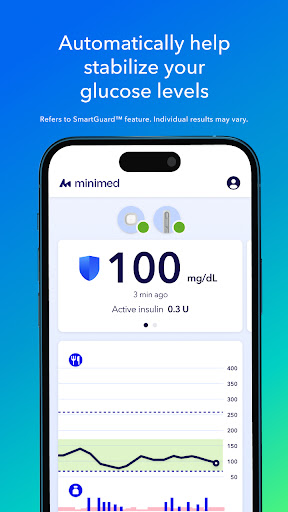
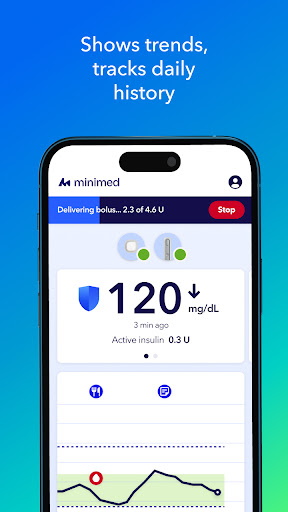
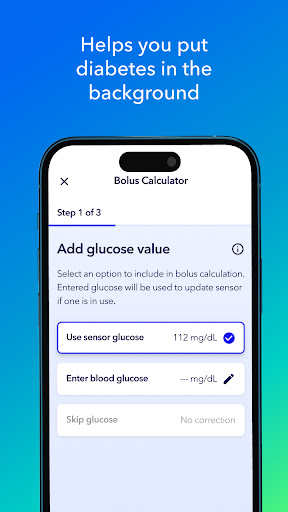
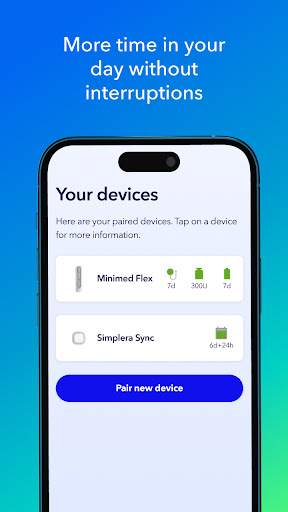
Manage your diabetes therapy with the MiniMed™ app! The MiniMed app connects to your MiniMed Flex™ pump system, letting you monitor glucose, adjust insulin delivery, and receive real-time alerts — all from your smartphone. View trends, track daily history, and get reminders for important actions. A new approach to making diabetes management simpler.
The app guides you through the startup process and provides an overview of data received from the MiniMed Flex™ pump and sensor. The MiniMed app is your primary source of information about your therapy and for controlling insulin delivery. Your data is automatically uploaded to CareLink™ software, simplifying the process of sharing information with your healthcare team and care partners. The MiniMed Flex system with SmartGuard™ feature automatically adjusts and corrects your sugar levels continuously throughout the day.
Refers to SmartGuard™ feature. Individual results may vary.
Important: The MiniMed™ app is only compatible with the MiniMed Flex™ system, it does not work with other MiniMed™ pumps. The MiniMed™ app should only be used with supported mobile devices and operating systems. To access the list of the supported mobile devices and operating systems, go to https://www.medtronicdiabetes.com/app-check
The MiniMed Flex™ system is intended for the continuous delivery of basal insulin at selectable rates, and the administration of insulin boluses at selectable rates for the management of type 1 diabetes mellitus in persons 7 years of age and older, and of type 2 diabetes mellitus in persons 18 years of age and older requiring insulin. The system is also intended to continuously monitor glucose values in the fluid under the skin. The MiniMed Flex™ system includes SmartGuard™ technology, which can be programmed to automatically adjust insulin delivery based on continuous glucose monitoring (CGM) sensor glucose values and can suspend delivery of insulin when the sensor glucose value falls below or is predicted to fall below predefined threshold values.
The Medtronic MiniMed Flex™ System consists of the following devices: MiniMed Flex™ Insulin Pump and the Simplera Sync™ sensor.
MiniMed Flex™ system is for type 1 ages 7 and over and type 2 ages 18 and over. Prescription required. WARNING: Do not use SmartGuard™ feature for people who require less than 8 units or more than 250 units of insulin/day. For additional safety information and user guides, see https://bit.ly/MiniMedRisks.
WARNING: Do not use the MiniMed Flex™ system until appropriate training has been received from a healthcare professional. Training is essential to ensure the safe use of the MiniMed Flex™ system. Pump therapy is not recommended for people whose vision or hearing does not allow for the recognition of pump signals, alerts, or alarms. The safety of the MiniMed Flex™ system has not been studied in pregnant women or in persons using other anti-hyperglycemic therapies that do not include insulin. For complete details of the system, including user guides and important safety information such as indications, contraindications, warnings and precautions associated with system and its components, see https://bit.ly/MiniMedRisks.
©2026 MiniMed. MiniMed and MiniMed logo are trademarks of Medtronic MiniMed, Inc. ™*Third-party brands are trademarks of their respective owners. All other brands are trademarks of the MiniMed company.
Meer tonen

1. Download de MEmu-installatie en voltooi de setup

2. Start MEmu en open vervolgens Google Play op het bureaublad

3. Zoek MiniMed in Google Play
Install
4. Download en installeer MiniMed
5. Klik op het icoon om te starten na het voltooien van de installatie

6. Ervaar MiniMed op pc met MEmu
MEmu Play is de beste Android-emulator, met meer dan 100 miljoen gebruikers die genieten van de superieure Android-app-ervaring. Dankzij de virtualisatietechnologie van MEmu kun je duizenden Android-apps soepel op je computer draaien, zelfs de meest veeleisende.
Groter scherm met betere graphics; Lange duur, zonder beperking van batterij of mobiele data.
Volledige Keymapping-ondersteuning voor nauwkeurige besturing van toetsenbord en muis of gamepad.
Meerdere game-accounts of taken op één PC tegelijk met Multi-Instance manager.
Gebruik MiniMed op PC door de volgende stappen te volgen: