Panda - Hands-Free Assistant
Bijgewerkt
Huidige Versie
1.1.10
Aangeboden door

Maak je geen zorgen meer over extra kosten bij het gebruik van Panda - Hands-Free Assistant op je mobiele telefoon, bevrijd jezelf van het kleine scherm en geniet van het gebruik van de app op een veel groter display. Vanaf nu, krijg een volledige schermervaring van je app met toetsenbord en muis. MEmu biedt je alle verrassende functies die je verwachtte: snelle installatie en eenvoudige configuratie, intuïtieve besturing, geen beperkingen meer van batterij, mobiele data en storende oproepen. De gloednieuwe MEmu 9 is de beste keuze voor het gebruik van Panda - Hands-Free Assistant op je computer. MEmu multi-instance manager maakt het mogelijk om tegelijkertijd 2 of meer accounts te openen. En het belangrijkste, onze exclusieve emulatiemotor kan het volledige potentieel van je PC benutten, waardoor alles soepel en plezierig wordt.
Meer tonen
Geniet van een fantastische ervaring met Panda - Hands-Free Assistant op je pc met MEmu Play. Het is een krachtige gratis Android-emulator die je duizenden Android-apps biedt voor de desktopversie. Geniet van contact met vrienden en verbeter je werk met hogere efficiëntie! Meet Panda - Automate with Voice, your personal AI phone operator.
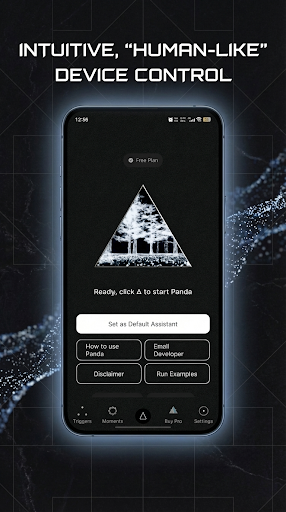
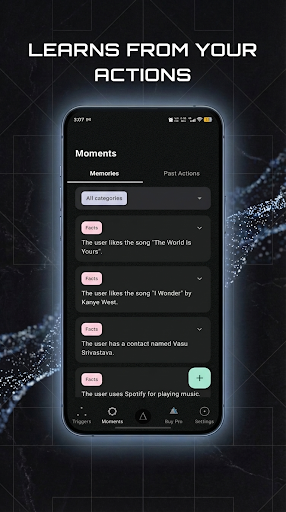
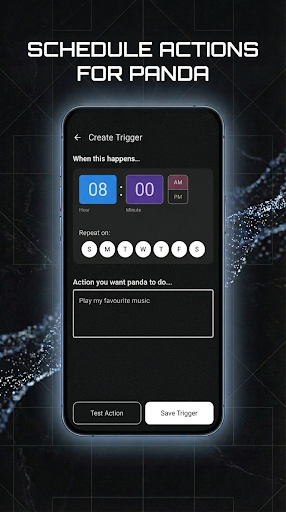
Meet Panda - Automate with Voice, your personal AI phone operator. Go beyond standard voice assistants and experience true hands-free control of your device. Panda is an intelligent agent that understands your commands and operates your phone's interface to accomplish complex tasks across any application, just like a human would.
You touch grass. I'll touch your glass.
What Can Panda Do?
Panda isn't limited to a few pre-programmed actions. By using Android's Accessibility Service, it can see and interact with your screen to perform a vast range of tasks. Simply tell Panda what you want to achieve, and it will handle the taps, swipes, and text input for you.
Examples:
"Send a WhatsApp message to Mom saying 'I'll be home late'."
"Open YouTube and search for 'ambient focus music'."
"Navigate to the last open app and copy the tracking number."
"Check my latest emails and read me the subject lines."
Key Features
Universal Cross-App Control: Panda is not restricted to specific apps. Its power comes from its ability to navigate and operate any application you have installed, from social media and messaging to productivity and entertainment.
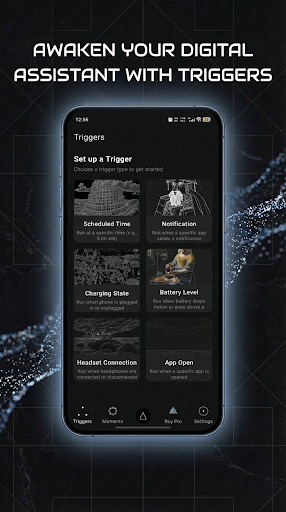
Proactive Automations: Set up powerful workflows that run automatically!
Scheduled Automations: Have Panda perform a task at a specific time (e.g., "Every weekday at 8 AM, check my calendar for today's events and read them to me").
Notification Automations: Begin a task when you receive a notification from a specific app (e.g., "When I get an email from 'Boss', read it out loud").
Intelligent Screen Understanding: Panda uses an advanced semantic parser to understand the elements on your screen—buttons, text, input fields, and more. This allows it to form a plan and execute your commands with precision.
High-Quality Voice: Featuring a natural and clear voice powered by Google Cloud's Chirp models, interactions with Panda are smooth and pleasant.
On-Device File System: For complex tasks, Panda can use a private, on-device file system to save information, create to-do lists, and track its progress, ensuring no step is missed.
Designed for Accessibility
Panda is a game-changer for users with visual and motor impairments. If you rely on accessibility tools but seek a faster, more fluid way to control your device, Panda offers a new level of independence.
True Hands-Free Navigation: Execute complex, multi-step tasks without ever needing to touch the screen.
Voice-Powered Efficiency: Bypass cumbersome screen reader navigation for common tasks.
Full Device Control: Open apps, type messages, change settings, and more, all with the power of your voice.
Privacy & Permissions
Your privacy is paramount. To function, Panda requires the Accessibility Service permission. Here’s what it means and how we protect you:
Why is it needed? This permission is the "eyes and hands" of the agent. It's what allows Panda to read the UI elements on your screen and perform gestures (taps, swipes) on your behalf. Without it, cross-app automation is impossible.
Your Data: Screen content and conversations are sent to Google's Gemini AI models for the sole purpose of understanding and executing your command in real-time. We are committed to transparency, and you can review our full Privacy Policy for details.
You Are in Control: The Accessibility Service is only active when you give Panda a task. You can revoke this permission at any time in your phone's settings.
Meer tonen

1. Download de MEmu-installatie en voltooi de setup

2. Start MEmu en open vervolgens Google Play op het bureaublad

3. Zoek Panda - Hands-Free Assistant in Google Play
Install
4. Download en installeer Panda - Hands-Free Assistant
5. Klik op het icoon om te starten na het voltooien van de installatie

6. Ervaar Panda - Hands-Free Assistant op pc met MEmu
MEmu Play is de beste Android-emulator, met meer dan 100 miljoen gebruikers die genieten van de superieure Android-app-ervaring. Dankzij de virtualisatietechnologie van MEmu kun je duizenden Android-apps soepel op je computer draaien, zelfs de meest veeleisende.
Groter scherm met betere graphics; Lange duur, zonder beperking van batterij of mobiele data.
Volledige Keymapping-ondersteuning voor nauwkeurige besturing van toetsenbord en muis of gamepad.
Meerdere game-accounts of taken op één PC tegelijk met Multi-Instance manager.
Gebruik Panda - Hands-Free Assistant op PC door de volgende stappen te volgen: