Syai
Bijgewerkt
Huidige Versie
Aangeboden door

Maak je geen zorgen meer over extra kosten bij het gebruik van Syai op je mobiele telefoon, bevrijd jezelf van het kleine scherm en geniet van het gebruik van de app op een veel groter display. Vanaf nu, krijg een volledige schermervaring van je app met toetsenbord en muis. MEmu biedt je alle verrassende functies die je verwachtte: snelle installatie en eenvoudige configuratie, intuïtieve besturing, geen beperkingen meer van batterij, mobiele data en storende oproepen. De gloednieuwe MEmu 9 is de beste keuze voor het gebruik van Syai op je computer. MEmu multi-instance manager maakt het mogelijk om tegelijkertijd 2 of meer accounts te openen. En het belangrijkste, onze exclusieve emulatiemotor kan het volledige potentieel van je PC benutten, waardoor alles soepel en plezierig wordt.
Meer tonen
Geniet van een fantastische ervaring met Syai op je pc met MEmu Play. Het is een krachtige gratis Android-emulator die je duizenden Android-apps biedt voor de desktopversie. Geniet van contact met vrienden en verbeter je werk met hogere efficiëntie! ONLY use this application if you have the Syai CGMS device.
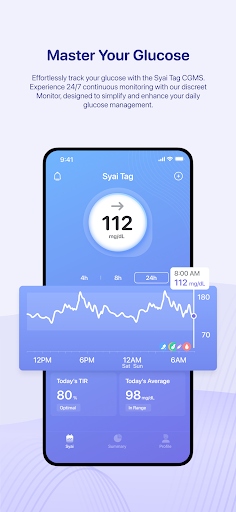
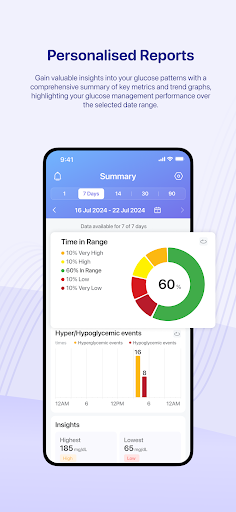
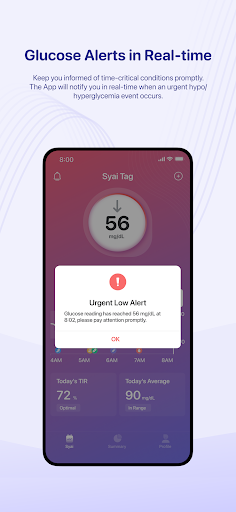
ONLY use this application if you have the Syai CGMS device. The application will require a connection to external CGM devices to cooperate for glucose data measurement and relevant functions for optimal experiences.
Note: The standalone application is not a medical device and it cannot measure any glucose data or generate data analytics on its own without mentioned connection with Syai CGMS devices.
Effortlessly track your glucose levels and trend patterns with the Syai CGMS (Continuous Glucose Monitoring System). The application is exclusively designed for Syai CGMS users. The Syai CGMS will provide real-time glucose readings to the application 24/7 with 0 downtime, factory calibrated for pin-point accuracy.
Key features:
1. Check your glucose data effortlessly at any time; receive customized glucose alerts for high, low, and urgent low events, fuss-free.
2. View real-time glucose readings, trend graphs, historical data, and glucose reports—all in one place.
3. A complete ecosystem allows you to share glucose data or transfer your injection history, etc., with third-party health apps and devices.
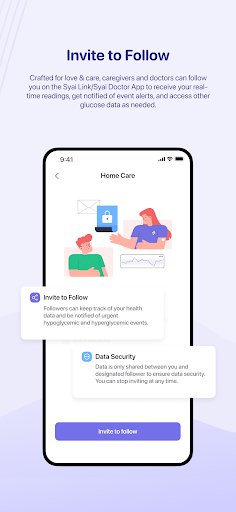
4. Connect to loved ones or HCPs with intuitive sharing features.
5. Add various logs to your Logbook to track your daily meals, exercises, medications, BG results, and such.
Wear OS App Available.
Disclaimer: This application is exclusively designed for continuous glucose monitoring with Syai CGM Monitors from Syai Health. The results, feedback, and information provided in the app cannot be regarded as substitutes for professional medical advice or treatment plan references. Always consult qualified healthcare professionals/providers (HCPs) for any medical decisions, or check your blood glucose with fingerstick tests if you feel unwell or suspect your Monitor readings might be inaccurate compared to symptoms.
Jurisdictional Notice: This application is intended solely for use within the European Union. Users from other regions or countries must ensure that their access and usage comply with their respective local laws before proceeding.
Meer tonen

1. Download de MEmu-installatie en voltooi de setup

2. Start MEmu en open vervolgens Google Play op het bureaublad

3. Zoek Syai in Google Play
Install
4. Download en installeer Syai
5. Klik op het icoon om te starten na het voltooien van de installatie

6. Ervaar Syai op pc met MEmu
MEmu Play is de beste Android-emulator, met meer dan 100 miljoen gebruikers die genieten van de superieure Android-app-ervaring. Dankzij de virtualisatietechnologie van MEmu kun je duizenden Android-apps soepel op je computer draaien, zelfs de meest veeleisende.
Groter scherm met betere graphics; Lange duur, zonder beperking van batterij of mobiele data.
Volledige Keymapping-ondersteuning voor nauwkeurige besturing van toetsenbord en muis of gamepad.
Meerdere game-accounts of taken op één PC tegelijk met Multi-Instance manager.
Gebruik Syai op PC door de volgende stappen te volgen: