Total Connect Comfort Intl
Bijgewerkt
Huidige Versie
4.19.0
Aangeboden door

Maak je geen zorgen meer over extra kosten bij het gebruik van Total Connect Comfort Intl op je mobiele telefoon, bevrijd jezelf van het kleine scherm en geniet van het gebruik van de app op een veel groter display. Vanaf nu, krijg een volledige schermervaring van je app met toetsenbord en muis. MEmu biedt je alle verrassende functies die je verwachtte: snelle installatie en eenvoudige configuratie, intuïtieve besturing, geen beperkingen meer van batterij, mobiele data en storende oproepen. De gloednieuwe MEmu 9 is de beste keuze voor het gebruik van Total Connect Comfort Intl op je computer. MEmu multi-instance manager maakt het mogelijk om tegelijkertijd 2 of meer accounts te openen. En het belangrijkste, onze exclusieve emulatiemotor kan het volledige potentieel van je PC benutten, waardoor alles soepel en plezierig wordt.
Meer tonen
Download Total Connect Comfort Intl on PC with MEmu Android Emulator. Enjoy playing on big screen. The Total Connect Comfort app allows users to remotely monitor and manage their heating and security system – at anytime, from anywhere.
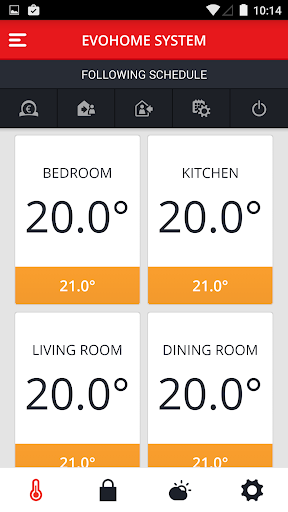
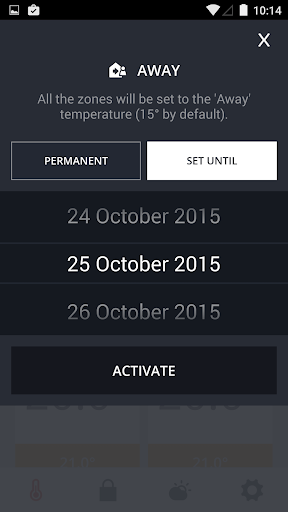
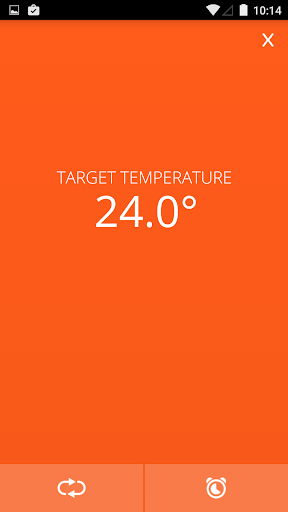
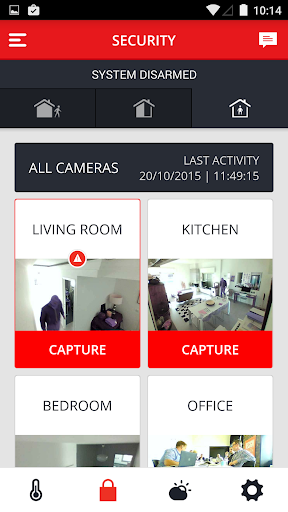
The Total Connect Comfort app allows users to remotely monitor and manage their heating and security system – at anytime, from anywhere. Total Connect Comfort works with the following thermostat and security solutions:
- The evohome thermostat systems
- The single zone thermostat in conjunction with an internet gateway
- The European voice controlled thermostat
- The Wi-Fi Smart thermostat (available in selected countries)
- Evohome Security
- Sucrebox Security
With the Total Connect Comfort app users can:
- View and set the indoor temperature
- View and change the program time period
- View and set a quick action (on selected solutions)
- View and set the system's operating mode (on selected solutions)
- View and set the fan's operating mode (on selected solutions)
- View a 5-Day weather forecast
- Access multiple locations if more than one system is registered
- Use the Demo Mode before purchasing a thermostat
- Automatically upgrade to new features once they become available
- Turn on or off email notifications about the system's connectivity status
With the Total Connect Comfort app together with an Evohome or SucreBox security system, users can:
- Arm, disarm or partial arm their security system
- Take camera shots upon an automatic or manual alarm trigger
- Receive alarm notifications via email or SMS
- View the alarm system activity feed
- Automatically upgrade to new features once they become available
To learn more about each solution and their respective functionalities, download the app now and take a tour using the demo mode.
Meer tonen

1. Download de MEmu-installatie en voltooi de setup

2. Start MEmu en open vervolgens Google Play op het bureaublad

3. Zoek Total Connect Comfort Intl in Google Play
Install
4. Download en installeer Total Connect Comfort Intl
5. Klik op het icoon om te starten na het voltooien van de installatie

6. Ervaar Total Connect Comfort Intl op pc met MEmu
MEmu Play is de beste Android-emulator, met meer dan 100 miljoen gebruikers die genieten van de superieure Android-app-ervaring. Dankzij de virtualisatietechnologie van MEmu kun je duizenden Android-apps soepel op je computer draaien, zelfs de meest veeleisende.
Groter scherm met betere graphics; Lange duur, zonder beperking van batterij of mobiele data.
Volledige Keymapping-ondersteuning voor nauwkeurige besturing van toetsenbord en muis of gamepad.
Meerdere game-accounts of taken op één PC tegelijk met Multi-Instance manager.
Gebruik Total Connect Comfort Intl op PC door de volgende stappen te volgen: