UltraIPTV M3U IPTV Player
Bijgewerkt
Huidige Versie
3.0.3
Aangeboden door

Maak je geen zorgen meer over extra kosten bij het gebruik van UltraIPTV M3U IPTV Player op je mobiele telefoon, bevrijd jezelf van het kleine scherm en geniet van het gebruik van de app op een veel groter display. Vanaf nu, krijg een volledige schermervaring van je app met toetsenbord en muis. MEmu biedt je alle verrassende functies die je verwachtte: snelle installatie en eenvoudige configuratie, intuïtieve besturing, geen beperkingen meer van batterij, mobiele data en storende oproepen. De gloednieuwe MEmu 9 is de beste keuze voor het gebruik van UltraIPTV M3U IPTV Player op je computer. MEmu multi-instance manager maakt het mogelijk om tegelijkertijd 2 of meer accounts te openen. En het belangrijkste, onze exclusieve emulatiemotor kan het volledige potentieel van je PC benutten, waardoor alles soepel en plezierig wordt.
Meer tonen
Geniet van een fantastische ervaring met UltraIPTV M3U IPTV Player op je pc met MEmu Play. Het is een krachtige gratis Android-emulator die je duizenden Android-apps biedt voor de desktopversie. Geniet van contact met vrienden en verbeter je werk met hogere efficiëntie! UltraIPTV is a powerful IPTV player for your own M3U and M3U8 playlists, compatible provider libraries and legally available public streams.
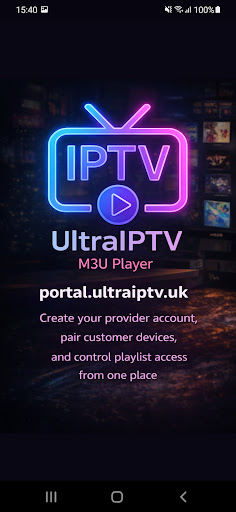
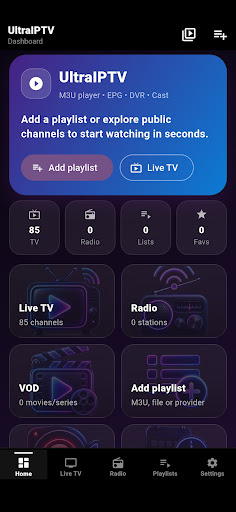
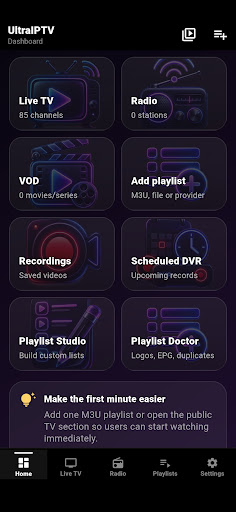
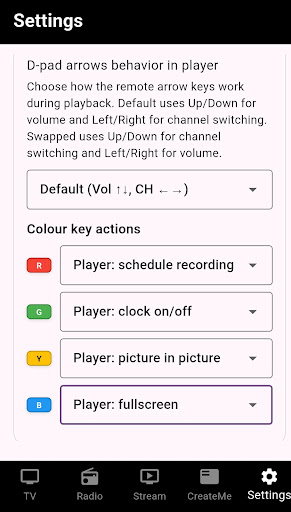
UltraIPTV is a powerful IPTV player for your own M3U and M3U8 playlists, compatible provider libraries and legally available public streams.
Watch Live TV, radio, movies and series on phones, tablets, Android TV, Google TV and TV boxes. UltraIPTV is designed for fast navigation, stable playback and remote-control use on large screens.
PLAYBACK BUILT FOR REAL IPTV STREAMS
• Fast Live TV and radio playback
• Automatic stream recovery and compatibility fallback
• Picture-in-Picture and background audio
• Chromecast and DLNA casting
• Audio-track, quality and display controls
• Sleep timer and quick channel switching
• Live timeshift controls when the stream exposes a seekable DVR window
• Catch-up playback where supported by your provider
MULTIVIEW
Watch multiple channels at the same time.
• 2, 4 or up to 6 panels depending on device performance
• Portrait and landscape layouts
• Open any panel in the normal full player
• Safe limits for lower-resource devices
TV GUIDE AND EPG
• Full timeline TV Guide
• XMLTV EPG from URL or local file
• Now/Next information and programme progress
• Manual channel-to-EPG matching and diagnostics
• Programme reminders
• Schedule recordings directly from the guide
• Series recording rules and conflict detection
• Catch-up options where available
DVR AND RECORDINGS
• Record supported IPTV streams
• Background and scheduled recording
• Smart DVR management
• Recordings library and playback
• Optional SMB/NAS archive for completed recordings
• Recorded-video tools where available
PLAYLIST AND LIBRARY TOOLS
• Add playlists from URL or file
• Multiple playlists and provider-based libraries
• Separate Live TV, radio, movies and series
• Playlist Studio for creating and editing M3U lists
• Playlist Doctor for missing logos, EPG matches, duplicates and source health
• Custom channel order, favourites and recently watched
• Watchlist and Continue Watching
SEARCH, PROFILES AND PERSONALISATION
• Global Search across channels, programmes, movies and series
• Voice Search on supported Android devices
• Local viewer profiles with optional PIN protection
• Kids profiles with restricted-content filtering
• Customisable dashboard, sections and startup screen
• Short- and long-press remote-control actions
• Device Sync packages for moving selected profiles, favourites, Watchlist, settings and Smart DVR rules between devices
ANDROID TV AND GOOGLE TV
• D-pad-friendly interface
• Android TV Home channels
• Continue Watching and Play Next integration
• Recently watched channels, upcoming programmes and recordings on the TV Home screen
• Shortcuts to Live TV, TV Guide, Movies and Series
IMPORTANT
UltraIPTV does not host, sell or own TV channels, movies, series or other media. Users must add sources they are legally entitled to access. The app may offer optional access to community-maintained public playlist directories; these are third-party sources and are not operated or guaranteed by UltraIPTV.
Some advanced features require PRO. The free mode remains usable with ads and optional rewarded ads.
Meer tonen

1. Download de MEmu-installatie en voltooi de setup

2. Start MEmu en open vervolgens Google Play op het bureaublad

3. Zoek UltraIPTV M3U IPTV Player in Google Play
Install
4. Download en installeer UltraIPTV M3U IPTV Player
5. Klik op het icoon om te starten na het voltooien van de installatie

6. Ervaar UltraIPTV M3U IPTV Player op pc met MEmu
MEmu Play is de beste Android-emulator, met meer dan 100 miljoen gebruikers die genieten van de superieure Android-app-ervaring. Dankzij de virtualisatietechnologie van MEmu kun je duizenden Android-apps soepel op je computer draaien, zelfs de meest veeleisende.
Groter scherm met betere graphics; Lange duur, zonder beperking van batterij of mobiele data.
Volledige Keymapping-ondersteuning voor nauwkeurige besturing van toetsenbord en muis of gamepad.
Meerdere game-accounts of taken op één PC tegelijk met Multi-Instance manager.
Gebruik UltraIPTV M3U IPTV Player op PC door de volgende stappen te volgen: