VPN - Super Unlimited Proxy
Bijgewerkt
Huidige Versie
2.27.0
Aangeboden door

Maak je geen zorgen meer over extra kosten bij het gebruik van VPN - Super Unlimited Proxy op je mobiele telefoon, bevrijd jezelf van het kleine scherm en geniet van het gebruik van de app op een veel groter display. Vanaf nu, krijg een volledige schermervaring van je app met toetsenbord en muis. MEmu biedt je alle verrassende functies die je verwachtte: snelle installatie en eenvoudige configuratie, intuïtieve besturing, geen beperkingen meer van batterij, mobiele data en storende oproepen. De gloednieuwe MEmu 9 is de beste keuze voor het gebruik van VPN - Super Unlimited Proxy op je computer. MEmu multi-instance manager maakt het mogelijk om tegelijkertijd 2 of meer accounts te openen. En het belangrijkste, onze exclusieve emulatiemotor kan het volledige potentieel van je PC benutten, waardoor alles soepel en plezierig wordt.
Meer tonen
Download VPN - Super Unlimited Proxy on PC with MEmu Android Emulator. Enjoy playing on big screen. VPN - Super Unlimited Proxy: Fast, Secure, and Free VPN app for Android.
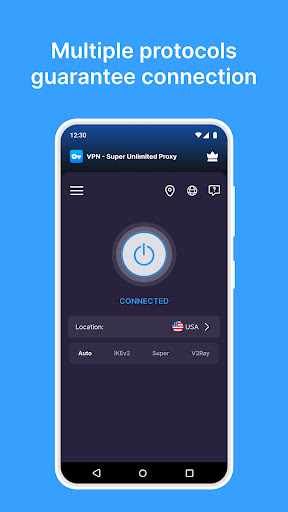
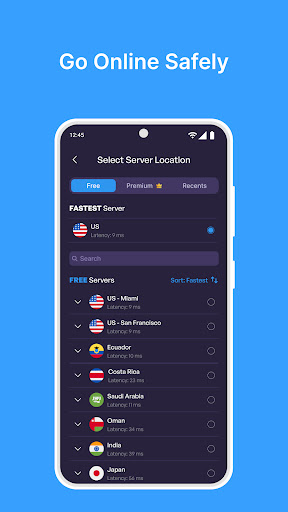
VPN - Super Unlimited Proxy: Fast, Secure, and Free VPN app for Android
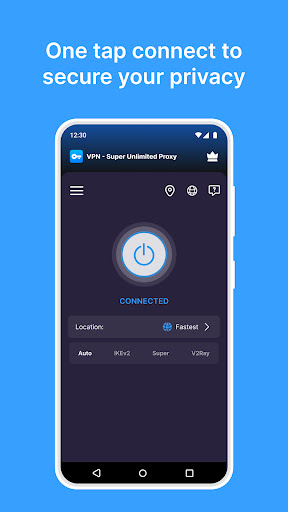
VPN Super Unlimited Proxy is a reliable and easy-to-use VPN with privacy at its core. Connect with a single tap to enjoy secure VPN access, unlimited bandwidth, and turbo fast speeds across thousands of servers worldwide. No registration or login required.
Whether you're on public Wi-Fi, streaming, gaming, or browsing privately, VPN Super Unlimited Proxy encrypts your internet connection, hides your IP address, and keeps your online activity safe.
■ Free VPN Features
- Completely free: No time limits or speed caps
- Unlimited speed, bandwidth, and usage
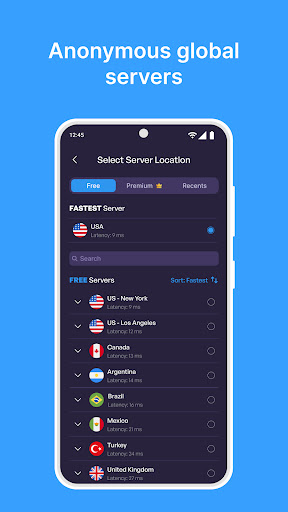
- Access content from 25+ server locations, including 10+ U.S. cities
- Military-grade encryption for maximum security
- Strict no activity logs policy: we never track or store what you do online
- Smart server selection for optimal performance
- Works on Wi-Fi, 5G, LTE/4G, 3G, and all cellular networks
- No registration needed - connect instantly
■ VPN Server Locations
Choose from over 5,000 servers in 55+ countries, including:
- North America: USA (40+ cities), Canada, Mexico
- Europe: UK, France, Germany, Italy, Spain, Netherlands, Sweden, Switzerland, Poland, and more
- Asia-Pacific: Japan, South Korea, Singapore, India, Malaysia, Australia, Vietnam, Philippines, and others
- South America: Brazil, Chile, Colombia, Peru
- Africa: Egypt, South Africa
■ VPN Protocols
- Up to 4 protocols available for free VPN users (depending on location)
- Recommended setting: Auto Mode, which selects the fastest option
- Supports OpenVPN, IKEv2, Super, and V2Ray (new protocol)
■ Premium VPN Features
Upgrade for an even faster and more flexible experience:
- 10 Gbps ultra-fast VPN servers
- No ads, ever
- Access to all 55+ countries
- 40+ city-level servers in the U.S.
- VPN protection for 10 devices with one account
■ What Is a VPN?
A Virtual Private Network (VPN) encrypts your internet traffic and routes it through secure servers, protecting your privacy and identity. It helps you:
- Secure connections on public Wi-Fi (cafes, schools, offices, airports)
- Protect privacy from your Internet Service Provider
- Access messaging apps like WhatsApp, Telegram, and Messenger
- Unblock social platforms like TikTok, Instagram, X, Reddit, and Facebook
- Stream from services such as Netflix, Amazon Plus, Hulu, HBO, and YouTube
- Play mobile games including PUBG Mobile, Call of Duty: Mobile, Roblox, and more
■ Commitment to User Privacy
VPN - Super Unlimited Proxy is committed to your privacy. We don't collect or store any activity logs or personal data. If you report a connection issue, only minimal diagnostic info is used to improve performance and it's never shared externally.
■ Download Free VPN Now
Download VPN Super Unlimited Proxy - the fast, free, and secure VPN for Android.
Enjoy total privacy, unrestricted access, and next-level internet freedom wherever you go.
Meer tonen

1. Download de MEmu-installatie en voltooi de setup

2. Start MEmu en open vervolgens Google Play op het bureaublad

3. Zoek VPN - Super Unlimited Proxy in Google Play
Install
4. Download en installeer VPN - Super Unlimited Proxy
5. Klik op het icoon om te starten na het voltooien van de installatie

6. Ervaar VPN - Super Unlimited Proxy op pc met MEmu
MEmu Play is de beste Android-emulator, met meer dan 100 miljoen gebruikers die genieten van de superieure Android-app-ervaring. Dankzij de virtualisatietechnologie van MEmu kun je duizenden Android-apps soepel op je computer draaien, zelfs de meest veeleisende.
Groter scherm met betere graphics; Lange duur, zonder beperking van batterij of mobiele data.
Volledige Keymapping-ondersteuning voor nauwkeurige besturing van toetsenbord en muis of gamepad.
Meerdere game-accounts of taken op één PC tegelijk met Multi-Instance manager.
Gebruik VPN - Super Unlimited Proxy op PC door de volgende stappen te volgen: