Watebly: Manage Water Delivery
Bijgewerkt
Huidige Versie
2.6.2
Aangeboden door

Maak je geen zorgen meer over extra kosten bij het gebruik van Watebly: Manage Water Delivery op je mobiele telefoon, bevrijd jezelf van het kleine scherm en geniet van het gebruik van de app op een veel groter display. Vanaf nu, krijg een volledige schermervaring van je app met toetsenbord en muis. MEmu biedt je alle verrassende functies die je verwachtte: snelle installatie en eenvoudige configuratie, intuïtieve besturing, geen beperkingen meer van batterij, mobiele data en storende oproepen. De gloednieuwe MEmu 9 is de beste keuze voor het gebruik van Watebly: Manage Water Delivery op je computer. MEmu multi-instance manager maakt het mogelijk om tegelijkertijd 2 of meer accounts te openen. En het belangrijkste, onze exclusieve emulatiemotor kan het volledige potentieel van je PC benutten, waardoor alles soepel en plezierig wordt.
Meer tonen
Geniet van een fantastische ervaring met Watebly: Manage Water Delivery op je pc met MEmu Play. Het is een krachtige gratis Android-emulator die je duizenden Android-apps biedt voor de desktopversie. Geniet van contact met vrienden en verbeter je werk met hogere efficiëntie! Watebly Manage Water Delivery App will provide you ease to manage and maintain your water bottle delivery business.
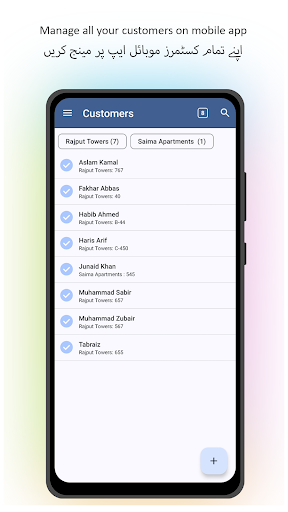
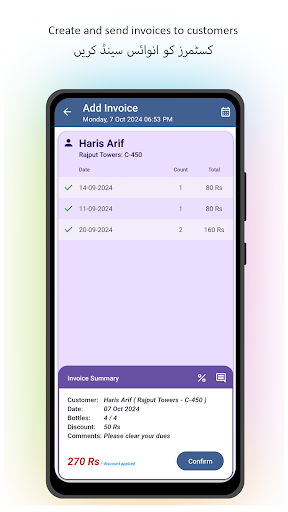
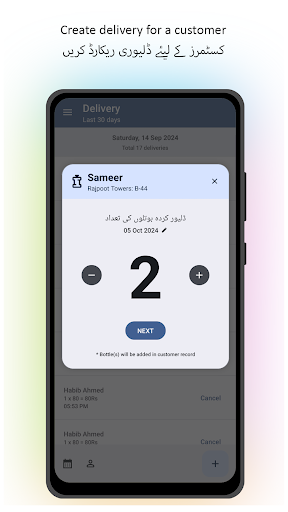
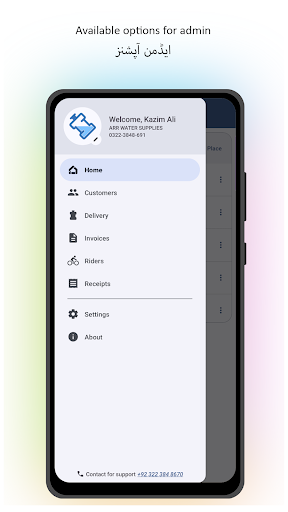
Watebly Manage Water Delivery App will provide you ease to manage and maintain your water bottle delivery business. Get rid of manual registry on journal and start using fully featured mobile app. The app is built to keep security and efficiency in mind. All your data is encrypted during transfer and available 24/7 online through mobile app. Just login and start exploring
• Customer : You can create, manage and update customers, view ledgers and update per bottle prices for the customer. Customers bottle requirement frequency can be set with these provided option i.e Daily, Weekly and On-Demand. Customers can be organised into places.
• Delivery: A user-friendly delivery system is available with in the app. Where you can add bottles at the time of delivery to the customer. App will add bottles into customer account as per price set by you during customer creation. Per bottle prices can be different for each customer. Customer Balances will update accordingly. Delivery cancellation option is available in-case of in-correct data entry or human error.
• Payments: Create bills for customers at the month end or as per your business flows. Bill create option will show you customer current balance and unpaid bottles, you can select All or some unpaid bottles to create a customer bill. Watebly app will show you the amount the customer has to pay automatically, no need to input the amount manually. Created bills can be shared to customers. Receipt cancellation option is available in-case of in-correct data-entry or human error.
• Locations: You can create multiple locations in app and use it for customer grouping. Let's say you have multiple customers from an Apartment named "Rajput Tower" you should create a location with the name "Rajput Tower". It will help you during customer creation and management.
• Business Profile: Your need to setup your business profile first when you install the Watebly Manage Water Delivery App. This information will be used during receipt prints. The information should be authentic and genuine. It will go along with your receipt prints.
• Customer App: You can send app link to your customers. Customers are able to view their billing and delivery history using Watebly Manage Water Delivery App
• Rider App: You can create riders in app. Riders can install app and make deliveries through mobile app. Riders can only view data and make deliveries.
• Products: You can create more than one product in the app for a customer. Products can be 19 litre bottle or 13 litre bottle and more options available to select. Products can have separate pricing and frequency different for each customer based on their requirements.
• Customer Security Deposit: You can add a one-time security deposit for a customer. A receipt for a security deposit can also be printed for sharing with customers. Security deposit return option can be used to return a security deposit.
Watebly Manage Water Delivery App is designed on new Android design system guidelines, Material Design and best practices recommended by Google. User-Experience is a key feature to keep in mind to deliver optimal app experience. Give it a try to manage and maintain your water bottle delivery business hassle free.
Meer tonen

1. Download de MEmu-installatie en voltooi de setup

2. Start MEmu en open vervolgens Google Play op het bureaublad

3. Zoek Watebly: Manage Water Delivery in Google Play
Install
4. Download en installeer Watebly: Manage Water Delivery
5. Klik op het icoon om te starten na het voltooien van de installatie

6. Ervaar Watebly: Manage Water Delivery op pc met MEmu
MEmu Play is de beste Android-emulator, met meer dan 100 miljoen gebruikers die genieten van de superieure Android-app-ervaring. Dankzij de virtualisatietechnologie van MEmu kun je duizenden Android-apps soepel op je computer draaien, zelfs de meest veeleisende.
Groter scherm met betere graphics; Lange duur, zonder beperking van batterij of mobiele data.
Volledige Keymapping-ondersteuning voor nauwkeurige besturing van toetsenbord en muis of gamepad.
Meerdere game-accounts of taken op één PC tegelijk met Multi-Instance manager.
Gebruik Watebly: Manage Water Delivery op PC door de volgende stappen te volgen: