Bandle - Guess the song
Zaktualizowano
Aktualna wersja
8.7.6
Sprzedawca

Przy całej swojej pasji do grania w Bandle - Guess the song, twoje ręce nie powinny być ograniczone na małym ekranie telefonu. Graj jak zawodowiec i uzyskaj pełną kontrolę nad grą za pomocą klawiatury i myszy. MEmu oferuje ci wszystko, czego oczekujesz. Pobierz i graj Bandle - Guess the song na PC. Graj tak długo, jak chcesz, bez ograniczeń baterii, danych komórkowych i niepokojących połączeń. Zupełnie nowy MEmu 9 to najlepszy wybór do grania w Bandle - Guess the song na PC. Przygotowany dzięki naszej wiedzy, znakomity, wstępnie ustawiony system mapowania klawiszy sprawia, że Bandle - Guess the song jest prawdziwą grą na PC. Zakodowany naszą absorpcją, menedżer wielu instancji umożliwia granie na 2 lub więcej kontach na tym samym urządzeniu. A co najważniejsze, nasz emulator może uwolnić pełny potencjał twojego komputera, sprawić, że wszystko będzie płynne. Dbamy nie tylko o to, jak grasz, ale także o cały proces czerpania radości z grania.
Pokaż więcej
Ciesz się wspaniałym doświadczeniem podczas grania w Bandle - Guess the song na komputerze z aplikacją MEMU App Player. Jest to potężny darmowy emulator Androida pozwalający grać w tysiące gier na Androida. Bandle to najlepszy quiz z odgadywaniem piosenek i gra muzyczna!
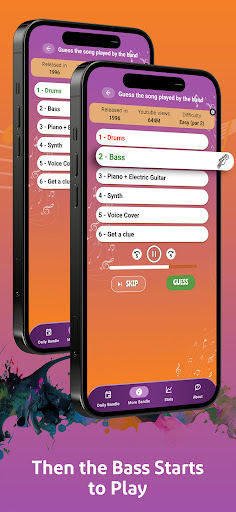
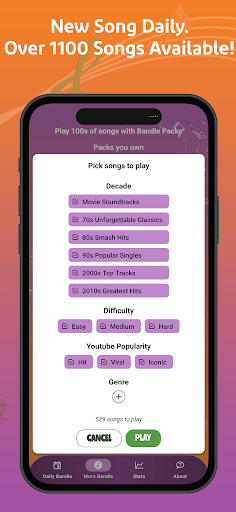
Bandle to najlepszy quiz z odgadywaniem piosenek i gra muzyczna!
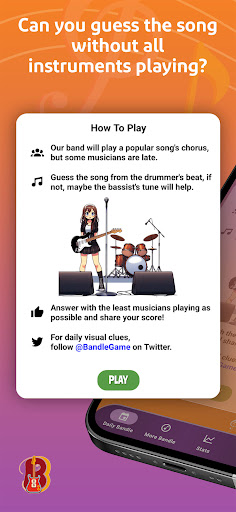
Musisz rozpoznać piosenkę, ale jest pewien haczyk — zaczynasz tylko od jednego instrumentu. Czy potrafisz zgadnąć piosenkę, na której gra najmniej instrumentów? Przenieś swoją muzyczną ciekawostkę na wyższy poziom i zgadnij piosenkę. Mamy ponad 500 piosenek ze wszystkich gatunków i stylów muzycznych!
„Bandle to najlepszy Worldle-alike, jaki widziałem od dłuższego czasu” — Tom Scott (Youtuber)
„Bandle — teraz rozmawiamy! Coś dobrego, stary!” — Nathan Stanz (Youtuber)
Bandle przykuł również uwagę osobowości Twitcha, w tym NorthernLion, theneedledrop i PooperNoodle, stając się częścią ich codziennej listy gier.
Jak grać w ten wyjątkowy quiz z odgadywaniem piosenek:
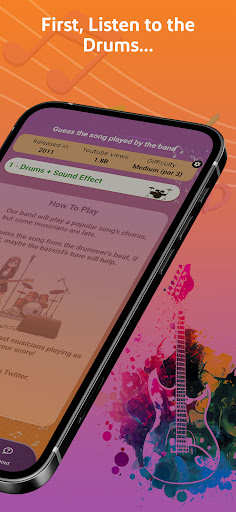
- Zacznij od rytmu: Posłuchaj perkusji i poczuj rytm.
- Dodaj bas: Pozwól, aby groove się uruchomił i zgadnij najlepiej, jak potrafisz.
- Dodaj gitarę, pianino i inne instrumenty w miarę rozwoju piosenki. - Czy potrafisz odgadnąć piosenkę bez udziału wszystkich instrumentów?
Funkcje:
- Codzienne wyzwanie i setki dostępnych piosenek!
- Duża różnorodność najnowszych hitów, a także piosenek z lat 70., 80., 90., 2000. i 2010.
- Pop, Rock, Metal, R&B, Rap Hip-Hop, Hard Rock, Easy Listening, Country, Latin, Alternative, Funk, Movie theme i wiele więcej!
- Mistrzostwo muzyczne: Naucz się rozpoznawać piosenki po ich poszczególnych instrumentach.
- 9 dodatkowych gier quizowych, w które możesz grać ze znajomymi i rodziną:
- Czy potrafisz uzupełnić tekst piosenki?
- Znajdź wykonawcę na zdjęciach.
- Zidentyfikuj głównego członka zespołu.
- Zgadnij, skąd pochodzi artysta.
- Odpowiedz na pytania quizowe dotyczące piosenek.
- Zgadnij piosenkę z tego samego roku.
- Zgadnij nazwę albumu.
- Zgadnij piosenkę o tym samym BPM.
- Zidentyfikuj piosenkę z podobnymi instrumentami.
Niezależnie od tego, czy jesteś miłośnikiem muzyki, czy po prostu szukasz wyjątkowego sposobu na spędzenie wieczoru quizowego ze znajomymi, Bandle oferuje symfoniczne połączenie wyzwań i rozrywki quizowej.
Pobierz teraz i rozpocznij swoją przygodę z odgadywaniem piosenek!
Pokaż więcej

1. Pobierz instalator MEmu i zakończ instalację

2. Uruchom MEmu, a następnie otwórz Google Play na pulpicie

3. Wyszukaj Bandle - Guess the song w Google Play
Install
4. Pobierz i zainstaluj Bandle - Guess the song
5. Po zakończeniu instalacji kliknij ikonę, aby rozpocząć

6. Ciesz się grą Bandle - Guess the song na PC z MEmu
MEmu Play to najlepszy emulator Androida, a 100 milionów ludzi już korzysta z jego i dosta doskonałe wrażenia z gier na Androida. Technologia wirtualizacji MEmu umożliwia płynne granie w tysiące gier Androida na komputerze, nawet tych najbardziej wymagających grafiki.
Większy ekran z lepszą grafiką; Długi czas, bez ograniczeń baterii lub danych mobilnych.
Pełna obsługa mapowania klawiszy dla precyzyjnego sterowania klawiaturą i myszą lub gamepadem.
Wiele kont gier lub zadań na jednym komputerze jednocześnie z menedżerem wielu instancji.
Play Bandle - Guess the song on PC by following steps: