High School Life: Open World
Zaktualizowano
Aktualna wersja
300
Sprzedawca

Przy całej swojej pasji do grania w High School Life: Open World, twoje ręce nie powinny być ograniczone na małym ekranie telefonu. Graj jak zawodowiec i uzyskaj pełną kontrolę nad grą za pomocą klawiatury i myszy. MEmu oferuje ci wszystko, czego oczekujesz. Pobierz i graj High School Life: Open World na PC. Graj tak długo, jak chcesz, bez ograniczeń baterii, danych komórkowych i niepokojących połączeń. Zupełnie nowy MEmu 9 to najlepszy wybór do grania w High School Life: Open World na PC. Przygotowany dzięki naszej wiedzy, znakomity, wstępnie ustawiony system mapowania klawiszy sprawia, że High School Life: Open World jest prawdziwą grą na PC. Zakodowany naszą absorpcją, menedżer wielu instancji umożliwia granie na 2 lub więcej kontach na tym samym urządzeniu. A co najważniejsze, nasz emulator może uwolnić pełny potencjał twojego komputera, sprawić, że wszystko będzie płynne. Dbamy nie tylko o to, jak grasz, ale także o cały proces czerpania radości z grania.
Pokaż więcej
Ciesz się wspaniałym doświadczeniem podczas grania w High School Life: Open World na komputerze z aplikacją MEMU App Player. Jest to potężny darmowy emulator Androida pozwalający grać w tysiące gier na Androida. Welcome to your new virtual high school!
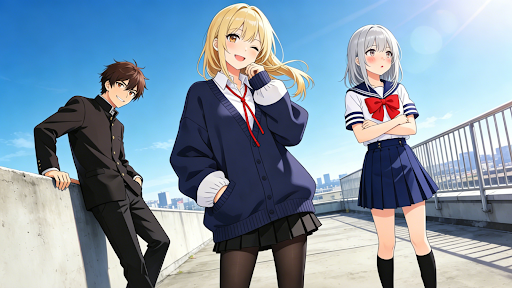

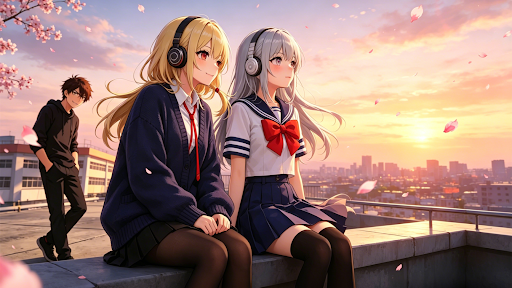

Welcome to your new virtual high school! In this open-world simulation, you have the freedom to define your own path. Experience the joys, friendships, and adventures of a student in a vast, interactive environment.
Key Features:
Expansive Exploration: Roam freely through a detailed city and school campus. Discover hidden secrets and unique locations at your own pace.
Personalized Experience: Customize your character to match your style. From daily outfits to unique accessories, make your avatar truly yours.
Interactive World: Engage with a variety of characters and objects. Build relationships, join school clubs, or simply take a stroll through the park.
Daily Adventures: Complete fun tasks or create your own challenges. Drive vehicles, find collectibles, and enjoy a dynamic simulation experience.
Creative Freedom: There are no fixed rules. Be a model student, a trendsetter, or an adventurous explorer—the choice is yours!
Join the community and start your unique high school journey today. What kind of stories will you create in this world of endless possibilities?Welcome to your new virtual high school! In this open-world simulation, you have the freedom to define your own path. Experience the joys, friendships, and adventures of a student in a vast, interactive environment.
Key Features:
Expansive Exploration: Roam freely through a detailed city and school campus. Discover hidden secrets and unique locations at your own pace.
Personalized Experience: Customize your character to match your style. From daily outfits to unique accessories, make your avatar truly yours.
Interactive World: Engage with a variety of characters and objects. Build relationships, join school clubs, or simply take a stroll through the park.
Daily Adventures: Complete fun tasks or create your own challenges. Drive vehicles, find collectibles, and enjoy a dynamic simulation experience.
Creative Freedom: There are no fixed rules. Be a model student, a trendsetter, or an adventurous explorer—the choice is yours!
Join the community and start your unique high school journey today. What kind of stories will you create in this world of endless possibilities?
Pokaż więcej

1. Pobierz instalator MEmu i zakończ instalację

2. Uruchom MEmu, a następnie otwórz Google Play na pulpicie

3. Wyszukaj High School Life: Open World w Google Play
Install
4. Pobierz i zainstaluj High School Life: Open World
5. Po zakończeniu instalacji kliknij ikonę, aby rozpocząć

6. Ciesz się grą High School Life: Open World na PC z MEmu
MEmu Play to najlepszy emulator Androida, a 100 milionów ludzi już korzysta z jego i dosta doskonałe wrażenia z gier na Androida. Technologia wirtualizacji MEmu umożliwia płynne granie w tysiące gier Androida na komputerze, nawet tych najbardziej wymagających grafiki.
Większy ekran z lepszą grafiką; Długi czas, bez ograniczeń baterii lub danych mobilnych.
Pełna obsługa mapowania klawiszy dla precyzyjnego sterowania klawiaturą i myszą lub gamepadem.
Wiele kont gier lub zadań na jednym komputerze jednocześnie z menedżerem wielu instancji.
Play High School Life: Open World on PC by following steps: