That's You!
Zaktualizowano
Aktualna wersja
1.4
Sprzedawca

Przy całej swojej pasji do grania w That's You!, twoje ręce nie powinny być ograniczone na małym ekranie telefonu. Graj jak zawodowiec i uzyskaj pełną kontrolę nad grą za pomocą klawiatury i myszy. MEmu oferuje ci wszystko, czego oczekujesz. Pobierz i graj That's You! na PC. Graj tak długo, jak chcesz, bez ograniczeń baterii, danych komórkowych i niepokojących połączeń. Zupełnie nowy MEmu 9 to najlepszy wybór do grania w That's You! na PC. Przygotowany dzięki naszej wiedzy, znakomity, wstępnie ustawiony system mapowania klawiszy sprawia, że That's You! jest prawdziwą grą na PC. Zakodowany naszą absorpcją, menedżer wielu instancji umożliwia granie na 2 lub więcej kontach na tym samym urządzeniu. A co najważniejsze, nasz emulator może uwolnić pełny potencjał twojego komputera, sprawić, że wszystko będzie płynne. Dbamy nie tylko o to, jak grasz, ale także o cały proces czerpania radości z grania.
Pokaż więcej
Ciesz się wspaniałym doświadczeniem podczas grania w That's You! na komputerze z aplikacją MEMU App Player. Jest to potężny darmowy emulator Androida pozwalający grać w tysiące gier na Androida. As of December 14 2023 - Important announcement regarding the companion apps in relation to the following PlayLink games: Chimparty, Frantics, Hidden Agenda, Knowledge is Power, Knowledge is Power Decades and That's You.
As of December 14 2023 - Important announcement regarding the companion apps in relation to the following PlayLink games: Chimparty, Frantics, Hidden Agenda, Knowledge is Power, Knowledge is Power Decades and That's You.
Android users:
If you have already downloaded the companion app to your current device or it has been added to your library, you will continue to be able to play the game with the relevant companion app.
Companion apps to the games above are no longer distributed on the Google Play Store to users whose devices run Android OS versions newer than the following versions.
Chimparty - Android 9
Frantics - Android 11
Hidden Agenda - Android 9
Knowledge is Power - Android 11
Knowledge is Power Decades - Android 11
That's You - Android 9
Apple iOS users:
You will continue to be able to play the game with the relevant companion app regardless of the iOS versions.
That's You! is the companion app you need to play the hilarious That’s You! game for the PlayStation®4 system. Please note: This app acts as a controller. PlayStation®4 system, That’s You! game, and That’s You! Companion App required to play. PS4™ system and That’s You! game for the PS4 system sold separately.
Find out what you and your friends really think about each other in the party game where the questions are all about… YOU!
Make sure your PlayStation®4 system is connected to the same Wi-Fi network as your device and then you're ready to go. Simply follow the in-app instructions to connect.
Use this app to:
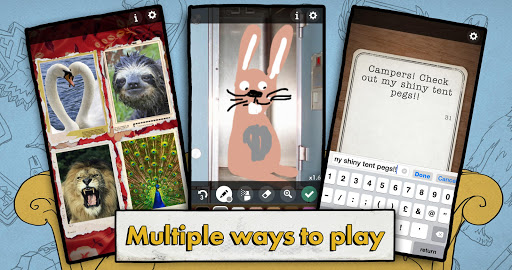
• Swipe, type, snap and draw your answers for the PS4 game
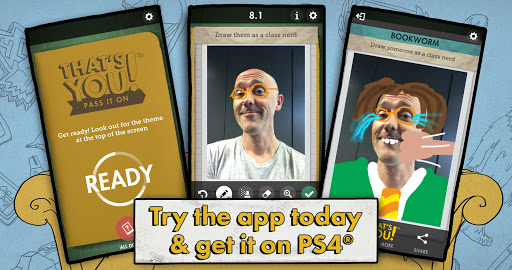
• Take pictures of yourself and your friends, then doodle on them to answer
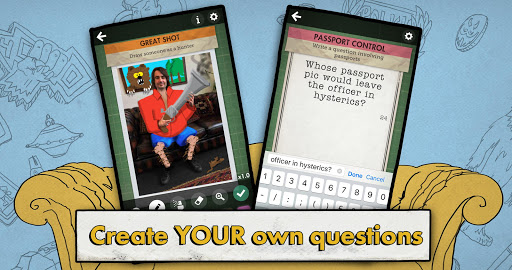
• Create your own word and picture questions to play on PS4
• Play ‘Pass It On’ using just the app, to get a taste of the full PS4 experience
• Share your pictures and questions on social media!
The application can be used in the following languages:
English (US) and Arabic.
Please note that this app is compatible only with the Arabic version of the game.
PlayLink titles are all about social gaming that everyone can enjoy. Pop a game into your PS4, pick up your smartphone or tablet, gather around your TV and prepare for a refreshingly different experience – without the need for multiple DUALSHOCK 4 wireless controllers. http://playstation.com/playlinkforps4
Please note: This app acts as a controller. PlayStation®4 system, That’s You! game, and That’s You! Companion App required to play. PS4™ system and That’s You! game for the PS4 system sold separately.
The following Terms of Use and Privacy Policy apply to use of this app, depending on your country of residence: https://www.playstation.com/en-us/legal/terms-of-use/op/
Pokaż więcej

1. Pobierz instalator MEmu i zakończ instalację

2. Uruchom MEmu, a następnie otwórz Google Play na pulpicie

3. Wyszukaj That's You! w Google Play
Install
4. Pobierz i zainstaluj That's You!
5. Po zakończeniu instalacji kliknij ikonę, aby rozpocząć

6. Ciesz się grą That's You! na PC z MEmu
MEmu Play to najlepszy emulator Androida, a 100 milionów ludzi już korzysta z jego i dosta doskonałe wrażenia z gier na Androida. Technologia wirtualizacji MEmu umożliwia płynne granie w tysiące gier Androida na komputerze, nawet tych najbardziej wymagających grafiki.
Większy ekran z lepszą grafiką; Długi czas, bez ograniczeń baterii lub danych mobilnych.
Pełna obsługa mapowania klawiszy dla precyzyjnego sterowania klawiaturą i myszą lub gamepadem.
Wiele kont gier lub zadań na jednym komputerze jednocześnie z menedżerem wielu instancji.
Play That's You! on PC by following steps: