Bella: AI Roleplay Chat
Zaktualizowano
Aktualna wersja
3.1.0
Sprzedawca

Przestań martwić się nadmiernymi opłatami podczas korzystania z Bella: AI Roleplay Chat na telefonie komórkowym, uwolnij się od małego ekranu i ciesz się korzystaniem z aplikacji na znacznie większym wyświetlaczu. Od teraz korzystaj z aplikacji na pełnym ekranie za pomocą klawiatury i myszy. MEmu oferuje wszystkie zaskakujące funkcje, których się spodziewałeś: szybką instalację i łatwą konfigurację, intuicyjne sterowanie, koniec z ograniczeniami baterii, danych mobilnych i niepokojących połączeń. Zupełnie nowy MEmu 9 to najlepszy wybór do używania Bella: AI Roleplay Chat na twoim komputerze. Zakodowany przez naszą absorpcję, menedżer wielu instancji umożliwia otwarcie 2 lub więcej kont w tym samym czasie. A co najważniejsze, nasz ekskluzywny emulator może uwolnić pełny potencjał twojego komputera, sprawić, że wszystko będzie płynne i przyjemne.
Pokaż więcej
Ciesz się wspaniałym doświadczeniem podczas grania w Bella: AI Roleplay Chat na komputerze z aplikacją MEMU App Player. Jest to potężny darmowy emulator Androida Umożliwia korzystanie z tysięcy aplikacji Androida. You hold the pen in Bella, an AI roleplay chat for creating characters, building worlds, and guiding ongoing stories with remembered context.

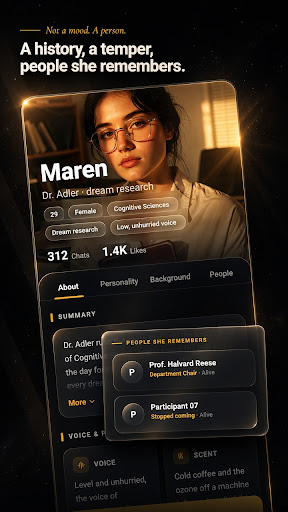
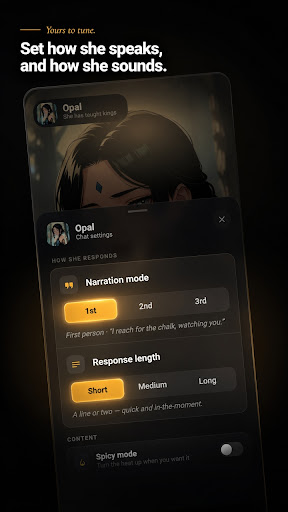
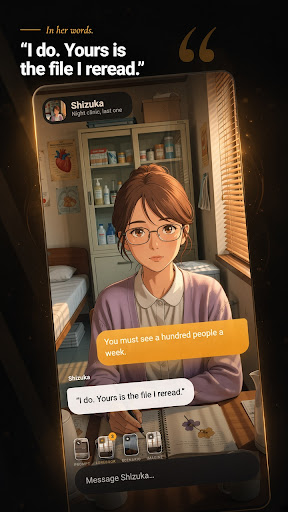
You hold the pen in Bella, an AI roleplay chat for creating characters, building worlds, and guiding ongoing stories with remembered context.
Meet a curated cast with hand-written backstories or create an AI character of your own. Bella gives you more than a blank chat box: shape the character, set the scene, steer the tone, and keep each roleplay moving in your direction.
Create and customize characters
Use the guided character creator for step-by-step character customization. Add an optional note, explore generated scenario concepts, and create a character with an avatar. Create an anime AI chat character, an AI waifu for roleplay, or anyone else you imagine. Keep characters and images organized in My Creations.
Build stories that remember
Conversation history and remembered context help characters build on earlier scenes. Attach lorebooks for the characters, places, and situations that matter to your world. Choose a prompt set or add a custom system prompt to guide behavior, tone, and story direction.
Shape each AI chat
Choose short, medium, or long responses to fit the moment. Select a model and content mode for each chat, use suggested replies when you want a nudge, and react to, copy, or delete messages. Save favorite characters so your next scene is easy to find.
Bring scenes to life
Use Imagine to create an image during a conversation. Change a roleplay costume or outfit, or move the action to a new background. Browse the curated cast by category or use the full-screen swipe deck.
Set the tone
Choose Story Mode for romance, tension, and slow-burn plots without explicit content. Adults can switch to optional age-gated Spicy Mode (18+) in Settings.
Stay free from interruptions
Bella has no ads. Start with one-tap anonymous sign-in, then link a Google account if you choose.
Create the character. Build the world. Guide the story. Take the pen.
Pokaż więcej

1. Pobierz instalator MEmu i zakończ instalację

2. Uruchom MEmu, a następnie otwórz Google Play na pulpicie

3. Wyszukaj Bella: AI Roleplay Chat w Google Play
Install
4. Pobierz i zainstaluj Bella: AI Roleplay Chat
5. Po zakończeniu instalacji kliknij ikonę, aby rozpocząć

6. Użyj MEmu, aby doświadczyć Bella: AI Roleplay Chat na swoim komputerze
MEmu Play to najlepszy emulator Androida, z którego korzysta ponad 100 milionów użytkowników, ciesząc się wyjątkowym doświadczeniem aplikacji na Androida. Technologia wirtualizacji MEmu pozwala na płynne uruchamianie tysięcy aplikacji Androida na komputerze, nawet tych najbardziej wymagających.
Większy ekran z lepszą grafiką; Długi czas, bez ograniczeń baterii lub danych mobilnych.
Pełna obsługa mapowania klawiszy dla precyzyjnego sterowania klawiaturą i myszą lub gamepadem.
Wiele kont gier lub zadań na jednym komputerze jednocześnie z menedżerem wielu instancji.
Use Bella: AI Roleplay Chat on PC by following steps: