BMS-TOOL
Zaktualizowano
Aktualna wersja
1.0.82
Sprzedawca

Przestań martwić się nadmiernymi opłatami podczas korzystania z BMS-TOOL na telefonie komórkowym, uwolnij się od małego ekranu i ciesz się korzystaniem z aplikacji na znacznie większym wyświetlaczu. Od teraz korzystaj z aplikacji na pełnym ekranie za pomocą klawiatury i myszy. MEmu oferuje wszystkie zaskakujące funkcje, których się spodziewałeś: szybką instalację i łatwą konfigurację, intuicyjne sterowanie, koniec z ograniczeniami baterii, danych mobilnych i niepokojących połączeń. Zupełnie nowy MEmu 9 to najlepszy wybór do używania BMS-TOOL na twoim komputerze. Zakodowany przez naszą absorpcję, menedżer wielu instancji umożliwia otwarcie 2 lub więcej kont w tym samym czasie. A co najważniejsze, nasz ekskluzywny emulator może uwolnić pełny potencjał twojego komputera, sprawić, że wszystko będzie płynne i przyjemne.
Pokaż więcej
Ciesz się wspaniałym doświadczeniem podczas grania w BMS-TOOL na komputerze z aplikacją MEMU App Player. Jest to potężny darmowy emulator Androida Umożliwia korzystanie z tysięcy aplikacji Androida. BMS-TOOL allows users to bind their devices easily and conveniently at anytime and anywhere,view battery health status, and record, diagnose and warn the real-time status of the battery.
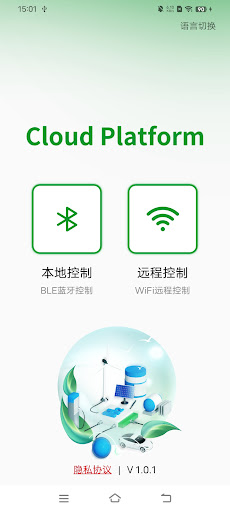
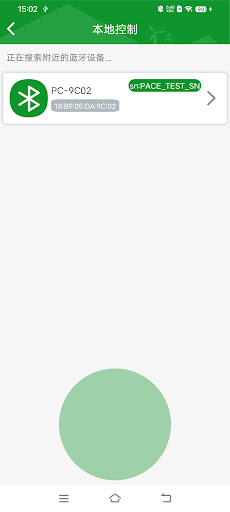
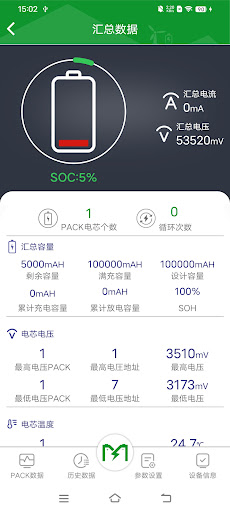
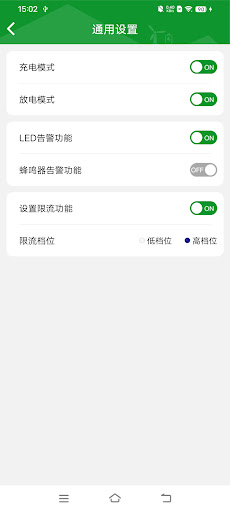
BMS-TOOL allows users to bind their devices easily and conveniently at anytime and anywhere,view battery health status, and record, diagnose and warn the real-time status of the battery.It is a good helper for users in operating and maintaining their devices.
Real-time data
Summary data: including battery current, voltage, number of cells, cycle times, SOC, SOH, temperature and other parameters;
Historical data
Record the alarm state, protection state, fault occurrence state and development process of the battery history,which can help the users to understand the state and performance of the battery.
Connection method
Local control: Through Bluetooth communication, no need to log in with an account, directly search for nearby Bluetooth signals, one-to-one connection, ready to use;
Remote control: through WIFI communication,need to register an account to log in, the APP and the device will automatically perform network distribution operations, and bind the account and device.
My device
Forgot password: reset password through email;
Edit device: Long press the device item, the edit menu will pop up at the bottom, you can modify the device nickname or delete the device;
Share device: Long press the device item, the device administrator who first configures the network and binds the account, can generate a QR code for the device for other users to scan the code to add.
Pokaż więcej

1. Pobierz instalator MEmu i zakończ instalację

2. Uruchom MEmu, a następnie otwórz Google Play na pulpicie

3. Wyszukaj BMS-TOOL w Google Play
Install
4. Pobierz i zainstaluj BMS-TOOL
5. Po zakończeniu instalacji kliknij ikonę, aby rozpocząć

6. Użyj MEmu, aby doświadczyć BMS-TOOL na swoim komputerze
MEmu Play to najlepszy emulator Androida, z którego korzysta ponad 100 milionów użytkowników, ciesząc się wyjątkowym doświadczeniem aplikacji na Androida. Technologia wirtualizacji MEmu pozwala na płynne uruchamianie tysięcy aplikacji Androida na komputerze, nawet tych najbardziej wymagających.
Większy ekran z lepszą grafiką; Długi czas, bez ograniczeń baterii lub danych mobilnych.
Pełna obsługa mapowania klawiszy dla precyzyjnego sterowania klawiaturą i myszą lub gamepadem.
Wiele kont gier lub zadań na jednym komputerze jednocześnie z menedżerem wielu instancji.
Use BMS-TOOL on PC by following steps: