
Lily's Diary
Zaktualizowano
Aktualna wersja
1.0.14
Sprzedawca

Przy całej swojej pasji do grania w Lily's Diary, twoje ręce nie powinny być ograniczone na małym ekranie telefonu. Graj jak zawodowiec i uzyskaj pełną kontrolę nad grą za pomocą klawiatury i myszy. MEmu oferuje ci wszystko, czego oczekujesz. Pobierz i graj Lily's Diary na PC. Graj tak długo, jak chcesz, bez ograniczeń baterii, danych komórkowych i niepokojących połączeń. Zupełnie nowy MEmu 9 to najlepszy wybór do grania w Lily's Diary na PC. Przygotowany dzięki naszej wiedzy, znakomity, wstępnie ustawiony system mapowania klawiszy sprawia, że Lily's Diary jest prawdziwą grą na PC. Zakodowany naszą absorpcją, menedżer wielu instancji umożliwia granie na 2 lub więcej kontach na tym samym urządzeniu. A co najważniejsze, nasz emulator może uwolnić pełny potencjał twojego komputera, sprawić, że wszystko będzie płynne. Dbamy nie tylko o to, jak grasz, ale także o cały proces czerpania radości z grania.
Pokaż więcej
Ciesz się wspaniałym doświadczeniem podczas grania w Lily's Diary na komputerze z aplikacją MEMU App Player. Jest to potężny darmowy emulator Androida pozwalający grać w tysiące gier na Androida. Zagraj w tę grę ZA DARMO z reklamami – lub zdobądź jeszcze więcej gier z aplikacją Gamehouse+!
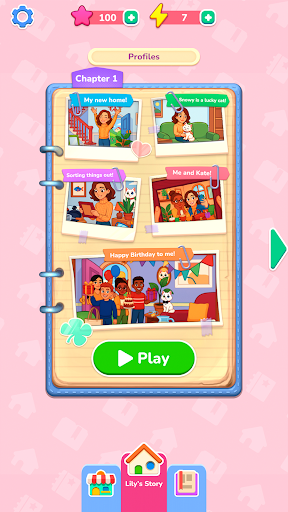
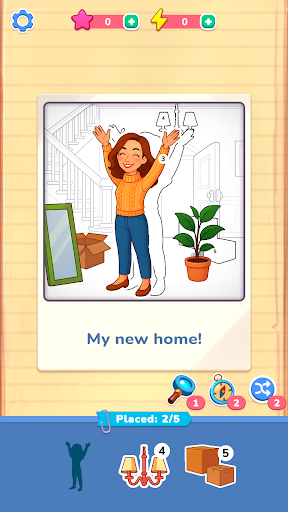
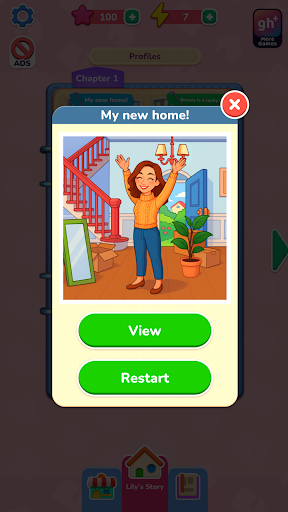
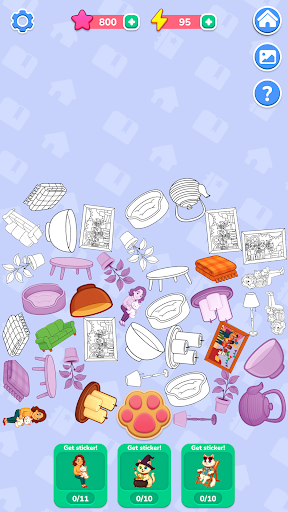
Zagraj w tę grę ZA DARMO z reklamami – lub zdobądź jeszcze więcej gier z aplikacją Gamehouse+! Odblokuj ponad 100 gier z reklamami jako członek GH+ Free lub przejdź na poziom GH+ VIP, aby cieszyć się WSZYSTKIMI grami bez reklam, grać offline, zdobywać ekskluzywne nagrody w grze i wiele więcej!
Zacznij od nowa z Lily, która urządza się w nowym domu i zaczyna pisać pamiętnik swoich przygód. Każde wspomnienie ożywa dzięki scenom w stylu zdjęć, które przywracasz, przeciągając i umieszczając ponumerowane naklejki – to świeże, kreatywne podejście do klasycznych łamigłówek kolorowania po numerach. Dopasowuj kształty, podążaj za liczbami i korzystaj z boosterów, gdy potrzebujesz odrobiny pomocy. Każde ukończone zdjęcie odsłania kolejny moment z codziennego życia Lily, od przyjaźni i hobby, po wakacje i drobne radości, które nadają sens każdemu dniowi.
Przywracając zdjęcia, zdobędziesz energię, aby odkryć sekretne historie o Snowy, psotnym kocie Lily. Kliknij przycisk z odciskiem łapy, aby zbierać przedmioty, łączyć je w naklejki i odblokowywać specjalne sceny w albumie Snowy. Zbierz każdą naklejkę, aby odkryć ukrytą stronę przygód Snowy.
Dzięki ponad 40 relaksującym poziomom, 10 sekretnym historiom i spokojnej rozgrywce typu „przeciągnij i umieść”, Lily's Diary oferuje kreatywną ucieczkę, w której każda naklejka przywołuje wspomnienia.
FUNKCJE:
Przywracanie zdjęć
Przeciągaj i umieszczaj ponumerowane naklejki, aby odbudować wspomnienia Lily.
Łatwe dopasowywanie
Podążaj za liczbami i kształtami, aby płynnie i satysfakcjonująco je układać.
Przydatne wspomagacze
Skorzystaj ze wskazówek, aby szybko znaleźć odpowiednie miejsce, gdy utkniesz.
Sekretne historie Snowy
Zbieraj i łącz przedmioty w naklejki, aby odblokować poziomy bonusowe.
Energia i nagrody
Zdobywaj energię, przywracając zdjęcia, i wykorzystaj ją do odkrywania przygód Snowy.
Przytulny postęp
Ciesz się ponad 40 relaksującymi scenami i 10 ukrytymi historiami do ukończenia we własnym tempie.
NOWOŚĆ! Znajdź swój idealny sposób na grę z aplikacją Gamehouse+! Ciesz się ponad 100 grami za darmo z reklamami jako członek GH+ Free lub zaktualizuj do GH+ VIP, aby grać bez reklam, mieć dostęp offline, ekskluzywne bonusy w grze i wiele więcej. Gamehouse+ to nie tylko kolejna aplikacja do gier — to miejsce, w którym możesz grać w dowolnym momencie i w każdej chwili „dla siebie”. Subskrybuj już dziś!
Pokaż więcej

1. Pobierz instalator MEmu i zakończ instalację

2. Uruchom MEmu, a następnie otwórz Google Play na pulpicie

3. Wyszukaj Lily's Diary w Google Play
Install
4. Pobierz i zainstaluj Lily's Diary
5. Po zakończeniu instalacji kliknij ikonę, aby rozpocząć

6. Ciesz się grą Lily's Diary na PC z MEmu
MEmu Play to najlepszy emulator Androida, a 100 milionów ludzi już korzysta z jego i dosta doskonałe wrażenia z gier na Androida. Technologia wirtualizacji MEmu umożliwia płynne granie w tysiące gier Androida na komputerze, nawet tych najbardziej wymagających grafiki.
Większy ekran z lepszą grafiką; Długi czas, bez ograniczeń baterii lub danych mobilnych.
Pełna obsługa mapowania klawiszy dla precyzyjnego sterowania klawiaturą i myszą lub gamepadem.
Wiele kont gier lub zadań na jednym komputerze jednocześnie z menedżerem wielu instancji.
Play Lily's Diary on PC by following steps: