Hue Light App Led Control
Zaktualizowano
Aktualna wersja
1.1.1
Sprzedawca

Przestań martwić się nadmiernymi opłatami podczas korzystania z Hue Light App Led Control na telefonie komórkowym, uwolnij się od małego ekranu i ciesz się korzystaniem z aplikacji na znacznie większym wyświetlaczu. Od teraz korzystaj z aplikacji na pełnym ekranie za pomocą klawiatury i myszy. MEmu oferuje wszystkie zaskakujące funkcje, których się spodziewałeś: szybką instalację i łatwą konfigurację, intuicyjne sterowanie, koniec z ograniczeniami baterii, danych mobilnych i niepokojących połączeń. Zupełnie nowy MEmu 9 to najlepszy wybór do używania Hue Light App Led Control na twoim komputerze. Zakodowany przez naszą absorpcję, menedżer wielu instancji umożliwia otwarcie 2 lub więcej kont w tym samym czasie. A co najważniejsze, nasz ekskluzywny emulator może uwolnić pełny potencjał twojego komputera, sprawić, że wszystko będzie płynne i przyjemne.
Pokaż więcej
Ciesz się wspaniałym doświadczeniem podczas grania w Hue Light App Led Control na komputerze z aplikacją MEMU App Player. Jest to potężny darmowy emulator Androida pozwalający grać w tysiące gier na Androida. The PhilipsHue Light App Control app will be the thing help that makes your home more vivid, colorful and smart than ever.
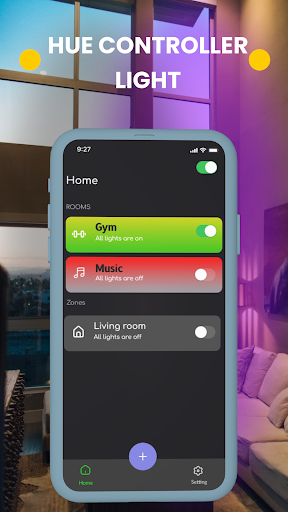
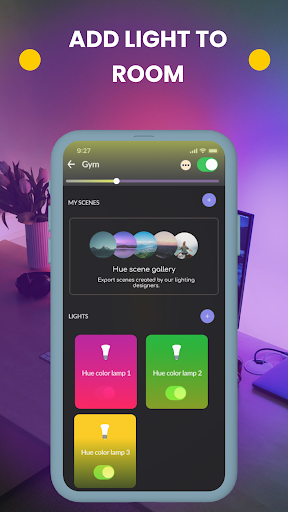
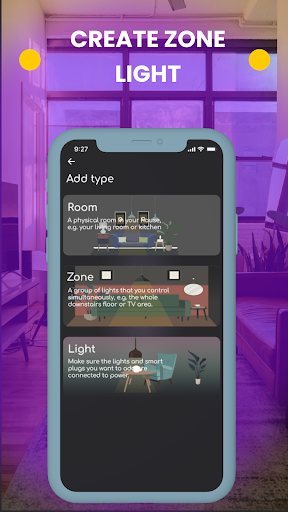
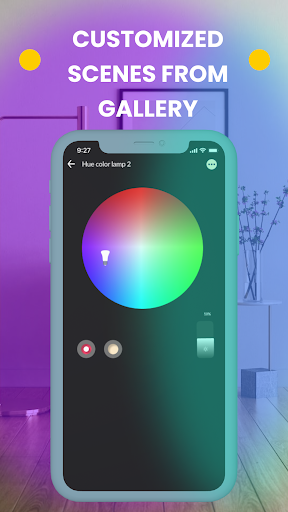
The PhilipsHue Light App Control app will be the thing help that makes your home more vivid, colorful and smart than ever.
Smart light that matches your mood. The movie you choose to watch will add more realism and emotion. The music you listen to becomes more relaxing. The dating space becomes more romantic. Locations in the home such as the bedroom, reading area and kitchen are also thanks to becoming more lively and eye-catching.
All waiting for you to bring more smart light into your home
Smart light can improve your life
More amazing living. Why not try NOW?
Hue Lights App Controller can help:
1. SET UP AND SYNC SMART LIGHT TO THE SCENE AT EASE
Easily set up this app as below:
- Connect to Led Hue Light bluetooth & bridge.
- Add the light.
- Create rooms/ zones.
- Choose a scene.
And start enjoying your own light show at home.
You can connect up to 50 Philips Hue Bulbs per Bridge. So you can decorate your area home – inside and outside – and control them all within the app.
2. PREMIUM SCENE
A lot of color waiting for you to pick up and design to become your own gallery scene. But, if you don't have time or don't want to design it, don't worry about it. This App has a lot of premium scenes designed by experts, and this will make you vibes vary from everywhere, every time you want.
3. CONTROL LIGHTS IN YOUR HOME
If you want to have featured light in your home, it is so great, you just need a few minutes of impromptu.
Let's turn your house party up with your own light show. Magically colorful spaces will be magic tricks to impress your friends. That is also the way to cooking inspiration when you're tired of cooking dinner.
You can customize and remote control your Led Hue Light-strip, Smart Hue Downlight, PhlipsHue Play Light Bar and Led Hue Bulb. With a smart color sync function, this app can sync smart light with music or your mood.
Terms of Use: http://smartremotedev.com/p/privacy-policy
Privacy Policy: http://smartremotedev.com/p/terms-of-service
You are welcome to Contact Us: support@smartremotedev.com
Pokaż więcej

1. Pobierz instalator MEmu i zakończ instalację

2. Uruchom MEmu, a następnie otwórz Google Play na pulpicie

3. Wyszukaj Hue Light App Led Control w Google Play
Install
4. Pobierz i zainstaluj Hue Light App Led Control
5. Po zakończeniu instalacji kliknij ikonę, aby rozpocząć

6. Użyj MEmu, aby doświadczyć Hue Light App Led Control na swoim komputerze
MEmu Play to najlepszy emulator Androida, z którego korzysta ponad 100 milionów użytkowników, ciesząc się wyjątkowym doświadczeniem aplikacji na Androida. Technologia wirtualizacji MEmu pozwala na płynne uruchamianie tysięcy aplikacji Androida na komputerze, nawet tych najbardziej wymagających.
Większy ekran z lepszą grafiką; Długi czas, bez ograniczeń baterii lub danych mobilnych.
Pełna obsługa mapowania klawiszy dla precyzyjnego sterowania klawiaturą i myszą lub gamepadem.
Wiele kont gier lub zadań na jednym komputerze jednocześnie z menedżerem wielu instancji.
Use Hue Light App Led Control on PC by following steps: