irplus - Pilot podczerwieni
Zaktualizowano
Aktualna wersja
1.9.13
Sprzedawca

Przestań martwić się nadmiernymi opłatami podczas korzystania z irplus - Pilot podczerwieni na telefonie komórkowym, uwolnij się od małego ekranu i ciesz się korzystaniem z aplikacji na znacznie większym wyświetlaczu. Od teraz korzystaj z aplikacji na pełnym ekranie za pomocą klawiatury i myszy. MEmu oferuje wszystkie zaskakujące funkcje, których się spodziewałeś: szybką instalację i łatwą konfigurację, intuicyjne sterowanie, koniec z ograniczeniami baterii, danych mobilnych i niepokojących połączeń. Zupełnie nowy MEmu 9 to najlepszy wybór do używania irplus - Pilot podczerwieni na twoim komputerze. Zakodowany przez naszą absorpcję, menedżer wielu instancji umożliwia otwarcie 2 lub więcej kont w tym samym czasie. A co najważniejsze, nasz ekskluzywny emulator może uwolnić pełny potencjał twojego komputera, sprawić, że wszystko będzie płynne i przyjemne.
Pokaż więcej
Ciesz się wspaniałym doświadczeniem podczas grania w irplus - Pilot podczerwieni na komputerze z aplikacją MEMU App Player. Jest to potężny darmowy emulator Androida Umożliwia korzystanie z tysięcy aplikacji Androida. This is an application for using the internal infrared blaster of many modern smartphones - with the long-term aim to support most devices with infrared-remote control and their functions as possible.
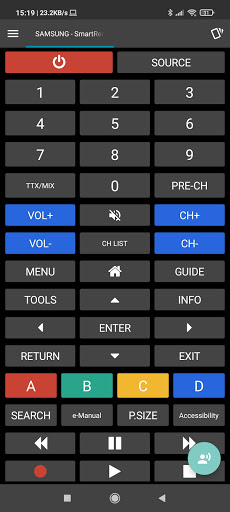
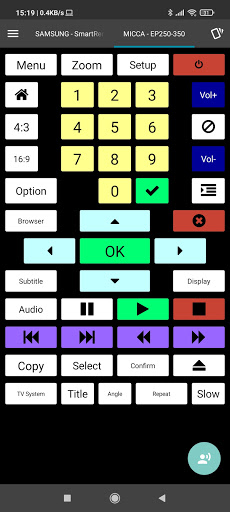
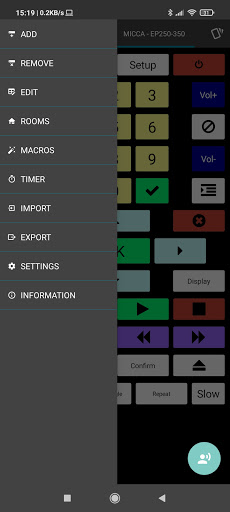
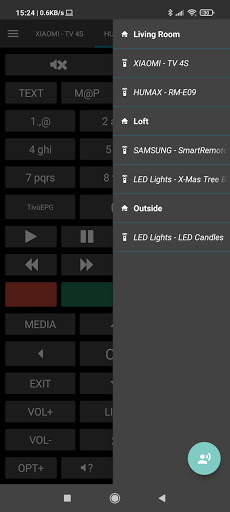
This is an application for using the internal infrared blaster of many modern smartphones - with the long-term aim to support most devices with infrared-remote control and their functions as possible.
The format of the remotes has been designed in a very flexible way and the full layout with codes can be edited via the app and an import / export method.
Supported devices:
- Any smartphone or tablet using Android 4.4 or higher with an infrared blaster / emitter (only if the API was correctly implemented by the manufacturer, Some SONY devices are NOT supported because they can not send RAW codes!)
- Other: Xiaomi Mi4, Cubot X12, Huawei Honor 8
- LG G3, G4, G5 and newer (Some older LGs are not supported because the LG API does not support raw codes on them)
- Samsung devices with Infrared and Stock-ROM will work on Android below Kitkat too.
- HTC devices below 4.4 are supported as well but may cause problems (Contact me if you need assistance)
- Support for Medion Lifetab S7852 and S10334 and other Lenovo devices with infrared.
- If your device has infrared and does not work, please contact with additional info so i can check if support can be added.
If the device you want to control is not available send me an E-Mail request and i will try to add it into the database when i have time. Also feel free to search for working discrete Codes yourself and send them in (LIRC, Pronto Hex etc) to make my research easier and build the database faster.
Notable features:
- Import LIRC (*.cf, *.conf) and irplus (*.irplus, *.xml) files.
- Macro mode, Buttons can send multiple IR commands in a row with one press
- Layout and codes of remote control can be customized via XML files
- Option to use Volume Up / Volume Down Hardware buttons to send commands
- Option to visualize sent IR code as On/Off graph for easy code check
- 3 type of Widgets (Single, 6- and 9-Button)
Please note: If you rate this application, please consider its under active development. If you have problems or suggestions please contact me for helping me to fix them! ;-)
Thanks!
~~~~~~
Pokaż więcej

1. Pobierz instalator MEmu i zakończ instalację

2. Uruchom MEmu, a następnie otwórz Google Play na pulpicie

3. Wyszukaj irplus - Pilot podczerwieni w Google Play
Install
4. Pobierz i zainstaluj irplus - Pilot podczerwieni
5. Po zakończeniu instalacji kliknij ikonę, aby rozpocząć

6. Użyj MEmu, aby doświadczyć irplus - Pilot podczerwieni na swoim komputerze
MEmu Play to najlepszy emulator Androida, z którego korzysta ponad 100 milionów użytkowników, ciesząc się wyjątkowym doświadczeniem aplikacji na Androida. Technologia wirtualizacji MEmu pozwala na płynne uruchamianie tysięcy aplikacji Androida na komputerze, nawet tych najbardziej wymagających.
Większy ekran z lepszą grafiką; Długi czas, bez ograniczeń baterii lub danych mobilnych.
Pełna obsługa mapowania klawiszy dla precyzyjnego sterowania klawiaturą i myszą lub gamepadem.
Wiele kont gier lub zadań na jednym komputerze jednocześnie z menedżerem wielu instancji.
Use irplus - Pilot podczerwieni on PC by following steps: