MAZZY
Zaktualizowano
Aktualna wersja
1.4
Sprzedawca

Przestań martwić się nadmiernymi opłatami podczas korzystania z MAZZY na telefonie komórkowym, uwolnij się od małego ekranu i ciesz się korzystaniem z aplikacji na znacznie większym wyświetlaczu. Od teraz korzystaj z aplikacji na pełnym ekranie za pomocą klawiatury i myszy. MEmu oferuje wszystkie zaskakujące funkcje, których się spodziewałeś: szybką instalację i łatwą konfigurację, intuicyjne sterowanie, koniec z ograniczeniami baterii, danych mobilnych i niepokojących połączeń. Zupełnie nowy MEmu 9 to najlepszy wybór do używania MAZZY na twoim komputerze. Zakodowany przez naszą absorpcję, menedżer wielu instancji umożliwia otwarcie 2 lub więcej kont w tym samym czasie. A co najważniejsze, nasz ekskluzywny emulator może uwolnić pełny potencjał twojego komputera, sprawić, że wszystko będzie płynne i przyjemne.
Pokaż więcej
Ciesz się wspaniałym doświadczeniem podczas grania w MAZZY na komputerze z aplikacją MEMU App Player. Jest to potężny darmowy emulator Androida Umożliwia korzystanie z tysięcy aplikacji Androida. MAZZY Smart is an APP to be used with the MAZZY robot from XTREM BOTS.
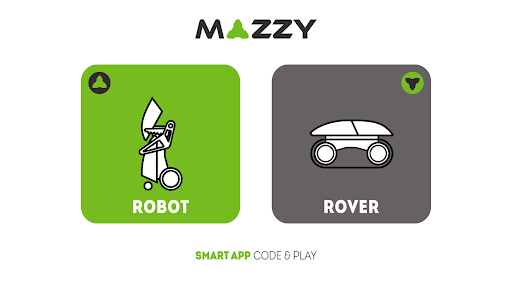
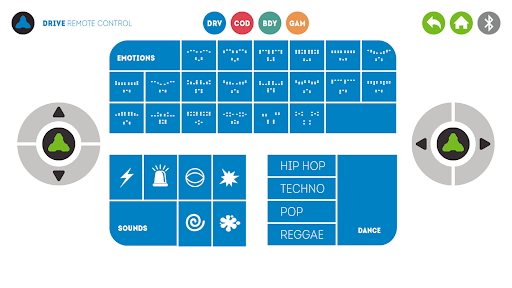
MAZZY Smart is an APP to be used with the MAZZY robot from XTREM BOTS. It is designed for you, to play and discover with MAZZY the principles of electronics, robotics and programming.
MAZZY is a robot designed to introduce the world of educational robotics, which allows you to program in an easy and intuitive way. MAZZY will follow the orders programmed by you through the control panel located on the robot's body or using this free APP.
Taking advantage of Bluetooth® technology you can communicate with the Robot, control it in real-time or simply by tilting your mobile device, make it dance, express your emotions and even teach it to execute your orders.
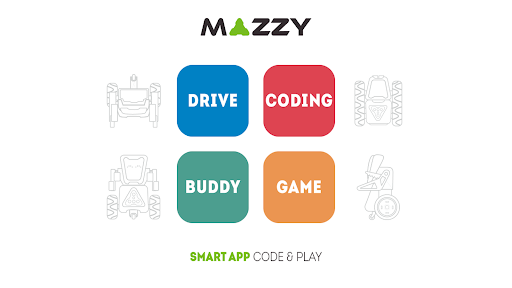
The APP introduces four sections where you will explore different areas of play:
DRIVE_ With 2 modes: REMOTE use as a remote control or GYROSCOPE which uses gyroscope of your device. You can control the movements, expressions, sounds and music of your robot.
CODING_ With 2 modes: VISUAL CODING where you can program an order sequences and SIMULATOR where you can simulate the programmed sequence.
BUDDY_ With 2 modes: EMOTIONS where you can send emotions to the robot and DANCE where you can perform impressive robotic dances.
GAME_ Build your own circuit and use the infrared sensor to detect obstacles. Take the MAZZY to the goal in the shortest time.
This APP is free and it will allow you to enter the fascinating STREAM world by the hand of your MAZZY robot.
It includes an incredible game of dexterity and speed, which uses the infrared sensor to detect obstacles. Create your own amazing circuits and get the best time. Only the fastest can record their name on the podium of the winners.
Download the APP and start the fun!
Pokaż więcej

1. Pobierz instalator MEmu i zakończ instalację

2. Uruchom MEmu, a następnie otwórz Google Play na pulpicie

3. Wyszukaj MAZZY w Google Play
Install
4. Pobierz i zainstaluj MAZZY
5. Po zakończeniu instalacji kliknij ikonę, aby rozpocząć

6. Użyj MEmu, aby doświadczyć MAZZY na swoim komputerze
MEmu Play to najlepszy emulator Androida, z którego korzysta ponad 100 milionów użytkowników, ciesząc się wyjątkowym doświadczeniem aplikacji na Androida. Technologia wirtualizacji MEmu pozwala na płynne uruchamianie tysięcy aplikacji Androida na komputerze, nawet tych najbardziej wymagających.
Większy ekran z lepszą grafiką; Długi czas, bez ograniczeń baterii lub danych mobilnych.
Pełna obsługa mapowania klawiszy dla precyzyjnego sterowania klawiaturą i myszą lub gamepadem.
Wiele kont gier lub zadań na jednym komputerze jednocześnie z menedżerem wielu instancji.
Use MAZZY on PC by following steps: