Photo Fun - Funny Pics Creator
Zaktualizowano
Aktualna wersja
220105
Sprzedawca

Przestań martwić się nadmiernymi opłatami podczas korzystania z Photo Fun - Funny Pics Creator na telefonie komórkowym, uwolnij się od małego ekranu i ciesz się korzystaniem z aplikacji na znacznie większym wyświetlaczu. Od teraz korzystaj z aplikacji na pełnym ekranie za pomocą klawiatury i myszy. MEmu oferuje wszystkie zaskakujące funkcje, których się spodziewałeś: szybką instalację i łatwą konfigurację, intuicyjne sterowanie, koniec z ograniczeniami baterii, danych mobilnych i niepokojących połączeń. Zupełnie nowy MEmu 9 to najlepszy wybór do używania Photo Fun - Funny Pics Creator na twoim komputerze. Zakodowany przez naszą absorpcję, menedżer wielu instancji umożliwia otwarcie 2 lub więcej kont w tym samym czasie. A co najważniejsze, nasz ekskluzywny emulator może uwolnić pełny potencjał twojego komputera, sprawić, że wszystko będzie płynne i przyjemne.
Pokaż więcej
Ciesz się wspaniałym doświadczeniem podczas grania w Photo Fun - Funny Pics Creator na komputerze z aplikacją MEMU App Player. Jest to potężny darmowy emulator Androida pozwalający grać w tysiące gier na Androida. Get the Photo Fun - Funny Pics Creator and create the most amazing fake images ;-)).
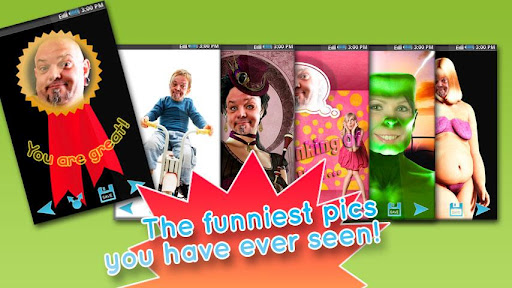
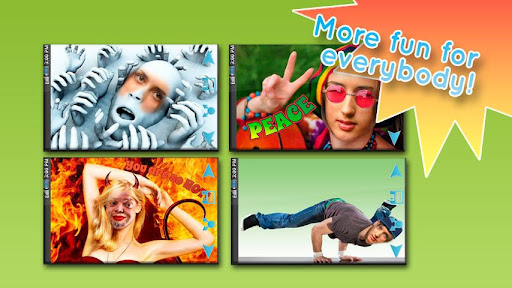
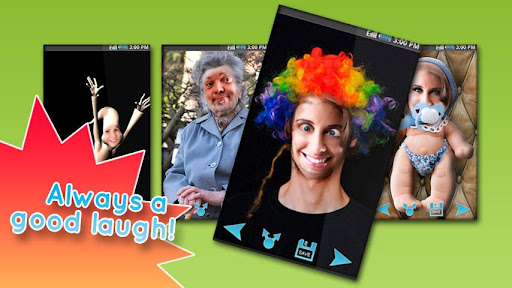

Get the Photo Fun - Funny Pics Creator and create the most amazing fake images ;-))
Take a photo of a friend and let the photo fun tool generate funny pictures.
It's easy:
1. Choose a picture
2. Place it in the frame. Resize or turn the picture with your finger(s).
3. See the funny results
4. Save and share
Enjoy yourself with this funny app and discover how easy it can be to create fake images.
Features:
- A lot of funny predefined pictures
- Save, email, share pictures
- Create wallpapers and backgrounds
- Create photomontages and put your picture on things like statues, fat people, animals and much more
- Turn yourself or your friend into an astronaut, a monkey, lovely baby etc. with just one click.
- Easy handling
- etc
Sticker Option:
Give your pictures a personal touch. Select either a photo from your gallery or an image which is already faked. Take the selected pic and start personalizing by choosing between numerous stickers. You will be spoiled for choice in selecting the coolest sticker. It contains stickers with various subjects like, hats, wigs (hairstyles), crowns, sunglasses, eyes, mouth expressions like kisses, scary objects with blood, etc. Let your pictures communicate something or create some comics by writing some fun stuff into bubbles.
Use this app at your next party and have lots of fun with your friends :-)
Download this funny and cool app now for free and fool your friends.
Pokaż więcej

1. Pobierz instalator MEmu i zakończ instalację

2. Uruchom MEmu, a następnie otwórz Google Play na pulpicie

3. Wyszukaj Photo Fun - Funny Pics Creator w Google Play
Install
4. Pobierz i zainstaluj Photo Fun - Funny Pics Creator
5. Po zakończeniu instalacji kliknij ikonę, aby rozpocząć

6. Użyj MEmu, aby doświadczyć Photo Fun - Funny Pics Creator na swoim komputerze
MEmu Play to najlepszy emulator Androida, z którego korzysta ponad 100 milionów użytkowników, ciesząc się wyjątkowym doświadczeniem aplikacji na Androida. Technologia wirtualizacji MEmu pozwala na płynne uruchamianie tysięcy aplikacji Androida na komputerze, nawet tych najbardziej wymagających.
Większy ekran z lepszą grafiką; Długi czas, bez ograniczeń baterii lub danych mobilnych.
Pełna obsługa mapowania klawiszy dla precyzyjnego sterowania klawiaturą i myszą lub gamepadem.
Wiele kont gier lub zadań na jednym komputerze jednocześnie z menedżerem wielu instancji.
Use Photo Fun - Funny Pics Creator on PC by following steps: