QR Reader
Zaktualizowano
Aktualna wersja
1.36
Sprzedawca

Przestań martwić się nadmiernymi opłatami podczas korzystania z QR Reader na telefonie komórkowym, uwolnij się od małego ekranu i ciesz się korzystaniem z aplikacji na znacznie większym wyświetlaczu. Od teraz korzystaj z aplikacji na pełnym ekranie za pomocą klawiatury i myszy. MEmu oferuje wszystkie zaskakujące funkcje, których się spodziewałeś: szybką instalację i łatwą konfigurację, intuicyjne sterowanie, koniec z ograniczeniami baterii, danych mobilnych i niepokojących połączeń. Zupełnie nowy MEmu 9 to najlepszy wybór do używania QR Reader na twoim komputerze. Zakodowany przez naszą absorpcję, menedżer wielu instancji umożliwia otwarcie 2 lub więcej kont w tym samym czasie. A co najważniejsze, nasz ekskluzywny emulator może uwolnić pełny potencjał twojego komputera, sprawić, że wszystko będzie płynne i przyjemne.
Pokaż więcej
Ciesz się wspaniałym doświadczeniem podczas grania w QR Reader na komputerze z aplikacją MEMU App Player. Jest to potężny darmowy emulator Androida Umożliwia korzystanie z tysięcy aplikacji Androida. The QR code reader and barcode scanner can scan a barcode or read a QR code.
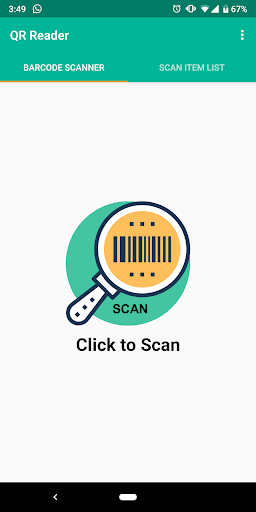
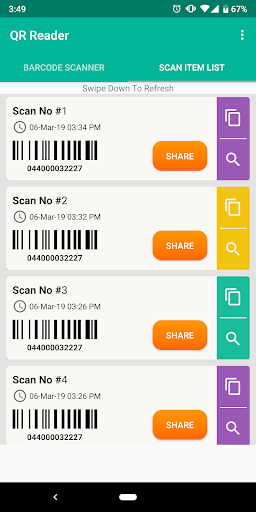
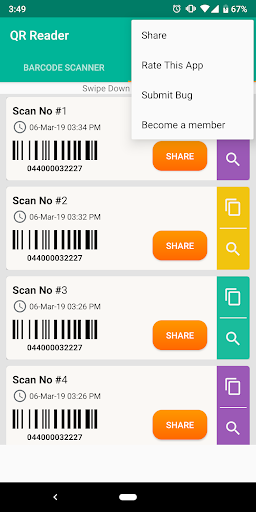
The QR code reader and barcode scanner can scan a barcode or read a QR code.
Our QR code scanner is a fast and easy scanner for any QR code application. It functions as both a QR code reader and QR code scanner and barcoding scanner.
The QR barcode app for scanners can read and scan all QR code types.
You can only use your cell phone to be able to read that information that is located behind the square barcode / QRcode in a matter of seconds. The code has never been decoded this easily.
The application used for the QRcode reader is super easy for use. You open up the application > Scan > point your camera toward the bar code or QR code that you intend to scan. The QRcode Reader can automatically distinguish any QRcode.
When you are scanning the QR code, and the code happens to hold a URL, you will be able to open your browser to that specific site by pressing the browser button. However, if the code should contain only text, it will be seen instantly.
The QR code application reader will read QR code varieties and will allow you to share and save the code that you just read.
Be sure to enjoy each of the benefits of scanning barcode/QR codes everywhere and anytime.
Listed below are some of the great features of this QR code reader:
• It is powerful as it decodes QR code fast
• It can read code or scan QR code easily
• For sending messages to your relatives and friends you can read your QR code for each specific message
• It will act as a barcode scanner that allows you to look at the detailed information on the product you are thinking of purchasing by QR codes at supermarkets or stores.
• The QR code scanner will not need an Internet connection for scanning barcode/ QR code
• The QR generator of code can share and save codes you have encrypted
• You can save your QR history, and even search your QR scanning history
The QR code scanner is used a lot to decode a QR/barcode like the EAN which is used for specific product manufacturing, and other codes.
The QR code scanner was created with the idea of using your camera. If you are wondering about security, this will be the application that you want to scan your codes. It is fully compatible and safe with the devices you use.
QR codes and the barcode system confuse some people; however, QR code is not the same as that of a barcode.
Pokaż więcej

1. Pobierz instalator MEmu i zakończ instalację

2. Uruchom MEmu, a następnie otwórz Google Play na pulpicie

3. Wyszukaj QR Reader w Google Play
Install
4. Pobierz i zainstaluj QR Reader
5. Po zakończeniu instalacji kliknij ikonę, aby rozpocząć

6. Użyj MEmu, aby doświadczyć QR Reader na swoim komputerze
MEmu Play to najlepszy emulator Androida, z którego korzysta ponad 100 milionów użytkowników, ciesząc się wyjątkowym doświadczeniem aplikacji na Androida. Technologia wirtualizacji MEmu pozwala na płynne uruchamianie tysięcy aplikacji Androida na komputerze, nawet tych najbardziej wymagających.
Większy ekran z lepszą grafiką; Długi czas, bez ograniczeń baterii lub danych mobilnych.
Pełna obsługa mapowania klawiszy dla precyzyjnego sterowania klawiaturą i myszą lub gamepadem.
Wiele kont gier lub zadań na jednym komputerze jednocześnie z menedżerem wielu instancji.
Use QR Reader on PC by following steps: