Quran 360: English, Memorize
Zaktualizowano
Aktualna wersja
6.3.01
Sprzedawca

Przestań martwić się nadmiernymi opłatami podczas korzystania z Quran 360: English, Memorize na telefonie komórkowym, uwolnij się od małego ekranu i ciesz się korzystaniem z aplikacji na znacznie większym wyświetlaczu. Od teraz korzystaj z aplikacji na pełnym ekranie za pomocą klawiatury i myszy. MEmu oferuje wszystkie zaskakujące funkcje, których się spodziewałeś: szybką instalację i łatwą konfigurację, intuicyjne sterowanie, koniec z ograniczeniami baterii, danych mobilnych i niepokojących połączeń. Zupełnie nowy MEmu 9 to najlepszy wybór do używania Quran 360: English, Memorize na twoim komputerze. Zakodowany przez naszą absorpcję, menedżer wielu instancji umożliwia otwarcie 2 lub więcej kont w tym samym czasie. A co najważniejsze, nasz ekskluzywny emulator może uwolnić pełny potencjał twojego komputera, sprawić, że wszystko będzie płynne i przyjemne.
Pokaż więcej
Ciesz się wspaniałym doświadczeniem podczas grania w Quran 360: English, Memorize na komputerze z aplikacją MEMU App Player. Jest to potężny darmowy emulator Androida pozwalający grać w tysiące gier na Androida. Unlock the Wisdom of Al Quran Kareem with Quran 360.

Unlock the Wisdom of Al Quran Kareem with Quran 360
Why Choose Quran 360?
Hifz Mistake Detection (New Feature): Perfect your Quranic recitation with instant feedback. Identify and correct errors to achieve flawless recitation, with personalized feedback on your pronunciation and rhythm (including voice recording).
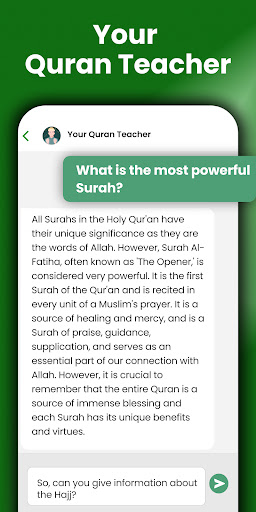
Your Personal Teacher: Deepen your understanding of Islamic teachings and get answers to your questions.
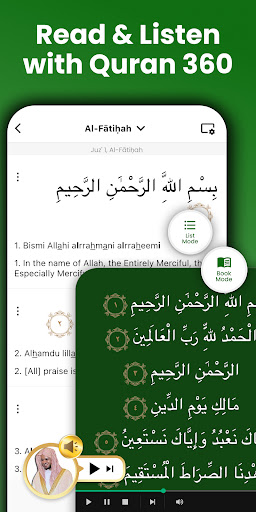
Al Quran Audio: Listen to renowned reciters, including Akram Al-Alaqmi, Abdul Rashid Sufi, and more, to aid in memorization and improve your Tilawah.
Bookmarks & Playlists: Save and organize meaningful Ayahs that resonate with you, and create personalized playlists for focused learning sessions.
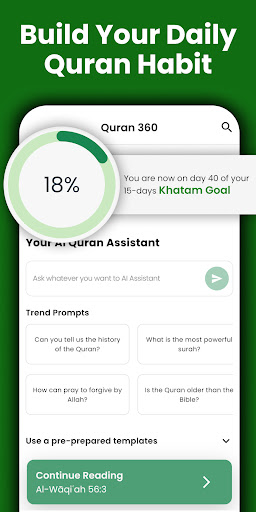
Khatam Tracker: Build a daily habit of reading the Mushaf with our Khatam Tracker, ensuring you complete your recitation.
Excellent Readability: Enjoy a smooth reading experience tailored to help you read AlQuran with Tajweed, with customizable font sizes, themes, and an intuitive design.
Al Quran Offline: Read and recite the Holy Quran anywhere, even without an internet connection, ensuring continuous practice.
Memorize the Quran with Ease
● Versatile Memorization Tools: Personalize your memorization journey with adjustable playback speed, verse highlighting, and similar verse identification. Tailor your experience to suit your learning pace and style.
● Repetition & Review: Strengthen your Hifz by revisiting and repeating key verses through customizable loops and targeted practice sessions.
Enhance Your Quranic Study
● Word-by-Word Tafsir: Word-by-word Tafsir (commentary) in multiple languages unlocks the deeper meanings and lessons within each Ayah.
● Verified Translations: Access over 40 Holy Quran translations, including English, Türkçe, français, Deutsch, español, Malay, Indonesian, and more.
Whether you’re a beginner or an experienced reader, Quran360 is your go-to app for Quranic recitation, memorization, and study, Insha'Allah.
Privacy & Terms : https://www.muslimassistant.com/privacy-terms.html
Pokaż więcej

1. Pobierz instalator MEmu i zakończ instalację

2. Uruchom MEmu, a następnie otwórz Google Play na pulpicie

3. Wyszukaj Quran 360: English, Memorize w Google Play
Install
4. Pobierz i zainstaluj Quran 360: English, Memorize
5. Po zakończeniu instalacji kliknij ikonę, aby rozpocząć

6. Użyj MEmu, aby doświadczyć Quran 360: English, Memorize na swoim komputerze
MEmu Play to najlepszy emulator Androida, z którego korzysta ponad 100 milionów użytkowników, ciesząc się wyjątkowym doświadczeniem aplikacji na Androida. Technologia wirtualizacji MEmu pozwala na płynne uruchamianie tysięcy aplikacji Androida na komputerze, nawet tych najbardziej wymagających.
Większy ekran z lepszą grafiką; Długi czas, bez ograniczeń baterii lub danych mobilnych.
Pełna obsługa mapowania klawiszy dla precyzyjnego sterowania klawiaturą i myszą lub gamepadem.
Wiele kont gier lub zadań na jednym komputerze jednocześnie z menedżerem wielu instancji.
Use Quran 360: English, Memorize on PC by following steps: