
Real Engine Sim
Zaktualizowano
Aktualna wersja
1.0
Sprzedawca

Przestań martwić się nadmiernymi opłatami podczas korzystania z Real Engine Sim na telefonie komórkowym, uwolnij się od małego ekranu i ciesz się korzystaniem z aplikacji na znacznie większym wyświetlaczu. Od teraz korzystaj z aplikacji na pełnym ekranie za pomocą klawiatury i myszy. MEmu oferuje wszystkie zaskakujące funkcje, których się spodziewałeś: szybką instalację i łatwą konfigurację, intuicyjne sterowanie, koniec z ograniczeniami baterii, danych mobilnych i niepokojących połączeń. Zupełnie nowy MEmu 9 to najlepszy wybór do używania Real Engine Sim na twoim komputerze. Zakodowany przez naszą absorpcję, menedżer wielu instancji umożliwia otwarcie 2 lub więcej kont w tym samym czasie. A co najważniejsze, nasz ekskluzywny emulator może uwolnić pełny potencjał twojego komputera, sprawić, że wszystko będzie płynne i przyjemne.
Pokaż więcej
Ciesz się wspaniałym doświadczeniem podczas grania w Real Engine Sim na komputerze z aplikacją MEMU App Player. Jest to potężny darmowy emulator Androida Umożliwia korzystanie z tysięcy aplikacji Androida. Real Engine Sim is a simulation game that you can enjoy the real engine sound of cars and motorcycles made by the innovative engine sound synthesis technology.
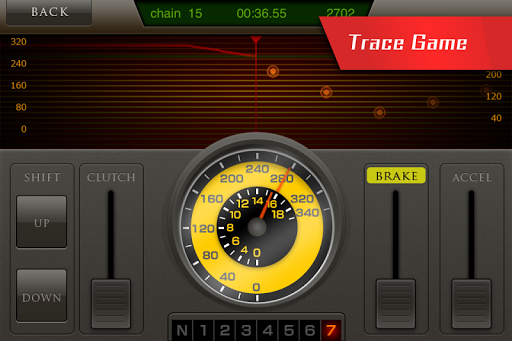

Real Engine Sim is a simulation game that you can enjoy the real engine sound of cars and motorcycles made by the innovative engine sound synthesis technology.
RealEngineSim uses technology completed through years of research by engine sound professionals in Hamamatsu, a region known as a home to the world’s automobile and motorcycle manufacturers. Using this technology, we have created the world’s only app able to regenerate real engine sounds.
○This app is a simulation game in which you can enjoy the speed control and the innovative engine sound of manual mission vehicles.
○The use of a speaker gives you even more realistic and muscular sound.
However, we would ask you to enjoy this app with an earphone or a headset when using it in public places.
(* Please be extra careful of the volume in order not to either hurt your hearing or trouble people around you.)
◆ Available vehicles ◆
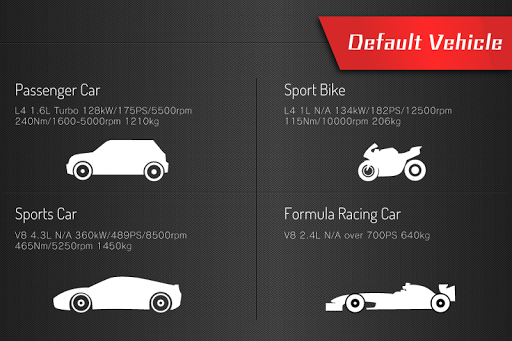
Four types: passenger cars, sports cars, sports motorcycles, and racing cars.
You can also enjoy controlling the acceleration, braking, clutch, and shifting of manual transmission vehicles (Auto-Clutch available).
◆ Pursuing realistic engine sound ◆
Precise vehicle models and innovative engine sound synthesizers were used to achieve real engine behavior and powerful engine sound that cannot be experienced through other racing games.
Features life-like tire slippage caused by sudden acceleration and braking.
◆ The Driving Mode ◆
There are two modes: free driving and speed tracing
Speed tracing is a game in which the object is to drive at a specific target speed.
Expert mode features the racing speed data from racing cards driving on famous courses from around the world, giving you the chance to experience the excitement of racing on real courses.
* The new technology of engine sound synthesis used in this app was developed by an engineer, who started his own business after a long time research on the sound at Yamaha Motor Co.,Ltd. (motorcycle manufacturer). The patent application is now in preparation.
Recommended models : Xperia Z4 or higher, or Nexus 5X or higher
◇For information and inquiries on our engine sound
The engine sound synthesis technology used for this app is available for use in a variety of medias such as games, movies, and so on. Please feel free to contact us for more details.
Sound Design Lab LLC.
Email: maedao@sound-design-lab.com
Website: http://www.sound-design-lab.com/
◎The Profile of The Producer
Name: Osamu Maeda (Resides in Iwata city, Shizuoka Pref.)
Career: April 1974 to Sept.2007
Worked for Yamaha Motor Co.,Ltd. There he was in charge of the research on the engine sound.
Oct. 2007 (to the present) Founded the Sound Design Lab LLC.
◇For inquiries on the middleware
The middleware to play the engine sound is available for mobile devices such. For more information, please contact at the following address.
CAI Media Co.,Ltd.
Email:info@smocca.co.jp
Website: http://www.smocca.co.jp/iphone/Realenginesim.html
*This product uses fonts from Fontworks Japan Co., Ltd.
The Fontworks Japan company name, Fontworks, and font names are trademarks or registered trademarks of Fontworks Japan Co., Ltd.
Pokaż więcej

1. Pobierz instalator MEmu i zakończ instalację

2. Uruchom MEmu, a następnie otwórz Google Play na pulpicie

3. Wyszukaj Real Engine Sim w Google Play
Install
4. Pobierz i zainstaluj Real Engine Sim
5. Po zakończeniu instalacji kliknij ikonę, aby rozpocząć

6. Użyj MEmu, aby doświadczyć Real Engine Sim na swoim komputerze
MEmu Play to najlepszy emulator Androida, z którego korzysta ponad 100 milionów użytkowników, ciesząc się wyjątkowym doświadczeniem aplikacji na Androida. Technologia wirtualizacji MEmu pozwala na płynne uruchamianie tysięcy aplikacji Androida na komputerze, nawet tych najbardziej wymagających.
Większy ekran z lepszą grafiką; Długi czas, bez ograniczeń baterii lub danych mobilnych.
Pełna obsługa mapowania klawiszy dla precyzyjnego sterowania klawiaturą i myszą lub gamepadem.
Wiele kont gier lub zadań na jednym komputerze jednocześnie z menedżerem wielu instancji.
Use Real Engine Sim on PC by following steps: