Remote Mouse Pro - Use full PC
Zaktualizowano
Aktualna wersja
0.2.1
Sprzedawca

Przestań martwić się nadmiernymi opłatami podczas korzystania z Remote Mouse Pro - Use full PC na telefonie komórkowym, uwolnij się od małego ekranu i ciesz się korzystaniem z aplikacji na znacznie większym wyświetlaczu. Od teraz korzystaj z aplikacji na pełnym ekranie za pomocą klawiatury i myszy. MEmu oferuje wszystkie zaskakujące funkcje, których się spodziewałeś: szybką instalację i łatwą konfigurację, intuicyjne sterowanie, koniec z ograniczeniami baterii, danych mobilnych i niepokojących połączeń. Zupełnie nowy MEmu 9 to najlepszy wybór do używania Remote Mouse Pro - Use full PC na twoim komputerze. Zakodowany przez naszą absorpcję, menedżer wielu instancji umożliwia otwarcie 2 lub więcej kont w tym samym czasie. A co najważniejsze, nasz ekskluzywny emulator może uwolnić pełny potencjał twojego komputera, sprawić, że wszystko będzie płynne i przyjemne.
Pokaż więcej
Ciesz się wspaniałym doświadczeniem podczas grania w Remote Mouse Pro - Use full PC na komputerze z aplikacją MEMU App Player. Jest to potężny darmowy emulator Androida Umożliwia korzystanie z tysięcy aplikacji Androida. Remote Mouse Pro turns your phone into a wireless touchpad, keyboard, voice assistant and file remote for your Windows PC.
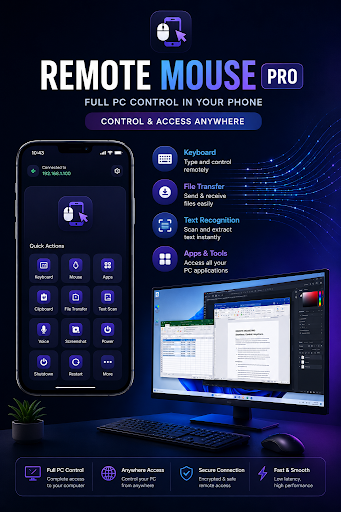
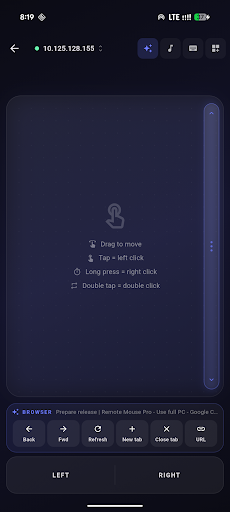
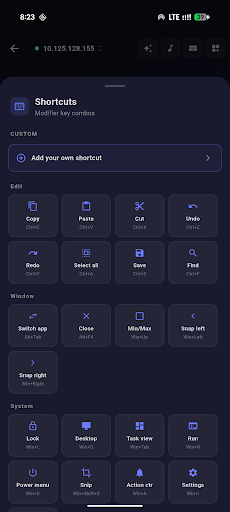
Remote Mouse Pro turns your phone into a wireless touchpad, keyboard, voice assistant and file remote for your Windows PC. Pair once over Wi-Fi, then control your computer from the couch, the bed, or across the room.
Built for people who actually use a PC: developers, content creators, presenters, and anyone who is tired of getting up to skip a song or close a tab.
— FEATURES —
• Precision touchpad with multi-finger gestures, scroll, right-click and drag
• Full software keyboard with modifier keys (Ctrl, Alt, Shift, Win) and shortcut macros
• Wake-on-LAN — power your PC on from your phone
• Multi-monitor aware: switch monitors with a tap
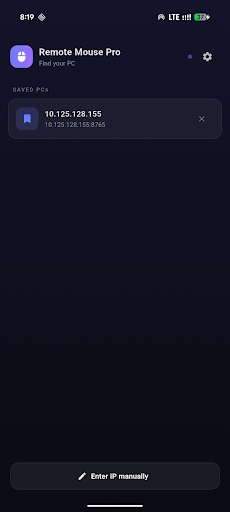
• Discover PCs on your network with zero-config mDNS — no IP typing
• Encrypted local-network connection with one-time pairing token
— PRO FEATURES (3-day free trial) —
• OCR — point your phone camera at any text, instantly paste it into the active PC window
• Voice macros — speak commands and trigger keyboard shortcuts on your PC
• Live snippets — keep a clipboard library on your phone, paste with one tap
• File transfer — push files from your phone to your PC, or pull files from your PC to your phone's Downloads folder
• Foreground app awareness — context-aware shortcuts that adapt to whatever app you have focused
— PRIVACY-FIRST —
Remote Mouse Pro runs entirely on your local Wi-Fi. There is no cloud, no analytics, no account. Your input never leaves your network. The Windows server is open about every byte it sends and receives — see thecodebage.com for the full transparency report.
— REQUIREMENTS —
• Windows 10 or 11 PC with the free Remote Mouse Pro server installed (download from thecodebage.com)
• Both devices on the same Wi-Fi network
• Android 7.0 (Nougat) or later
— SUPPORT —
Questions, feature requests, or bug reports? Email hanifshah812@gmail.com or visit thecodebage.com/apps/remote-mouse-pro
Built by independent devs at codebage. No tracking, no ads, no nonsense.
Pokaż więcej

1. Pobierz instalator MEmu i zakończ instalację

2. Uruchom MEmu, a następnie otwórz Google Play na pulpicie

3. Wyszukaj Remote Mouse Pro - Use full PC w Google Play
Install
4. Pobierz i zainstaluj Remote Mouse Pro - Use full PC
5. Po zakończeniu instalacji kliknij ikonę, aby rozpocząć

6. Użyj MEmu, aby doświadczyć Remote Mouse Pro - Use full PC na swoim komputerze
MEmu Play to najlepszy emulator Androida, z którego korzysta ponad 100 milionów użytkowników, ciesząc się wyjątkowym doświadczeniem aplikacji na Androida. Technologia wirtualizacji MEmu pozwala na płynne uruchamianie tysięcy aplikacji Androida na komputerze, nawet tych najbardziej wymagających.
Większy ekran z lepszą grafiką; Długi czas, bez ograniczeń baterii lub danych mobilnych.
Pełna obsługa mapowania klawiszy dla precyzyjnego sterowania klawiaturą i myszą lub gamepadem.
Wiele kont gier lub zadań na jednym komputerze jednocześnie z menedżerem wielu instancji.
Use Remote Mouse Pro - Use full PC on PC by following steps: