Samsung Food: Meal Planning
Zaktualizowano
Aktualna wersja
2.32.0
Sprzedawca

Przestań martwić się nadmiernymi opłatami podczas korzystania z Samsung Food: Meal Planning na telefonie komórkowym, uwolnij się od małego ekranu i ciesz się korzystaniem z aplikacji na znacznie większym wyświetlaczu. Od teraz korzystaj z aplikacji na pełnym ekranie za pomocą klawiatury i myszy. MEmu oferuje wszystkie zaskakujące funkcje, których się spodziewałeś: szybką instalację i łatwą konfigurację, intuicyjne sterowanie, koniec z ograniczeniami baterii, danych mobilnych i niepokojących połączeń. Zupełnie nowy MEmu 9 to najlepszy wybór do używania Samsung Food: Meal Planning na twoim komputerze. Zakodowany przez naszą absorpcję, menedżer wielu instancji umożliwia otwarcie 2 lub więcej kont w tym samym czasie. A co najważniejsze, nasz ekskluzywny emulator może uwolnić pełny potencjał twojego komputera, sprawić, że wszystko będzie płynne i przyjemne.
Pokaż więcej
Ciesz się wspaniałym doświadczeniem podczas grania w Samsung Food: Meal Planning na komputerze z aplikacją MEMU App Player. Jest to potężny darmowy emulator Androida pozwalający grać w tysiące gier na Androida. A free, all-in-one app to take you from ‘what’s for dinner’ to ‘food on the table.
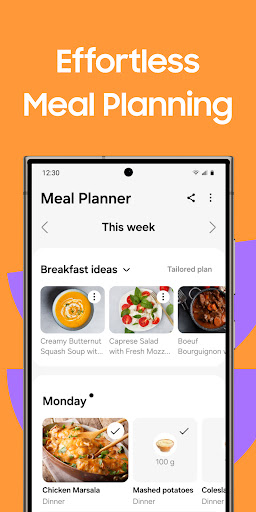
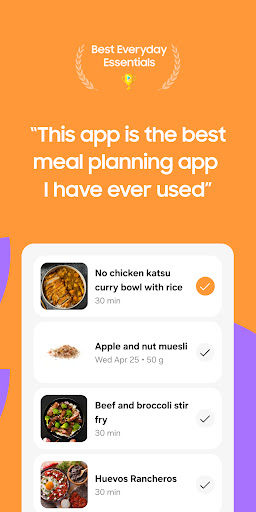

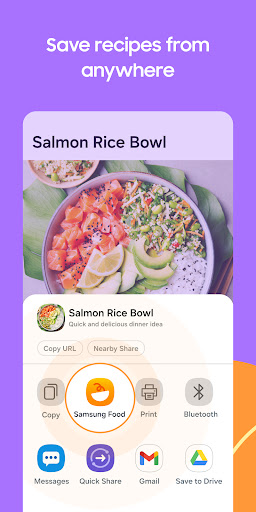
A free, all-in-one app to take you from ‘what’s for dinner’ to ‘food on the table.’ Samsung Food gives you all the food information and features you need to help you make the food, health, and cooking decisions that are right for you. Get recipe inspiration and saving, meal planning, nutritional information, automatic shopping lists, guided cooking, ingredient search, recipe reviews, and food communities in one spot.
It’s food, your way.
Samsung Food features give you a single platform to:
- Save recipes from anywhere: Yes, really, any website. One tap lets you save and organize all your recipes and access them instantly, whether it’s a family secret or a food blog find. No need to take screenshots or copy and paste recipes into notes again.
- Create and share meal plans: Use meal plans to add breakfast, lunch, dinner and snacks for the week. Share them with family or friends so everyone knows what’s on the menu. Simplify your meal planning for the week - save money, save time, and avoid food waste.
- Browse thousands of recipes for inspiration: Can't decide what to cook? Browse our database of over 160 000 recipes, and filter by cuisine, cook time, skill level, and more.
- Automatic grocery lists: Tap to make grocery lists from the recipes you want to cook. Easily add or remove items and organize your list by aisle for speedy shopping. Or create a shared shopping list with everybody in your house.
- Detailed nutritional information: Get detailed nutritional information and calorie counts on every recipe. That includes recipes where you change or substitute ingredients, and recipes you submit yourself. Whether you want to make healthier choices, lose weight, gain muscle, or just know what’s in your food and make informed choices about your diet, accurate nutritional information makes it possible.
- Search for recipes by ingredients: No need for a trip to the store. Find recipes you can cook using the ingredients you already have (or need to use up fast!) in your fridge or pantry. Reduce food waste, make proper use of leftovers, and save money and time by using what you already have on hand.
- Edit recipes for your own needs: Add notes and comments about the things that you want to change so you remember for next time. Substitute ingredients, change quantities, or add notes about the cooking methods. You can also easily and automatically convert from metric to imperial and vice versa. Go ahead and personalize the recipes in your recipe box.
- Get groceries delivered: Convert your automatic shopping list into an online food order with just a couple of taps, and enjoy groceries delivered to your door.
- Smart Cooking: Appliance control means you can use SmartThings to pre-warm ovens and set timers with just a tap.
- Connect with other foodies: search, join, and contribute to communities for foodies of all types. Follow food creators and other home cooks to get inspiration. Share and receive cooking tips and kitchen tricks. Add recipe reviews or comments to help other foodies and support your favorite creators. Improve your cooking and be encouraged by the Samsung Food community.
If you have any questions, please email us at support@samsungfood.com.
Pokaż więcej

1. Pobierz instalator MEmu i zakończ instalację

2. Uruchom MEmu, a następnie otwórz Google Play na pulpicie

3. Wyszukaj Samsung Food: Meal Planning w Google Play
Install
4. Pobierz i zainstaluj Samsung Food: Meal Planning
5. Po zakończeniu instalacji kliknij ikonę, aby rozpocząć

6. Użyj MEmu, aby doświadczyć Samsung Food: Meal Planning na swoim komputerze
MEmu Play to najlepszy emulator Androida, z którego korzysta ponad 100 milionów użytkowników, ciesząc się wyjątkowym doświadczeniem aplikacji na Androida. Technologia wirtualizacji MEmu pozwala na płynne uruchamianie tysięcy aplikacji Androida na komputerze, nawet tych najbardziej wymagających.
Większy ekran z lepszą grafiką; Długi czas, bez ograniczeń baterii lub danych mobilnych.
Pełna obsługa mapowania klawiszy dla precyzyjnego sterowania klawiaturą i myszą lub gamepadem.
Wiele kont gier lub zadań na jednym komputerze jednocześnie z menedżerem wielu instancji.
Use Samsung Food: Meal Planning on PC by following steps: