SnapBridge
Zaktualizowano
Aktualna wersja
2.12.0
Sprzedawca

Przestań martwić się nadmiernymi opłatami podczas korzystania z SnapBridge na telefonie komórkowym, uwolnij się od małego ekranu i ciesz się korzystaniem z aplikacji na znacznie większym wyświetlaczu. Od teraz korzystaj z aplikacji na pełnym ekranie za pomocą klawiatury i myszy. MEmu oferuje wszystkie zaskakujące funkcje, których się spodziewałeś: szybką instalację i łatwą konfigurację, intuicyjne sterowanie, koniec z ograniczeniami baterii, danych mobilnych i niepokojących połączeń. Zupełnie nowy MEmu 9 to najlepszy wybór do używania SnapBridge na twoim komputerze. Zakodowany przez naszą absorpcję, menedżer wielu instancji umożliwia otwarcie 2 lub więcej kont w tym samym czasie. A co najważniejsze, nasz ekskluzywny emulator może uwolnić pełny potencjał twojego komputera, sprawić, że wszystko będzie płynne i przyjemne.
Pokaż więcej
Ciesz się wspaniałym doświadczeniem podczas grania w SnapBridge na komputerze z aplikacją MEMU App Player. Jest to potężny darmowy emulator Androida pozwalający grać w tysiące gier na Androida. High-quality photos taken with Nikon camera can be shared via e-mail or social media just as you would photos taken with your smart device.
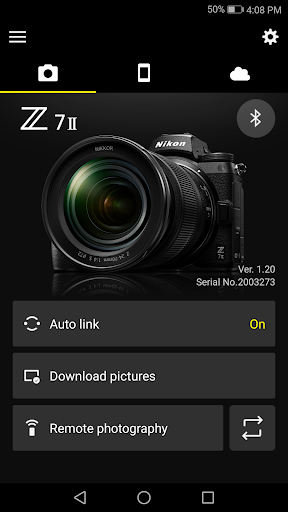
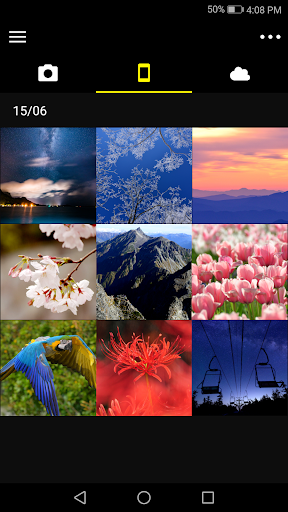
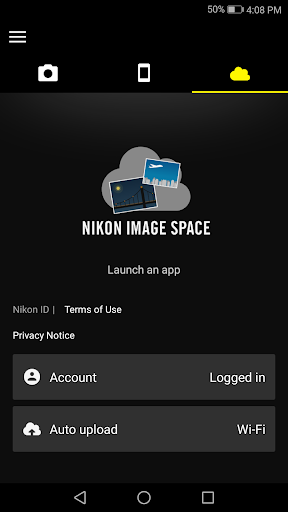
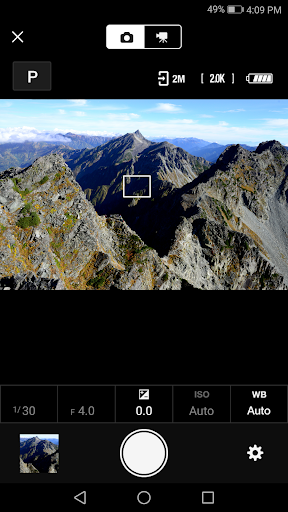
High-quality photos taken with Nikon camera can be shared via e-mail or social media just as you would photos taken with your smart device.
Does the camera offer a WPA2-PSK/WPA3-SAE authentication/encryption option?
The camera may be unable to connect to the smart device if WPA2-PSK/WPA3-SAE is selected for authentication/encryption.
In this event, switch the camera authentication/encryption setting to WPA2-PSK-AES.
See the camera documentation for information on changing Wi-Fi connection settings.
Supported Digital Cameras as of November 2024
Z9, Z8, D6, Z7II, Z6III, Z6II, Z7, Z6, Z5, Zf, Zfc, Z50II, Z50, Z30, D850, D780, D500, D7500, D5600, D3500, D3400, COOLPIX P1000, P950, A1000, A900, A300, B700, B500, B600, W300, W150, W100, KeyMission 80
D750, D7200, D7100, D5500, D5300, D3300, Df, J5, P900, S7000, S3700, AW130
The foregoing may include models not available in some regions.
Be sure to update the camera firmware to the latest version.
Use a computer to download the latest camera firmware from the Nikon Download Center. * According to your camera's model, you can download your camera's firmware via the SnapBridge app.
http://downloadcenter.nikonimglib.com/
Principal Features
- Once the camera is paired with your smart device, new photos can be downloaded automatically.
- Adjust camera settings and take photos.
- View the pictures on and download photos from the camera.
- Use the app to pair the device with up to five cameras.
- Automatically upload pictures taken with the camera to NIKON IMAGE SPACE (Note 1).
- View downloaded photos or share them via e-mail or social media.
- Add photo info or text to uploaded photos.
- Download location data to the camera (Note 2) or set the camera clock to the time reported by the smart device.
- Receive notifications of firmware updates for paired cameras.
System Requirements
Android 11.0 or later, 12, 13, 14, 15
A device with Bluetooth 4.0 or later (i.e., a device that supports Bluetooth Low Energy) is required.
There is no guarantee that this app will run on all Android devices.
Notes
- Note 1: Upload to NIKON IMAGE SPACE requires a Nikon ID.
- Note 2: The GPS function runs continuously in the background, increasing the drain on the battery. The drain on the battery can be reduced by choosing power-saving mode.
- If you are unable to download images or connect via Bluetooth or Wi-Fi after pairing, try one or more of the following solutions:
- Turn the paired camera off and then on again.
- Switch tabs in SnapBridge.
- Exit and relaunch SnapBridge.
- Users can register for a Nikon ID using this app.
- Enable Bluetooth and Wi-Fi when using this app.
- Remote movie recording is not supported on some cameras.
- Movies can be downloaded by switching to Wi-Fi and selecting the files manually. Download is not available with AVI files.
- Enable NFC on the smart device before attempting to launch the app or connect via NFC.
- Remote photography and movie download are available only if the camera has Wi-Fi (some cameras only).
- The app may not perform as expected depending on your environment and network conditions.
- A smart device with a display resolution of WVGA (960 × 540 pixels) or better is required.
- The app cannot be used to view movies. Use a movie-viewing app.
- The app requires a 100 MB or more of free memory on the smart device.
Using the App
For more information, use the app "Help" option.
Pokaż więcej

1. Pobierz instalator MEmu i zakończ instalację

2. Uruchom MEmu, a następnie otwórz Google Play na pulpicie

3. Wyszukaj SnapBridge w Google Play
Install
4. Pobierz i zainstaluj SnapBridge
5. Po zakończeniu instalacji kliknij ikonę, aby rozpocząć

6. Użyj MEmu, aby doświadczyć SnapBridge na swoim komputerze
MEmu Play to najlepszy emulator Androida, z którego korzysta ponad 100 milionów użytkowników, ciesząc się wyjątkowym doświadczeniem aplikacji na Androida. Technologia wirtualizacji MEmu pozwala na płynne uruchamianie tysięcy aplikacji Androida na komputerze, nawet tych najbardziej wymagających.
Większy ekran z lepszą grafiką; Długi czas, bez ograniczeń baterii lub danych mobilnych.
Pełna obsługa mapowania klawiszy dla precyzyjnego sterowania klawiaturą i myszą lub gamepadem.
Wiele kont gier lub zadań na jednym komputerze jednocześnie z menedżerem wielu instancji.
Use SnapBridge on PC by following steps: