
SoftPOS
Zaktualizowano
Aktualna wersja
0.1.20
Sprzedawca

Przestań martwić się nadmiernymi opłatami podczas korzystania z SoftPOS na telefonie komórkowym, uwolnij się od małego ekranu i ciesz się korzystaniem z aplikacji na znacznie większym wyświetlaczu. Od teraz korzystaj z aplikacji na pełnym ekranie za pomocą klawiatury i myszy. MEmu oferuje wszystkie zaskakujące funkcje, których się spodziewałeś: szybką instalację i łatwą konfigurację, intuicyjne sterowanie, koniec z ograniczeniami baterii, danych mobilnych i niepokojących połączeń. Zupełnie nowy MEmu 9 to najlepszy wybór do używania SoftPOS na twoim komputerze. Zakodowany przez naszą absorpcję, menedżer wielu instancji umożliwia otwarcie 2 lub więcej kont w tym samym czasie. A co najważniejsze, nasz ekskluzywny emulator może uwolnić pełny potencjał twojego komputera, sprawić, że wszystko będzie płynne i przyjemne.
Pokaż więcej
Ciesz się wspaniałym doświadczeniem podczas grania w SoftPOS na komputerze z aplikacją MEMU App Player. Jest to potężny darmowy emulator Androida Umożliwia korzystanie z tysięcy aplikacji Androida. Payment platform JoinPAY proudly presents SoftPOS—an application that helps accommodate a fully-blown online cash register inside a regular smartphone, thus being a perfect payment solution for the self-employed and SMBs.
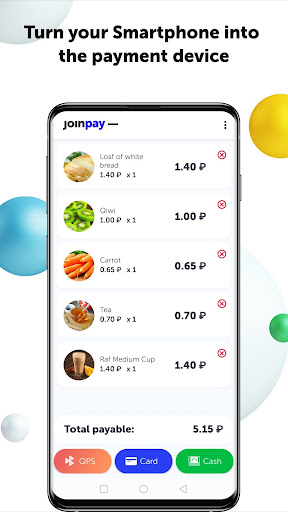
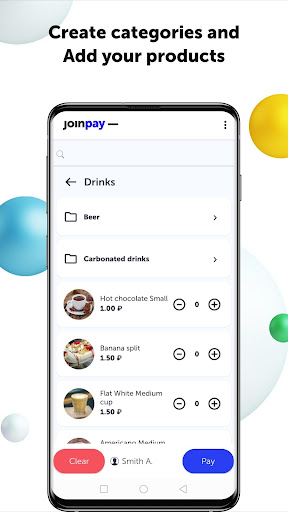
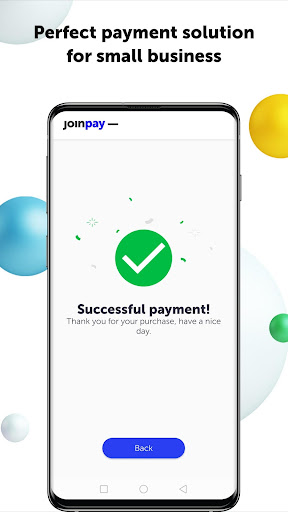
Payment platform JoinPAY proudly presents SoftPOS—an application that helps accommodate a fully-blown online cash register inside a regular smartphone, thus being a perfect payment solution for the self-employed and SMBs. Forget paying for high-end equipment! Just use your smartphone to accept payments from your customers. The solution is exquisitely handy and totally secure, as every bit of payment information is transmitted over a flawlessly protected channel.
No costly equipment. All you need to accept payments is an NFC-enabled smartphone with Android 7 or higher onboard.
All types of payments are here, in your smartphone!
Accept bank cards, wearables (e.g. smartphones, watches, and wristbands supporting Apple Pay, Google Pay, Samsung Pay, or Mir Pay), cash, and even QR code (Fast Payment System).
Manage products.
SoftPOS from JoinPAY is the Russian market’s first solution that incorporates online cash register functionality into a smartphone. Create product categories, add products to the catalog, set prices and discounts.
Loyalty programs.
Enhance profitability of your business by contriving friendly customer loyalty programs. Enjoying discounts and bonuses, one-time customers turn into regular ones—thus making your earnings soar, advocating your brand, and driving new clients.
Personal account.
You will get access to a free JoinPAY account. There, you can manage products, create loyalty programs, view integrated sales statistics for every point of sale, employee, or even product. Govern all your points of sale with the JoinPAY cloud account.
Security is key.
Rest assured, all payment data are protected. Upon payment, all data transferred are encrypted; moreover, they are never stored on your smartphone. SoftPOS from JoinPAY can be confidently called a reliable and secure service.
Just 2 days to kickstart using SoftPOS
1. Fill out a request at join-pay.com/payment-solutions/softpos
2. We will help you conclude an agreement with the bank
3. Here you go! You are ready to accept payments with SoftPOS
Pokaż więcej

1. Pobierz instalator MEmu i zakończ instalację

2. Uruchom MEmu, a następnie otwórz Google Play na pulpicie

3. Wyszukaj SoftPOS w Google Play
Install
4. Pobierz i zainstaluj SoftPOS
5. Po zakończeniu instalacji kliknij ikonę, aby rozpocząć

6. Użyj MEmu, aby doświadczyć SoftPOS na swoim komputerze
MEmu Play to najlepszy emulator Androida, z którego korzysta ponad 100 milionów użytkowników, ciesząc się wyjątkowym doświadczeniem aplikacji na Androida. Technologia wirtualizacji MEmu pozwala na płynne uruchamianie tysięcy aplikacji Androida na komputerze, nawet tych najbardziej wymagających.
Większy ekran z lepszą grafiką; Długi czas, bez ograniczeń baterii lub danych mobilnych.
Pełna obsługa mapowania klawiszy dla precyzyjnego sterowania klawiaturą i myszą lub gamepadem.
Wiele kont gier lub zadań na jednym komputerze jednocześnie z menedżerem wielu instancji.
Use SoftPOS on PC by following steps: