Swoo: digital wallet
Zaktualizowano
Aktualna wersja
2.63.3
Sprzedawca

Przestań martwić się nadmiernymi opłatami podczas korzystania z Swoo: digital wallet na telefonie komórkowym, uwolnij się od małego ekranu i ciesz się korzystaniem z aplikacji na znacznie większym wyświetlaczu. Od teraz korzystaj z aplikacji na pełnym ekranie za pomocą klawiatury i myszy. MEmu oferuje wszystkie zaskakujące funkcje, których się spodziewałeś: szybką instalację i łatwą konfigurację, intuicyjne sterowanie, koniec z ograniczeniami baterii, danych mobilnych i niepokojących połączeń. Zupełnie nowy MEmu 9 to najlepszy wybór do używania Swoo: digital wallet na twoim komputerze. Zakodowany przez naszą absorpcję, menedżer wielu instancji umożliwia otwarcie 2 lub więcej kont w tym samym czasie. A co najważniejsze, nasz ekskluzywny emulator może uwolnić pełny potencjał twojego komputera, sprawić, że wszystko będzie płynne i przyjemne.
Pokaż więcej
Ciesz się wspaniałym doświadczeniem podczas grania w Swoo: digital wallet na komputerze z aplikacją MEMU App Player. Jest to potężny darmowy emulator Androida pozwalający grać w tysiące gier na Androida. Swoosh!
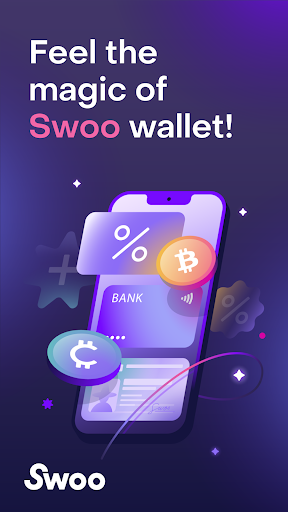
Swoosh! Meet the digital wallet where you can earn. Why just get an SMS when you can get paid for the same messages via Swoo? Get paid to stay connected with your favorite brands. Download the Swoo app now and opt-in to receive messages from brands. For every message you receive, you earn money — up to $10 per month.
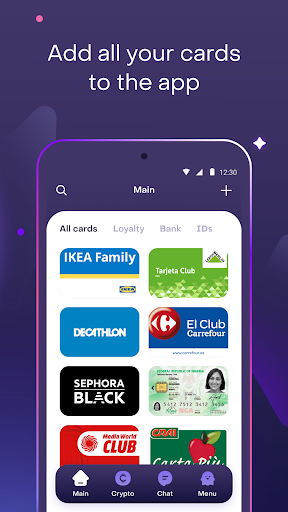
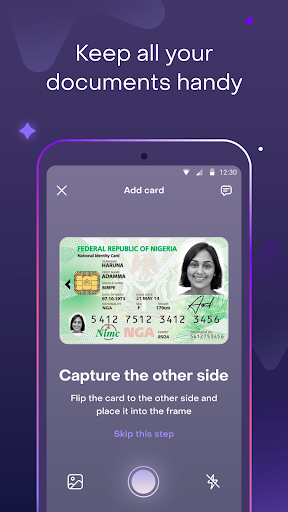
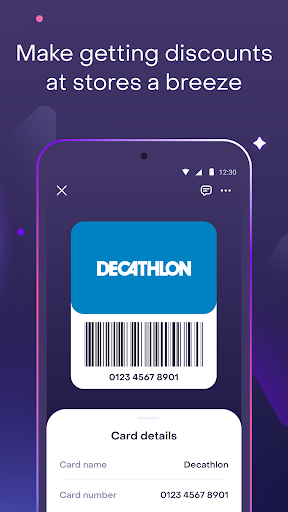
Say goodbye to the hassle of carrying around important documents and cards. Organize all essential documents, loyalty cards and bank cards by adding them to Swoo. No more searching through your wallet or home for the card you need. Never lose important documents or cards again. Plus, securely store your bank card for easy access when you need its details for online shopping. With built-in encryption you can rest assured that everything you have in Swoo is safe.
HERE ARE A FEW MORE BENEFITS OF SWOO MAGIC
• Start earning with messages from brands
You can now allow brands you love to send you messages directly through the Swoo app, and earn money for each message you receive. Whether it's a promotional message, a promo code, or a useful message with a confirmation code, you can earn up to $10 per month. It's a great way to stay connected with your favorite brands while earning some extra cash.
• Store essential documents in the app
Add an ID, driver's license, or business cards to the Swoo app and use the card details for any situation. Swoo's wallet feature is also great for storing other cards such as health insurance, library cards, and more. You can easily access and view your stored cards at anytime. Plus, you can be sure that your information is safe and secure with Swoo's encryption technology.
• Have all your cards at hand
Unlike a regular wallet, Swoo lets you add an unlimited number of cards, whether there are 5, 25, or even 100 of them! Forgetting cards at home is a thing of the past. You'll always have them with you on your smartphone. Even if you lose a plastic card, you won't miss out on your discount because your card will be safe in Swoo.
• Simply add discount and loyalty cards
It's as easy as taking a selfie. Just take a picture of the both sides of a card, and our smart algorithms will do the rest. You can add to Swoo cards from any retailer.
• Share your loyalty cards with friends and family
You can share discounts with your sister, friend, or co-worker. And even with the person in front of you in the checkout line. You can send a loyalty or discount card via any messenger you want.
• Rest assured everything is secure
All things secure as it’s the top priority. Swoo has been designed with robust security measures to protect user data. All data is encrypted and stored securely, ensuring that users can trust the app with their information. Additionally, Swoo is certified for compliance with the latest international security standards by PCI DSS and Mastercard for exchanges of payment data.
Feel that Swoo magic
The magic of modern technology.
If you have questions or suggestions on how to improve the app, contact us at support@swooapp.com
And follow Swoo on social media:
Instagram @swoo_app
Facebook @swooapp
TikTok @swoo_app
Twitter @swoo_app
Welcome to Swoo! Digital wallet that makes it easy to earn money and store docs and cards. All in one place!
Pokaż więcej

1. Pobierz instalator MEmu i zakończ instalację

2. Uruchom MEmu, a następnie otwórz Google Play na pulpicie

3. Wyszukaj Swoo: digital wallet w Google Play
Install
4. Pobierz i zainstaluj Swoo: digital wallet
5. Po zakończeniu instalacji kliknij ikonę, aby rozpocząć

6. Użyj MEmu, aby doświadczyć Swoo: digital wallet na swoim komputerze
MEmu Play to najlepszy emulator Androida, z którego korzysta ponad 100 milionów użytkowników, ciesząc się wyjątkowym doświadczeniem aplikacji na Androida. Technologia wirtualizacji MEmu pozwala na płynne uruchamianie tysięcy aplikacji Androida na komputerze, nawet tych najbardziej wymagających.
Większy ekran z lepszą grafiką; Długi czas, bez ograniczeń baterii lub danych mobilnych.
Pełna obsługa mapowania klawiszy dla precyzyjnego sterowania klawiaturą i myszą lub gamepadem.
Wiele kont gier lub zadań na jednym komputerze jednocześnie z menedżerem wielu instancji.
Use Swoo: digital wallet on PC by following steps: