WavePay APP by Wave Money
Zaktualizowano
Aktualna wersja
2.3.1
Sprzedawca

Przestań martwić się nadmiernymi opłatami podczas korzystania z WavePay APP by Wave Money na telefonie komórkowym, uwolnij się od małego ekranu i ciesz się korzystaniem z aplikacji na znacznie większym wyświetlaczu. Od teraz korzystaj z aplikacji na pełnym ekranie za pomocą klawiatury i myszy. MEmu oferuje wszystkie zaskakujące funkcje, których się spodziewałeś: szybką instalację i łatwą konfigurację, intuicyjne sterowanie, koniec z ograniczeniami baterii, danych mobilnych i niepokojących połączeń. Zupełnie nowy MEmu 9 to najlepszy wybór do używania WavePay APP by Wave Money na twoim komputerze. Zakodowany przez naszą absorpcję, menedżer wielu instancji umożliwia otwarcie 2 lub więcej kont w tym samym czasie. A co najważniejsze, nasz ekskluzywny emulator może uwolnić pełny potencjał twojego komputera, sprawić, że wszystko będzie płynne i przyjemne.
Pokaż więcej
Ciesz się wspaniałym doświadczeniem podczas grania w WavePay APP by Wave Money na komputerze z aplikacją MEMU App Player. Jest to potężny darmowy emulator Androida pozwalający grać w tysiące gier na Androida. Fast, Easy and Safe Online payments - Myanmar's Leading Mobile Financial Service.
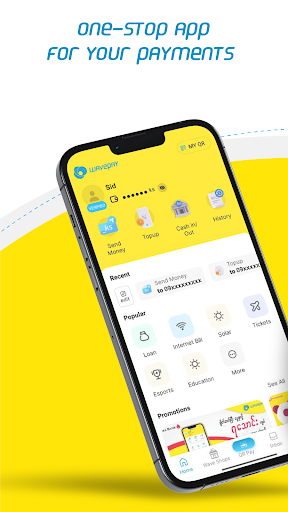
Fast, Easy and Safe Online payments - Myanmar's Leading Mobile Financial Service
WavePay, Mobile wallet application by WaveMoney enabling the inclusion of all users into the digital payment ecosystem, riding on the largest network of ~60,000 agents and 200,000+ merchants. WavePay is one stop solution for all your payment needs:
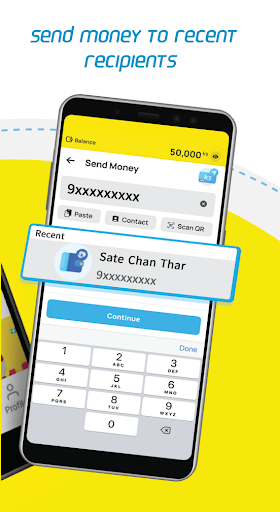
• Send money to your family and friends using mobile number, including to those who are not on WavePay APP
• Scan QR code and make instant payments at grocery stores, medical shops, electronic shops, restaurants etc.
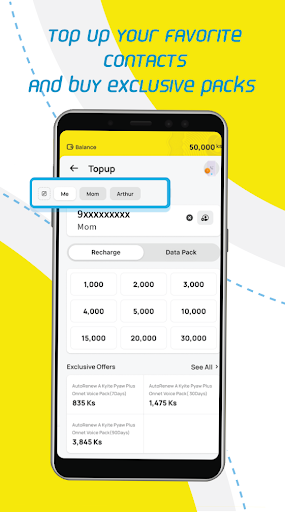
• Top up or buy packs for your or your family and friends mobile.
• Pay your bills easily – Internet, Solar, Insurance, MFI loans etc.
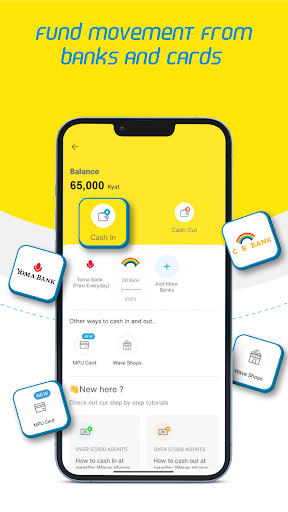
• Link your bank or MPU cards and easily transfer funds in and out of the wallet easily.
Safe and Secure payments
• Protected with “One Wallet, One Device” (1W1D) feature that enables access of your account from only 1 device at any point of time, keeping your WavePay account safe & secure.
• Set your PIN, which is a 4-digit number, it’s mandatory to set the PIN while creating your account and authorize all transactions using your PIN
• Additional security of 6-digit secret code for money transfer to people who are not on WavePay app. Money can be easily collected at the nearest WaveMoney agent shop by providing transaction ID and 6-digit secret code
Easy Cash-in and Cash-out services
• Easily Cash-in or Cash-out at your near Wave agent shops; more than 60,000 agents across the country are at your service all the time
• Link your bank accounts from our partner banks or any e-commerce enabled MPU cards for easily moving funds in and out of the wallet
Easy Airtime top up and bill payments.
• Top up or buy packs for your mobile and always stay connected with your loved ones. You can top up to any operator mobile number – ATOM, MPT, Ooredoo
• Make your internet bill payments across 30+ providers including ATOM, Ooredoo, Myanmar Net, 5BB, Fortune, Mahar Net, WeLink, Myanmar APN etc.
• Make your loan repayments across 40+ partners including – Aeon, Rent2Own, Early Dawn, Yoma Bank, Mahar Bawga,, Advans, Alliance, VisionFund etc.
• Make your Insurance payments of Prudential, Manulife, Capital Taiyo, Young Insurance, KBZ MS General Insurance etc
• Make your Solar bill payments of OV Solar, Solar Home, Sun King Solar
• Make your healthcare and telehealth service payments of PunHlaing Hospitals, MyanCare, myDoctor, Health4U, T-Fitness etc.
Fast and reliable payments at Online stores
• Make your online shopping payments at Shop.com.mm, OwayFresh and many other trusted partners instantly using WavePay and avoid worries about cash on delivery.
• Order your favorite food or groceries on FoodPanda and pay using WavePay app
Book Hotels & Tickets for Bus, Flights
• Domestic or international; One-way or Round trip – Book your flight tickets on FlyMya, AirKBZ etc and make payments with your WavePay wallet.
• Book online bus tickets - MMBus Ticket, Oway, AungSan, AungMinGalar, Mandalay Gate. Check seat availability & get real-time updates.
• Book hotels before you travel – Memories Hotel, Memories Travel, Balloons Over Myanmar, etc.
• Make hassle free payments for your groceries, medicines, electronics, clothing purchases by scanning Wave QR at 200,000+ merchants.
Contact Us
• WaveMoney Call Centre is available every day 8AM-10PM to provide any assistance. Call 900 from ATOM Numbers (free) or 097900090000 for other operator numbers
To become a business partner, agent? E-mail us at business@wavemoney.com.mm or call our call-center
Pokaż więcej

1. Pobierz instalator MEmu i zakończ instalację

2. Uruchom MEmu, a następnie otwórz Google Play na pulpicie

3. Wyszukaj WavePay APP by Wave Money w Google Play
Install
4. Pobierz i zainstaluj WavePay APP by Wave Money
5. Po zakończeniu instalacji kliknij ikonę, aby rozpocząć

6. Użyj MEmu, aby doświadczyć WavePay APP by Wave Money na swoim komputerze
MEmu Play to najlepszy emulator Androida, z którego korzysta ponad 100 milionów użytkowników, ciesząc się wyjątkowym doświadczeniem aplikacji na Androida. Technologia wirtualizacji MEmu pozwala na płynne uruchamianie tysięcy aplikacji Androida na komputerze, nawet tych najbardziej wymagających.
Większy ekran z lepszą grafiką; Długi czas, bez ograniczeń baterii lub danych mobilnych.
Pełna obsługa mapowania klawiszy dla precyzyjnego sterowania klawiaturą i myszą lub gamepadem.
Wiele kont gier lub zadań na jednym komputerze jednocześnie z menedżerem wielu instancji.
Use WavePay APP by Wave Money on PC by following steps: