
Wedding Planner: Easy Weddings
Zaktualizowano
Aktualna wersja
3.20.3
Sprzedawca

Przestań martwić się nadmiernymi opłatami podczas korzystania z Wedding Planner: Easy Weddings na telefonie komórkowym, uwolnij się od małego ekranu i ciesz się korzystaniem z aplikacji na znacznie większym wyświetlaczu. Od teraz korzystaj z aplikacji na pełnym ekranie za pomocą klawiatury i myszy. MEmu oferuje wszystkie zaskakujące funkcje, których się spodziewałeś: szybką instalację i łatwą konfigurację, intuicyjne sterowanie, koniec z ograniczeniami baterii, danych mobilnych i niepokojących połączeń. Zupełnie nowy MEmu 9 to najlepszy wybór do używania Wedding Planner: Easy Weddings na twoim komputerze. Zakodowany przez naszą absorpcję, menedżer wielu instancji umożliwia otwarcie 2 lub więcej kont w tym samym czasie. A co najważniejsze, nasz ekskluzywny emulator może uwolnić pełny potencjał twojego komputera, sprawić, że wszystko będzie płynne i przyjemne.
Pokaż więcej
Ciesz się wspaniałym doświadczeniem podczas grania w Wedding Planner: Easy Weddings na komputerze z aplikacją MEMU App Player. Jest to potężny darmowy emulator Androida pozwalający grać w tysiące gier na Androida. Planning a wedding?

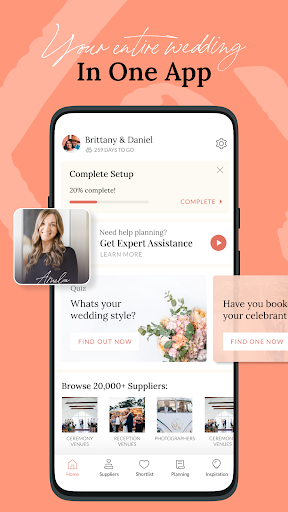
Planning a wedding? Our all-in-one wedding planner app is here to ease the stress and keep you organised. With intuitive wedding planning tools and Australia's biggest wedding supplier directory at your fingertips, you're in control every step of the way. Trusted by 80% of Australian couples, Easy Weddings is your ultimate wedding planning companion. Download the app today and take charge of your wedding planning experience!
Features:
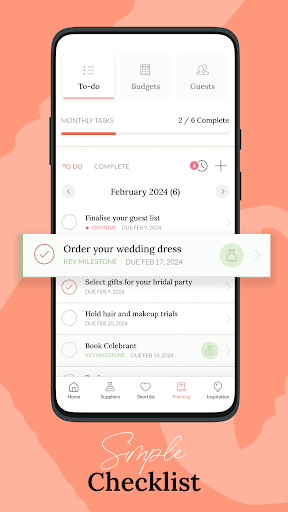
1. WEDDING TO-DO LIST
Mark off wedding tasks and stay organised.
You’ll know exactly what you need to do and when to do it, with our pre-populated wedding checklist. Tick off tasks as you go, add new tasks and remove any you don’t need.
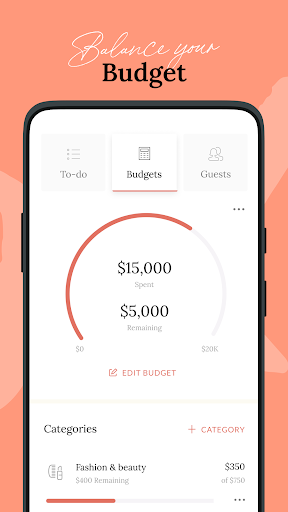
2. BUDGET CALCULATOR
Set a budget and stick to it.
Input what you’d like to spend on your wedding overall, then track the budget versus actual costs for each item. Ensure you don’t spend what you don’t want to.
3. WEDDING GUEST LIST
Manage your wedding RSVPs.
Add your guests, sort them into family and friendship groups and mark off RSVPs to your various wedding events. E.g. ceremony, reception, hen’s night.
4. WEDDING MILESTONES
Be motivated by your progress.
When you've accomplished big planning milestones like booking a venue or setting a budget, you’ll be rewarded with fun achievement badges to keep you excited and motivated.
5. WEDDING SUPPLIER DIRECTORY
Find top rated suppliers near you.
Browse and connect with over 4,000 trusted suppliers—from venues to florists—and manage your favourites with our simple Shortlist feature.
6. VERIFIED REVIEWS
Choose suppliers with confidence.
Read verified reviews from real couples and select a vendor dream team you can trust. Our detailed reviews and star ratings from previous customers will help you book only the best and most reliable suppliers for your big day.
7. PERSONALISED VENDOR SUGGESTIONS
Get expert advice from a supplier specialist.
Get personalised help from our in-house wedding experts who can recommend suppliers matched to your budget and vision. Save time, money and stress!
8. WEDDING STYLE QUIZ
Discover your wedding theme.
Not sure if your wedding style is boho, rustic or luxury? Our fun quiz tests your tastes on the visual elements of a wedding, which also helps your suppliers understand your vision.
9. REAL WEDDINGS GALLERY
Get inspired by real couples.
Explore thousands of real wedding photos to find what speaks to you and your partner. See something you like? Pin it to your handy built-in Inspiration Board.
10. WEDDING COUNTDOWN WIDGETS
Your wedding plans and countdown at a glance.
Build the excitement and be reminded of important wedding tasks without having to open the app. Available in three sizes, our home screen countdown widgets are convenient and fun.
11. SYNCS YOUR ACCOUNT
Plan from any device.
Everything you do on the app syncs to your EasyWeddings.com.au account for seamless switching between devices. Available on desktop, iPhone and iPad.
AND NO ADS!
Ready to make planning your wedding easy and fun? Download the Easy Weddings Wedding Planner now and see why we are the easy choice for thousands of couples planning their weddings every day.
For help or to be featured in our Real Weddings gallery, please contact service@easyweddings.com.au.
Pokaż więcej

1. Pobierz instalator MEmu i zakończ instalację

2. Uruchom MEmu, a następnie otwórz Google Play na pulpicie

3. Wyszukaj Wedding Planner: Easy Weddings w Google Play
Install
4. Pobierz i zainstaluj Wedding Planner: Easy Weddings
5. Po zakończeniu instalacji kliknij ikonę, aby rozpocząć

6. Użyj MEmu, aby doświadczyć Wedding Planner: Easy Weddings na swoim komputerze
MEmu Play to najlepszy emulator Androida, z którego korzysta ponad 100 milionów użytkowników, ciesząc się wyjątkowym doświadczeniem aplikacji na Androida. Technologia wirtualizacji MEmu pozwala na płynne uruchamianie tysięcy aplikacji Androida na komputerze, nawet tych najbardziej wymagających.
Większy ekran z lepszą grafiką; Długi czas, bez ograniczeń baterii lub danych mobilnych.
Pełna obsługa mapowania klawiszy dla precyzyjnego sterowania klawiaturą i myszą lub gamepadem.
Wiele kont gier lub zadań na jednym komputerze jednocześnie z menedżerem wielu instancji.
Use Wedding Planner: Easy Weddings on PC by following steps: