Autobuy
Обновлено
Текущая версия
1.0.30
Продавец

Перестаньте беспокоиться о быстром разряде батареи при использовании Autobuy на вашем телефоне. Освободитесь от крошечного экрана и наслаждайтесь приложением на гораздо большем экране. Теперь вы можете работать с приложением в полноэкранном режиме с удобством клавиатуры и мыши. MEmu предлагает вам все ожидаемые удивительные функции: быструю установку и простую настройку, интуитивно понятное управление и больше никаких забот о времени автономной работы, мобильном трафике или неожиданных звонках. Совершенно новый MEmu 9 — идеальный выбор для использования Autobuy на вашем компьютере. С помощью менеджера нескольких экземпляров MEmu вы можете одновременно использовать два или более аккаунтов. И самое главное, наш эксклюзивный движок эмуляции раскрывает весь потенциал вашего ПК, обеспечивая плавную и приятную работу.
Показать больше
Наслаждайтесь превосходным опытом использования Autobuy на ПК с MEmu Play. Это мощный бесплатный эмулятор Android, который предлагает тысячи приложений для настольных компьютеров. Наслаждайтесь общением с друзьями и совершенствуйте свою работу ещё эффективнее! Autobuy LLC is a cutting-edge car transportation and auction helper app designed specifically for automotive enthusiasts, dealerships, and individuals involved in the automobile industry.
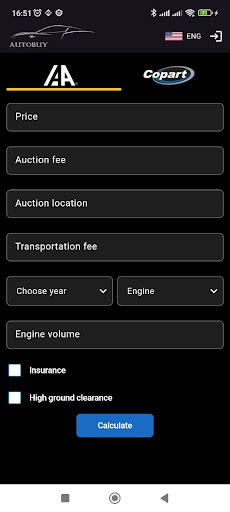
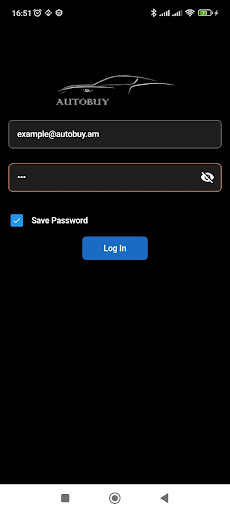
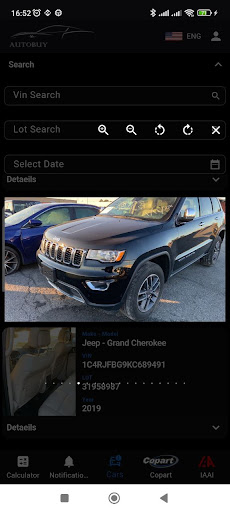
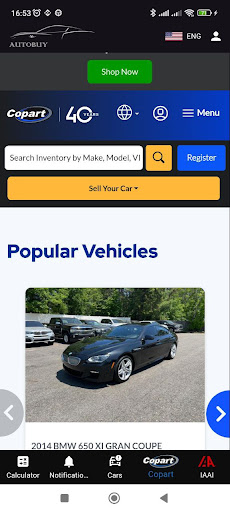
Autobuy LLC is a cutting-edge car transportation and auction helper app designed specifically for automotive enthusiasts, dealerships, and individuals involved in the automobile industry. With a strong focus on streamlining the vehicle acquisition process, Autobuy LLC serves as an indispensable tool for navigating the world of car auctions.
Key Features:
Auction Assistance: Autobuy LLC integrates with leading auction platforms like Copart and IAAI, providing users with comprehensive auction assistance. Stay informed about upcoming auctions, view detailed vehicle listings, and access essential auction data such as bid history, vehicle condition reports, and more.
Intelligent Search: Discover the perfect vehicle for your needs with Autobuy LLC's intelligent search functionality. Effortlessly filter through vast inventories by make, model, year, mileage, and other key parameters. Save searches and receive notifications when new vehicles matching your criteria become available.
Real-time Bidding: Seamlessly participate in auctions directly from the app. Enjoy real-time bidding functionality, enabling you to make informed decisions and place bids instantly. Autobuy LLC keeps you updated on the progress of your bids, ensuring you never miss an opportunity.
Vehicle Transportation: Simplify the logistics of acquiring and delivering vehicles with Autobuy LLC's efficient transportation services. Request hassle-free vehicle shipping and transportation quotes within the app, allowing you to coordinate transportation seamlessly.
Vehicle History Reports: Access comprehensive vehicle history reports for added peace of mind. Autobuy LLC partners with reputable providers to offer detailed vehicle background information, including accident history, title records, maintenance records, and more.
Personalized Watchlist: Create a personalized watchlist of vehicles you are interested in, enabling you to closely monitor their auction status and bidding activity. Receive instant notifications about changes in the auction status, bid updates, and other relevant information.
User-friendly Interface: Autobuy LLC boasts a sleek and intuitive user interface, making it easy for users to navigate through the app's features and functionalities. Enjoy a smooth and efficient experience while exploring auctions and managing your vehicle acquisitions.
Download Autobuy LLC today and gain a competitive edge in the car transportation and auction industry. Discover an array of powerful features designed to simplify the vehicle acquisition process, enhance bidding strategies, and streamline vehicle transportation logistics.
Показать больше

1. Скачать инсталлятор MEmu и завершайте установку

2. Запускайте MEmu, затем откройте Google Play на главной странице

3. Ищите Autobuy в Google Play
Install
4. Скачайте и установите Autobuy
5. При завершении установки, нажмите на значок для старта

6. Наслаждайтесь Autobuy на своем компьютере с помощью MEmu.
MEmu Play — лучший бесплатный эмулятор Android, превосходный опыт работы с которым оценили 50 миллионов пользователей. Технология виртуализации MEmu позволяет без проблем запускать тысячи Android-приложений на вашем компьютере, даже самые требовательные.
Большой экран с лучшей графикой; Большая продолжительность, без ограничения батареи или мобильных данных.
Полная поддержка установки клавиш для точного управления клавиатурой и мышью или геймпадом.
Несколько игровых учетных записей или задач на одном компьютере одновременно с менеджером нескольких экземпляров.
Use Autobuy on PC by following steps: