JumpJumpVPN- Fast & Secure VPN
Обновлено
Текущая версия
2.9.5
Продавец

Перестаньте беспокоиться о быстром разряде батареи при использовании JumpJumpVPN- Fast & Secure VPN на вашем телефоне. Освободитесь от крошечного экрана и наслаждайтесь приложением на гораздо большем экране. Теперь вы можете работать с приложением в полноэкранном режиме с удобством клавиатуры и мыши. MEmu предлагает вам все ожидаемые удивительные функции: быструю установку и простую настройку, интуитивно понятное управление и больше никаких забот о времени автономной работы, мобильном трафике или неожиданных звонках. Совершенно новый MEmu 9 — идеальный выбор для использования JumpJumpVPN- Fast & Secure VPN на вашем компьютере. С помощью менеджера нескольких экземпляров MEmu вы можете одновременно использовать два или более аккаунтов. И самое главное, наш эксклюзивный движок эмуляции раскрывает весь потенциал вашего ПК, обеспечивая плавную и приятную работу.
Показать больше
Скачайте JumpJumpVPN- Fast & Secure VPN на ПК с помощью Андроид эмулятора MEmu. Наслаждайтесь на большом экране. JumpJumpVPN - Быстрый и стабильный VPN-прокси.


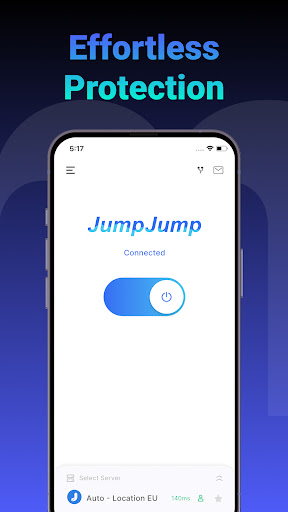
JumpJumpVPN - Быстрый и стабильный VPN-прокси
JumpJumpVPN помогает вам наслаждаться стабильным и плавным интернет-соединением в любом месте.
С простым дизайном и удобным управлением просто нажмите «Подключиться», чтобы получить доступ к нашей глобальной сети серверов для быстрой и стабильной работы.
Почему выбирают JumpJumpVPN?
JumpJumpVPN предлагает простой и удобный интерфейс, стабильное качество соединения и гибкий выбор серверов.
Основные функции:
• Бесплатное использование: Подключайтесь к бесплатным глобальным серверам без ограничений по трафику.
• Высокоскоростная сеть: Оптимизированная маршрутизация обеспечивает быстрое и стабильное подключение.
• Надежная производительность: Поддерживайте стабильное соединение в любое время.
• Простота использования: Одно нажатие для подключения, без сложных настроек.
Автопродление:
• Оплата взимается с вашего аккаунта Google после подтверждения покупки.
• Подписка продлевается автоматически, если не отменена не менее чем за 24 часа до конца расчетного периода.
• Управляйте подпиской или отменяйте её в настройках аккаунта Google Play.
• Неиспользованная часть бесплатного пробного периода аннулируется после покупки.
Юридическая информация:
• Условия обслуживания: https://jumpjump.io/#/termsofservice/index
• Политика конфиденциальности: https://jumpjump.io/#/privacyterms/index
Свяжитесь с нами:
support@jumpjump.io
Показать больше

1. Скачать инсталлятор MEmu и завершайте установку

2. Запускайте MEmu, затем откройте Google Play на главной странице

3. Ищите JumpJumpVPN- Fast & Secure VPN в Google Play
Install
4. Скачайте и установите JumpJumpVPN- Fast & Secure VPN
5. При завершении установки, нажмите на значок для старта

6. Наслаждайтесь JumpJumpVPN- Fast & Secure VPN на своем компьютере с помощью MEmu.
MEmu Play — лучший бесплатный эмулятор Android, превосходный опыт работы с которым оценили 50 миллионов пользователей. Технология виртуализации MEmu позволяет без проблем запускать тысячи Android-приложений на вашем компьютере, даже самые требовательные.
Большой экран с лучшей графикой; Большая продолжительность, без ограничения батареи или мобильных данных.
Полная поддержка установки клавиш для точного управления клавиатурой и мышью или геймпадом.
Несколько игровых учетных записей или задач на одном компьютере одновременно с менеджером нескольких экземпляров.
Use JumpJumpVPN- Fast & Secure VPN on PC by following steps: