BOOYAH!
Обновлено
Текущая версия
1.54.11
Продавец

Перестаньте беспокоиться о быстром разряде батареи при использовании BOOYAH! на вашем телефоне. Освободитесь от крошечного экрана и наслаждайтесь приложением на гораздо большем экране. Теперь вы можете работать с приложением в полноэкранном режиме с удобством клавиатуры и мыши. MEmu предлагает вам все ожидаемые удивительные функции: быструю установку и простую настройку, интуитивно понятное управление и больше никаких забот о времени автономной работы, мобильном трафике или неожиданных звонках. Совершенно новый MEmu 9 — идеальный выбор для использования BOOYAH! на вашем компьютере. С помощью менеджера нескольких экземпляров MEmu вы можете одновременно использовать два или более аккаунтов. И самое главное, наш эксклюзивный движок эмуляции раскрывает весь потенциал вашего ПК, обеспечивая плавную и приятную работу.
Показать больше
Скачайте BOOYAH! на ПК с помощью Андроид эмулятора MEmu. Наслаждайтесь на большом экране. BOOYAH!


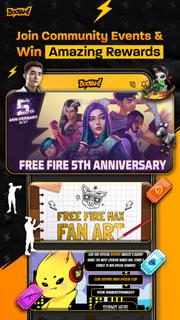
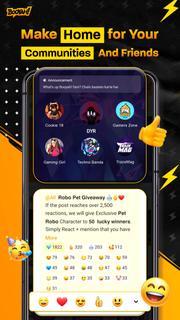
BOOYAH! is the go-to community app that empowers you to connect with friends and communities via group chats, voice calls, fun events, short videos, and live streams. Whether you are a gamer, a comic lover, a music fan, or a learner, you can find your communities here. Chat and talk smoothly with friends having the same interests and passions through text, voice, image, and video. Participate in exciting gaming events, enjoy trending short videos, and watch favourite game live streams. Experience the games you love with friends like never before! Explore community clubs by interestIf you are a gamer, you can learn gaming tips, team up a gaming squad with other players, or gain the latest game updates in the gaming clubs. If you like watching movies, you can find more high-quality movie recommendations or talk about a popular film in a movie club. Explore more interest-based clubs and chat with the communities. Also, you can feature your favourite clubs on the top of your joined club list to hang out with friends with just one click!Create your own clubs with helpful tools Working on a school project? Create a study club and invite only school project members to talk about homework together. Playing games with a few close friends? Set up a private gaming group chat to discuss game strategies while playing. Create your own club and manage its invitations, roles, chat rooms, and permissions with helpful and reliable tools. Besides, you can find out how many friends have reacted to your messages and how engaging your content is with just one glance at the community activities section.Stay connected through text group chats & voice group chatsChat freely with friends through text, pictures, memes etc., in text rooms. Join topic-based group chats to learn gaming tricks, chat with your favourite streamers, or talk about music, study, vacation, fanarts etc. Express your attitude towards a topic or statement by sending emoji reactions to messages. Jump into voice rooms to talk about your interests, meet new friends, or just listen to chill music. See who has joined the voice room, chat and talk about anything you like with new friends.Short video clipsSwipe down to watch the endless stream of short game videos shared by creators and players from the community. Like, comment, and share the videos with your friends through social media channels. We offer tools to capture your epic gaming moments and make it easy for you to create your own short videos. You can upload the short game videos to engage with viewers from all over the world! Game LivestreamYou can restream your favourite games to major streaming platforms (Facebook, YouTube) and chat with your viewers and friends from all platforms simultaneously, without any fee or membership! Be a part of the BOOYAH! community. Gain more fantastic gaming experiences through text chats, voice chats, short videos, and live streams. We have it all here for you! Login to hang out with gaming communities you love now!
Показать больше

1. Скачать инсталлятор MEmu и завершайте установку

2. Запускайте MEmu, затем откройте Google Play на главной странице

3. Ищите BOOYAH! в Google Play
Install
4. Скачайте и установите BOOYAH!
5. При завершении установки, нажмите на значок для старта

6. Наслаждайтесь BOOYAH! на своем компьютере с помощью MEmu.
MEmu Play — лучший бесплатный эмулятор Android, превосходный опыт работы с которым оценили 50 миллионов пользователей. Технология виртуализации MEmu позволяет без проблем запускать тысячи Android-приложений на вашем компьютере, даже самые требовательные.
Большой экран с лучшей графикой; Большая продолжительность, без ограничения батареи или мобильных данных.
Полная поддержка установки клавиш для точного управления клавиатурой и мышью или геймпадом.
Несколько игровых учетных записей или задач на одном компьютере одновременно с менеджером нескольких экземпляров.
Use BOOYAH! on PC by following steps: