Child Growth Tracker
Обновлено
Текущая версия
A.2024.08.15
Продавец

Перестаньте беспокоиться о быстром разряде батареи при использовании Child Growth Tracker на вашем телефоне. Освободитесь от крошечного экрана и наслаждайтесь приложением на гораздо большем экране. Теперь вы можете работать с приложением в полноэкранном режиме с удобством клавиатуры и мыши. MEmu предлагает вам все ожидаемые удивительные функции: быструю установку и простую настройку, интуитивно понятное управление и больше никаких забот о времени автономной работы, мобильном трафике или неожиданных звонках. Совершенно новый MEmu 9 — идеальный выбор для использования Child Growth Tracker на вашем компьютере. С помощью менеджера нескольких экземпляров MEmu вы можете одновременно использовать два или более аккаунтов. И самое главное, наш эксклюзивный движок эмуляции раскрывает весь потенциал вашего ПК, обеспечивая плавную и приятную работу.
Показать больше
Скачайте Child Growth Tracker на ПК с помощью Андроид эмулятора MEmu. Наслаждайтесь на большом экране. Record multiple children's weight, height, and head circumference measurements and use them to generate growth charts and percentiles from birth to age 20 for some measurements.
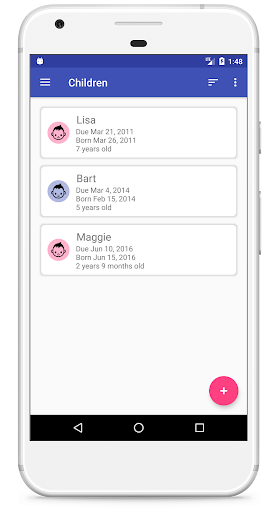
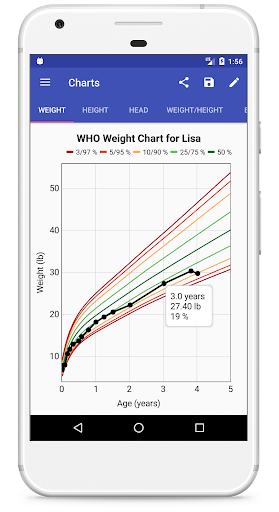
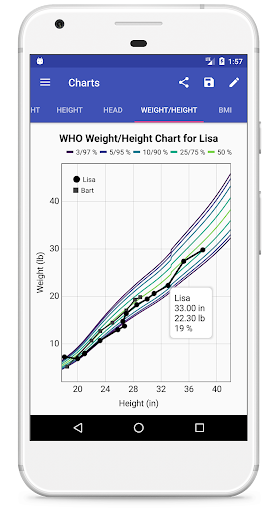
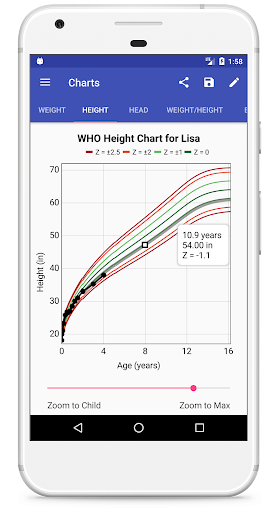
Record multiple children's weight, height, and head circumference measurements and use them to generate growth charts and percentiles from birth to age 20 for some measurements.
The CDC, WHO, IAP (Indian), Swedish, Spanish, German, TNO (Dutch), Belgian, Norwegian, Japanese, and Chinese (and more!) charts are included, as well as the Fenton gestational age charts for pre-term babies and an Adult chart for tracking weight and BMI for all ages. There are also CDC and IAP recommended combination charts (WHO-CDC switching at 2 years old, WHO-IAP switching at 5 years old) and Preterm-WHO for using corrected age with the WHO curve from birth. All percentiles are calculated using the same high accuracy LMS method doctor's offices often use.
You can save images of your child's charts or percentile tables to share, put in a baby book, or take along to discuss with your child's doctor. Easily export and import data to an open CSV format. Generate a PDF report with a growth chart and percentile table. Compare multiple children's growth curves or enter a parent's data and compare child with parent. Project growth up to the end of each curve.
Want the UK90 charts, or an ad-free experience? Try Child Growth Tracker Pro!
Visit our web page for FAQ, video user guide, details about percentiles and CSV imports/exports, and more.
Features:
* Easy to use and completely free!
* Supports lb/in or kg/cm units (or a mix!)
* Record measurements for an unlimited number of children (local storage) or up to four children with Cloud Backup
* Optional Cloud Backup to sync data between devices and share with other users
* Age-vs-weight, Age-vs-Height, Age-vs-Head Circumference, Age-vs-BMI, and Weight-vs-Height Charts
* Show percentiles or Z-scores in charts and tables
* Customize the chart with different line colors
* CDC, WHO, IAP (Indian), Swedish, TNO (Dutch), Belgian, Norwegian, Chinese, Japanese, Spanish, German, CDC Down Syndrome, Adult, and Fenton Pre-Term Percentiles (and more!)
* Combination charts (Preterm-WHO, WHO-CDC and WHO-IAP)
* Project children's growth out to the full curve
* Show percentiles using either real age (based on birth date) or corrected age (based on due date) for premature babies
* Compare multiple children on the same plot
* Charts support pinch zoom and use intelligent scaling to show the right range for each child
* Clickable points on the charts show exact percentiles, or easily generate a table of percentiles for all measurements
* Easily share or save chart images or PDF reports
* Securely stored data integrated with Android cloud backup
* Export and import measurements to CSV files
* Customize the child list with a photo of each child
* Available in English, Spanish, French, Dutch, German, and Portuguese. Want to see your language? Contact us to arrange a translation!
Показать больше

1. Скачать инсталлятор MEmu и завершайте установку

2. Запускайте MEmu, затем откройте Google Play на главной странице

3. Ищите Child Growth Tracker в Google Play
Install
4. Скачайте и установите Child Growth Tracker
5. При завершении установки, нажмите на значок для старта

6. Наслаждайтесь Child Growth Tracker на своем компьютере с помощью MEmu.
MEmu Play — лучший бесплатный эмулятор Android, превосходный опыт работы с которым оценили 50 миллионов пользователей. Технология виртуализации MEmu позволяет без проблем запускать тысячи Android-приложений на вашем компьютере, даже самые требовательные.
Большой экран с лучшей графикой; Большая продолжительность, без ограничения батареи или мобильных данных.
Полная поддержка установки клавиш для точного управления клавиатурой и мышью или геймпадом.
Несколько игровых учетных записей или задач на одном компьютере одновременно с менеджером нескольких экземпляров.
Use Child Growth Tracker on PC by following steps: