Rust+
Обновлено
Текущая версия
0.0.32
Продавец

Перестаньте беспокоиться о быстром разряде батареи при использовании Rust+ на вашем телефоне. Освободитесь от крошечного экрана и наслаждайтесь приложением на гораздо большем экране. Теперь вы можете работать с приложением в полноэкранном режиме с удобством клавиатуры и мыши. MEmu предлагает вам все ожидаемые удивительные функции: быструю установку и простую настройку, интуитивно понятное управление и больше никаких забот о времени автономной работы, мобильном трафике или неожиданных звонках. Совершенно новый MEmu 9 — идеальный выбор для использования Rust+ на вашем компьютере. С помощью менеджера нескольких экземпляров MEmu вы можете одновременно использовать два или более аккаунтов. И самое главное, наш эксклюзивный движок эмуляции раскрывает весь потенциал вашего ПК, обеспечивая плавную и приятную работу.
Показать больше
Скачайте Rust+ на ПК с помощью Андроид эмулятора MEmu. Наслаждайтесь на большом экране. The official Rust companion app from Facepunch Studios – stay connected to the game so you never miss an important moment again.
The official Rust companion app from Facepunch Studios – stay connected to the game so you never miss an important moment again. Coordinate with your team, receive alerts when you’re being raided, remotely set off traps, and more!
Requires the Rust game - available on PC and macOS. Rust Console Edition is not supported at this time.
PAIR WITH YOUR SERVERS
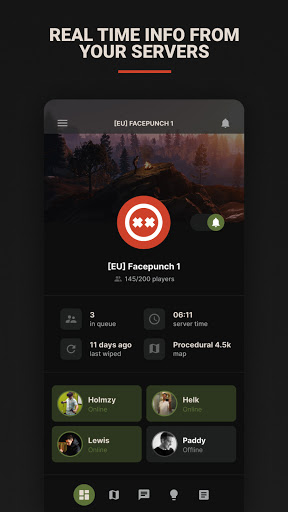
Pair with your favorite Rust servers to receive real-time updates for the things that matter the most: player counts, current game time, online teammates, and more. You’ll also get (optional) push notifications whenever one of your teammates joins the game.
EXPLORE THE MAP
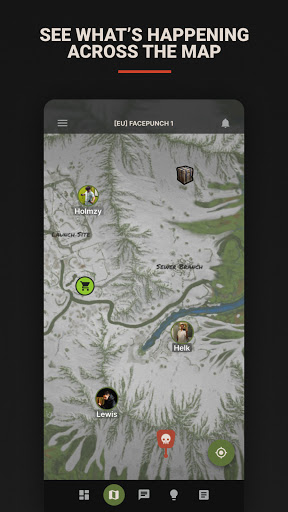
View the full server map to find points of interest, see where your teammates are and check on vending machines. You can also track ongoing events like the attack helicopter and cargo ship.
KEEP UP WITH YOUR TEAM
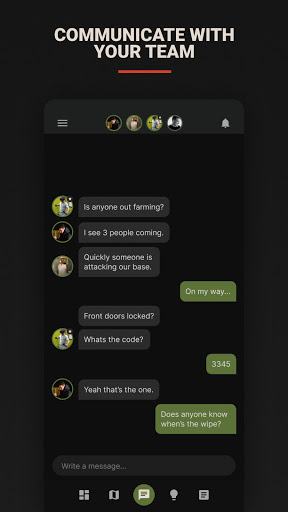
Communicate with your team from anywhere to just catch up or plan for your next raid. Messages are visible in both the app and the in-game team chat so you can seamlessly switch between the two.
CONTROL YOUR IN-GAME DEVICES
Connect Smart Switches and Smart Alarms to your in-game electrical contraptions and pair them with Rust+ to control them remotely at any time. Smart Switches let you turn things on or off, and Smart Alarms send customizable push notification alerts when an electrical signal is detected.
GET THE LATEST RUST NEWS
Get notified about new Rust blogs and news so you can stay on top of the latest updates, or catch up on older blogs you may have missed.
Terms of Service: https://facepunch.com/legal#TermsOfService
© 2023 Facepunch Studios Limited. "Rust+", "Rust", "Facepunch", and their logos are trade marks of Facepunch Studios Limited. All rights reserved.
Показать больше

1. Скачать инсталлятор MEmu и завершайте установку

2. Запускайте MEmu, затем откройте Google Play на главной странице

3. Ищите Rust+ в Google Play
Install
4. Скачайте и установите Rust+
5. При завершении установки, нажмите на значок для старта

6. Наслаждайтесь Rust+ на своем компьютере с помощью MEmu.
MEmu Play — лучший бесплатный эмулятор Android, превосходный опыт работы с которым оценили 50 миллионов пользователей. Технология виртуализации MEmu позволяет без проблем запускать тысячи Android-приложений на вашем компьютере, даже самые требовательные.
Большой экран с лучшей графикой; Большая продолжительность, без ограничения батареи или мобильных данных.
Полная поддержка установки клавиш для точного управления клавиатурой и мышью или геймпадом.
Несколько игровых учетных записей или задач на одном компьютере одновременно с менеджером нескольких экземпляров.
Use Rust+ on PC by following steps: