
Memory cleaner. Speed booster & junk removal
Обновлено
Текущая версия
1.0.22
Продавец

Перестаньте беспокоиться о быстром разряде батареи при использовании Memory cleaner. Speed booster & junk removal на вашем телефоне. Освободитесь от крошечного экрана и наслаждайтесь приложением на гораздо большем экране. Теперь вы можете работать с приложением в полноэкранном режиме с удобством клавиатуры и мыши. MEmu предлагает вам все ожидаемые удивительные функции: быструю установку и простую настройку, интуитивно понятное управление и больше никаких забот о времени автономной работы, мобильном трафике или неожиданных звонках. Совершенно новый MEmu 9 — идеальный выбор для использования Memory cleaner. Speed booster & junk removal на вашем компьютере. С помощью менеджера нескольких экземпляров MEmu вы можете одновременно использовать два или более аккаунтов. И самое главное, наш эксклюзивный движок эмуляции раскрывает весь потенциал вашего ПК, обеспечивая плавную и приятную работу.
Показать больше
Скачайте Memory cleaner. Speed booster & junk removal на ПК с помощью Андроид эмулятора MEmu. Наслаждайтесь на большом экране. Tired of the fact that your device is constantly running out of memory?
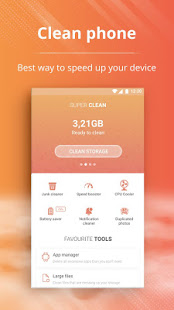



Tired of the fact that your device is constantly running out of memory? Tired of receiving daily notifications that your phone is slow? So, memory cleaner and speed booster app is what you are looking for. A simple and light app that will make your device feel good. Nothing extra! Remove all extra cache files, stop apps that slow down the device, remove duplicate unnecessary photos, and more.
Memory cleaner. Speed booster & Junk removal app features:
Junk Cleaner
Remove unnecessary cache, residual files, ad junk and much more that slows down your phone. The new cleaning technology will allow you to do it quickly and efficiently.
Speed Booster
Optimize running apps to make them works perfectly. It's simple and reliable. You need just tap one button
CPU Cooler
If your device is running multiple processes at the same time, the phone's processor may overheat and become ineffective. The Junk Removal application optimizes application performance to help the CPU cool down.
Battery Saver
Does your phone consume the battery fast? This happens quite often, especially on older devices. To keep your phone running longer, use the power saving feature and extend battery life.
Notification Manager
Tired of useless push notifications? Pick them up in the same place and clean them when you need them.
Block annoying notifications you do not want to receive.
Duplicate photos cleaner
Generally, many identical photos are stored on the phone. Find them all, delete and free up memory.
App Manager
Make sure apps are installed on your device and remove apps that take up a lot of space and are not used.
Large files cleaner
Find large files on your device and delete those you do not need.
Download the Memory Cleaner & Speed Booster and enjoy the great performance of your device. We have done our best to help your device feel good. Enjoy Please!
Показать больше

1. Скачать инсталлятор MEmu и завершайте установку

2. Запускайте MEmu, затем откройте Google Play на главной странице

3. Ищите Memory cleaner. Speed booster & junk removal в Google Play
Install
4. Скачайте и установите Memory cleaner. Speed booster & junk removal
5. При завершении установки, нажмите на значок для старта

6. Наслаждайтесь Memory cleaner. Speed booster & junk removal на своем компьютере с помощью MEmu.
MEmu Play — лучший бесплатный эмулятор Android, превосходный опыт работы с которым оценили 50 миллионов пользователей. Технология виртуализации MEmu позволяет без проблем запускать тысячи Android-приложений на вашем компьютере, даже самые требовательные.
Большой экран с лучшей графикой; Большая продолжительность, без ограничения батареи или мобильных данных.
Полная поддержка установки клавиш для точного управления клавиатурой и мышью или геймпадом.
Несколько игровых учетных записей или задач на одном компьютере одновременно с менеджером нескольких экземпляров.
Use Memory cleaner. Speed booster & junk removal on PC by following steps: