OptiLink™
Обновлено
Текущая версия
v2.40
Продавец

Перестаньте беспокоиться о быстром разряде батареи при использовании OptiLink™ на вашем телефоне. Освободитесь от крошечного экрана и наслаждайтесь приложением на гораздо большем экране. Теперь вы можете работать с приложением в полноэкранном режиме с удобством клавиатуры и мыши. MEmu предлагает вам все ожидаемые удивительные функции: быструю установку и простую настройку, интуитивно понятное управление и больше никаких забот о времени автономной работы, мобильном трафике или неожиданных звонках. Совершенно новый MEmu 9 — идеальный выбор для использования OptiLink™ на вашем компьютере. С помощью менеджера нескольких экземпляров MEmu вы можете одновременно использовать два или более аккаунтов. И самое главное, наш эксклюзивный движок эмуляции раскрывает весь потенциал вашего ПК, обеспечивая плавную и приятную работу.
Показать больше
Скачайте OptiLink™ на ПК с помощью Андроид эмулятора MEmu. Наслаждайтесь на большом экране. OptiLink™ is a mobile app that allows complete control of your trailer in combination with an OptiLink™ ECU (446 290 700 0), and makes your fleet more effective.
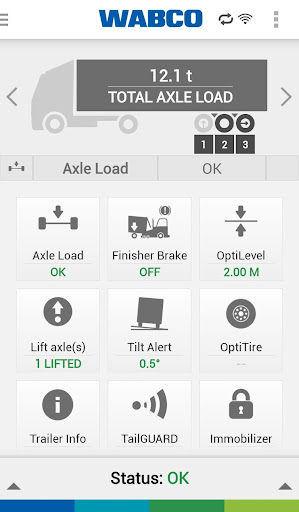
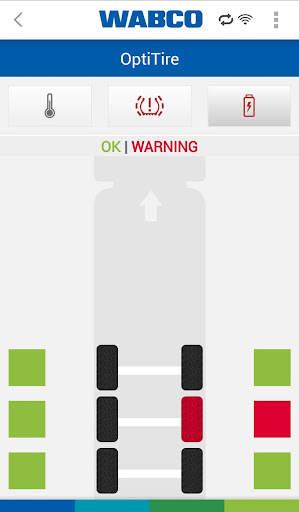
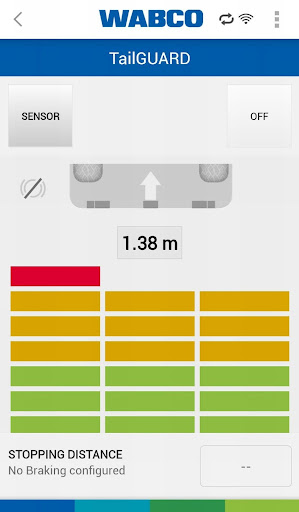
OptiLink™ is a mobile app that allows complete control of your trailer in combination with an OptiLink™ ECU (446 290 700 0), and makes your fleet more effective. Featuring a smart, modern design, OptiLink allows truck drivers and fleet operators to monitor and control available trailer functions wirelessly from an Android smartphone. It provides easy access to 19 separate trailer functions, controlling suspension, axles, braking and security functions.
OptiLink is available in 17 languages. It provides real-time condition monitoring for drivers and fleet operators, delivering fast and easy access to a range of critical trailer data via a simple-to-use graphical interface.
It helps to improve safety by allowing a trailer to be controlled from the cab or at a safe distance from the unit, and through a range of automatic alarms tasked to monitor safety-critical parameters and activities.
Some of the functions are:
Show Me Your Trailer - A simple tool designed to present trailer information at-a-glance. This includes trailer ID number, serial number, type and manufacturer.
Axle Load - The OptiLink app presents axle load information, measured in tones and separated into total load across all axles and load on each individual axle. The function also provides an automatic warning when the axle load exceeds pre-programmed limits.
Vehicle Inclination - Indicates the angle of inclination for the trailer, with an automatic warning if a defined threshold is exceeded. This is particularly useful for tipping trailers, verifying the trailer is horizontally-positioned before the load is emptied.
BVA A brake pad monitoring function for disc brakes displays the condition of brake pads and warns when worn pads require replacement.
Tire pressure - Using the App, drivers and maintenance staff can monitor tire pressure and tire temperature. The battery status of the tire pressure monitoring system is also observable and the system will warn users if any parameter moves outside of defined target ranges.
OptiLevel - Using OptiLink, drivers and depot staff can control trailer electronic air suspension functions. From a smartphone, the user can: lift and lower the trailer chassis; select from a range of loading functions and select driving levels.
Axle Control - Using OptiLink, drivers can control the function of lift (tag) axles, while the dynamic wheelbase functions OptiLoad™ and OptiTurn™ as well as Traction Help can be activated and deactivated. The app can also lock or unlock the steering axle.
Finisher Brake - A Finisher Brake function for tipper trailers allows the driver to set the brake pressure in case of declining road conditions.
Immobilizer - An Immobilizer function enables the locking and unlocking of the trailer brakes with a PIN, preventing a trailer from rolling or being stolen.
TailGUARD™ - This blind spot monitoring system activates automatically when reverse gear is selected. OptiLink automatically shows the distances to objects behind the trailer and provides an audible warning with increasing signal frequency as distance shortens. OptiLink can also use the smartphone’s vibration function to provide a haptic warning.
GIO Switch - OptiLink can control customer-specific programmed functions, such as walking floor control.
Failure codes - Displays error codes and allows for diagnosis. Diagnostic reports can be emailed.
Bounce Control - Bounce Control allows the driver to slowly release the invisible tension of the axle bogie built up during unloading, avoiding the trailer from bouncing when the park brake is released.
Send Data - Relevant trailer operating data can be sent via email, allowing fleet managers to analyze trailer functions without bringing it back to the workshop.
The OptiLink app requires additional hardware (OptiLink™ ECU (446 290 700 0).
Показать больше

1. Скачать инсталлятор MEmu и завершайте установку

2. Запускайте MEmu, затем откройте Google Play на главной странице

3. Ищите OptiLink™ в Google Play
Install
4. Скачайте и установите OptiLink™
5. При завершении установки, нажмите на значок для старта

6. Наслаждайтесь OptiLink™ на своем компьютере с помощью MEmu.
MEmu Play — лучший бесплатный эмулятор Android, превосходный опыт работы с которым оценили 50 миллионов пользователей. Технология виртуализации MEmu позволяет без проблем запускать тысячи Android-приложений на вашем компьютере, даже самые требовательные.
Большой экран с лучшей графикой; Большая продолжительность, без ограничения батареи или мобильных данных.
Полная поддержка установки клавиш для точного управления клавиатурой и мышью или геймпадом.
Несколько игровых учетных записей или задач на одном компьютере одновременно с менеджером нескольких экземпляров.
Use OptiLink™ on PC by following steps: