HYGO
Обновлено
Текущая версия
11.0.0
Продавец

Перестаньте беспокоиться о быстром разряде батареи при использовании HYGO на вашем телефоне. Освободитесь от крошечного экрана и наслаждайтесь приложением на гораздо большем экране. Теперь вы можете работать с приложением в полноэкранном режиме с удобством клавиатуры и мыши. MEmu предлагает вам все ожидаемые удивительные функции: быструю установку и простую настройку, интуитивно понятное управление и больше никаких забот о времени автономной работы, мобильном трафике или неожиданных звонках. Совершенно новый MEmu 9 — идеальный выбор для использования HYGO на вашем компьютере. С помощью менеджера нескольких экземпляров MEmu вы можете одновременно использовать два или более аккаунтов. И самое главное, наш эксклюзивный движок эмуляции раскрывает весь потенциал вашего ПК, обеспечивая плавную и приятную работу.
Показать больше
Скачайте HYGO на ПК с помощью Андроид эмулятора MEmu. Наслаждайтесь на большом экране. HYGO offers farmers a simple, innovative solution for optimizing their plant protection operations.
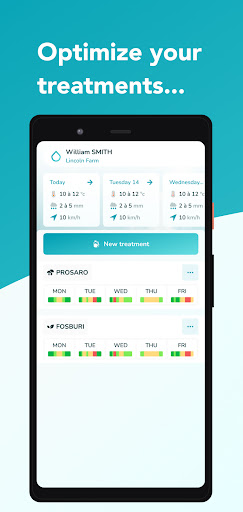
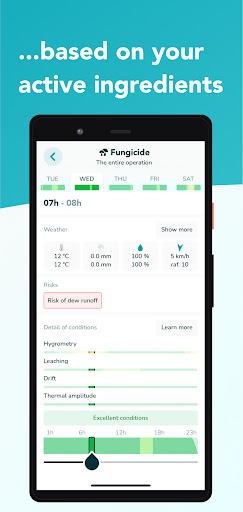
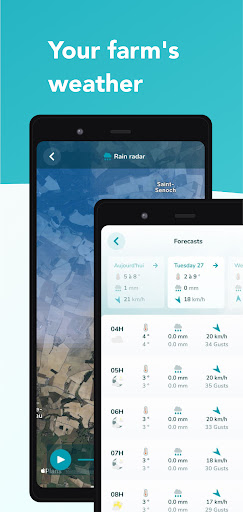
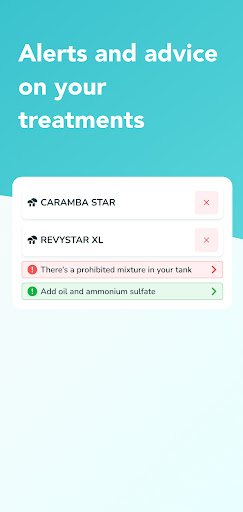
HYGO offers farmers a simple, innovative solution for optimizing their plant protection operations.
With HYGO, identify at a glance the best application windows for your crop protection and nutrition products, and optimize your inputs with peace of mind. Thanks to its built-in agronomic intelligence, HYGO provides you with the best application slots for the next 5 days, after analyzing outside weather conditions and taking into account the modes of action of each plant protection product in your sprayer’s tank. HYGO's playful color coding and detailed explanations for each intervention slot enable you to make the best decisions quickly.
HYGO application is 100% free for life for farmers. More than 10,000 farmers actively use HYGO in France and Belgium.
Stop wasting time and money by applying your crop protection and nutrition products in conditions in which they won't be effective!
Gain agronomic precision and regain control of your plant protection
- Agronomic knowledge of over 20,000 products, adjuvants, and fertilizers
- Smart agronomic advice throughout the spraying process, from the spraying mixture preparation to the application
- Modes of action for each product, even for multimode products
- Ultra-reliable hour-by-hour agricultural weather forecasts for up to 5 days
- Precise rain radar at ± 3h
- 5 agricultural interventions simultaneously visible at your home screen
- Phytotoxicity and product incompatibility alerts for mixtures
- Recommendations on the use of adjuvants based on modes of action and weather
- Alerts on prohibited mixtures
Create your free HYGO account by downloading the application.
Any questions? Contact Alvie at info@alvie.fr or +331 76 38 03 72.
More information at www.alvie.fr/hygo.
Показать больше

1. Скачать инсталлятор MEmu и завершайте установку

2. Запускайте MEmu, затем откройте Google Play на главной странице

3. Ищите HYGO в Google Play
Install
4. Скачайте и установите HYGO
5. При завершении установки, нажмите на значок для старта

6. Наслаждайтесь HYGO на своем компьютере с помощью MEmu.
MEmu Play — лучший бесплатный эмулятор Android, превосходный опыт работы с которым оценили 50 миллионов пользователей. Технология виртуализации MEmu позволяет без проблем запускать тысячи Android-приложений на вашем компьютере, даже самые требовательные.
Большой экран с лучшей графикой; Большая продолжительность, без ограничения батареи или мобильных данных.
Полная поддержка установки клавиш для точного управления клавиатурой и мышью или геймпадом.
Несколько игровых учетных записей или задач на одном компьютере одновременно с менеджером нескольких экземпляров.
Use HYGO on PC by following steps: