Mathos AI: Math Helper & Tutor
Обновлено
Текущая версия
2.1.5
Продавец

Перестаньте беспокоиться о быстром разряде батареи при использовании Mathos AI: Math Helper & Tutor на вашем телефоне. Освободитесь от крошечного экрана и наслаждайтесь приложением на гораздо большем экране. Теперь вы можете работать с приложением в полноэкранном режиме с удобством клавиатуры и мыши. MEmu предлагает вам все ожидаемые удивительные функции: быструю установку и простую настройку, интуитивно понятное управление и больше никаких забот о времени автономной работы, мобильном трафике или неожиданных звонках. Совершенно новый MEmu 9 — идеальный выбор для использования Mathos AI: Math Helper & Tutor на вашем компьютере. С помощью менеджера нескольких экземпляров MEmu вы можете одновременно использовать два или более аккаунтов. И самое главное, наш эксклюзивный движок эмуляции раскрывает весь потенциал вашего ПК, обеспечивая плавную и приятную работу.
Показать больше
Скачайте Mathos AI: Math Helper & Tutor на ПК с помощью Андроид эмулятора MEmu. Наслаждайтесь на большом экране. Mathos AI — это программа для решения математических задач на базе искусственного интеллекта и персонализированный репетитор, созданная, чтобы помочь учащимся решать сложные математические задачи, одновременно улучшая их понимание математических концепций на всех уровнях.
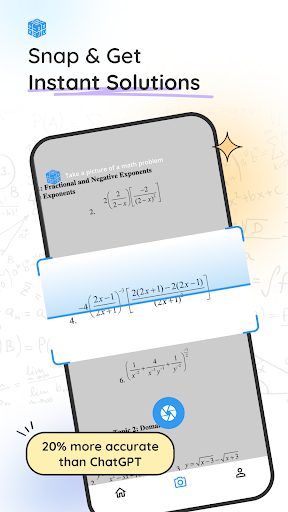
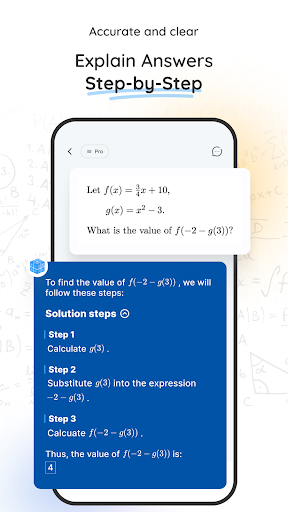
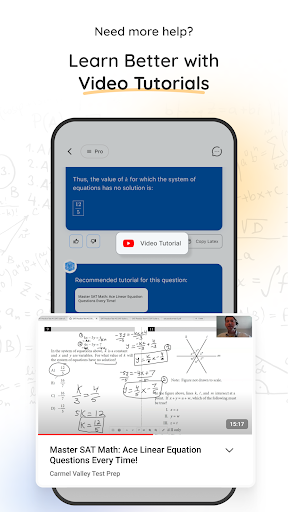
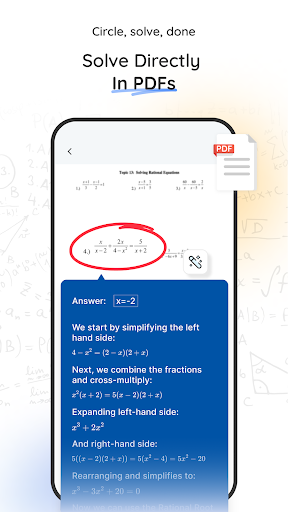
Mathos AI — это программа для решения математических задач на базе искусственного интеллекта и персонализированный репетитор, созданная, чтобы помочь учащимся решать сложные математические задачи, одновременно улучшая их понимание математических концепций на всех уровнях. Mathos AI, которому доверяют более 2 миллионов студентов из более чем 200 стран, — это больше, чем просто калькулятор — это комплексное решение для обучения математике как для студентов, преподавателей, так и для тех, кто учится на протяжении всей жизни. Независимо от того, изучаете ли вы базовую алгебру, геометрию или сложные математические вычисления, Mathos AI предоставляет точные и мгновенные решения с подробными пошаговыми объяснениями, которые помогут вам уверенно освоить математику.
Ключевые особенности:
-Решение математических задач: мгновенно решайте сложные математические задачи с помощью пошаговых объяснений, которые улучшат ваше понимание.
-Помощник по домашним заданиям в формате PDF: загрузите PDF-файлы с домашними заданиями и позвольте Mathos решать задачи прямо из документа. Комментируйте, делайте заметки и взаимодействуйте с PDF-файлами для беспрепятственного обучения.
-AI Tutor: получайте индивидуальное обучение с распознаванием голоса и рисунков. Искусственный интеллект адаптируется к вашему стилю и темпу обучения, обеспечивая индивидуальные рекомендации и объяснения.
-Графический калькулятор: визуализируйте уравнения и функции в интерактивном режиме с помощью мощного графического калькулятора для построения графиков и решения сложных уравнений.
-Специальная коллекция калькуляторов: доступ к множеству специализированных калькуляторов, в том числе: калькулятор дробей, научный калькулятор, алгебраический калькулятор, графический калькулятор в стиле Desmos, калькулятор интегралов и производных, квадратичный калькулятор, калькулятор квадратного корня, калькулятор упрощения, калькулятор пределов, калькулятор коэффициентов, Калькулятор научных обозначений, калькулятор первообразных и комплексная поддержка предметов: Mathos AI охватывает широкий спектр предметов, включая математику, физику, химию, биологию, инженерное дело и статистику.
Почему Матос:
-Получите самое точное решение: Mathos AI предлагает самые точные математические решения на каждом уровне и по любой теме — решаете ли вы алгебру, исчисление, квадратное уравнение, научную запись или что-то среднее между ними. Наша продвинутая модель искусственного интеллекта на 20 % точнее, чем ChatGPT и любой другой инструмент, и дает вам ответы, которым вы можете доверять.
-Помощь в выполнении домашних заданий: быстро и легко
Получить помощь по Mathos AI очень просто и удобно. Вы можете решать свои домашние задания, используя различные методы взаимодействия — будь то загрузка и редактирование PDF-файла, фотографирование задачи, ввод текста, его рисование или даже использование голоса. Кроме того, благодаря синхронизации нескольких устройств вы можете переключаться между телефоном, планшетом или ноутбуком, не упуская ни малейшей детали.
-Учитесь у своего персонального репетитора по искусственному интеллекту: Mathos AI — это ваш собственный репетитор по математике с искусственным интеллектом, который действительно понимает, как вы учитесь. Искусственный интеллект Mathos может распознавать ваши рисунки и голосовой ввод, поэтому независимо от того, предпочитаете ли вы озвучить свои проблемы или набросать их, мы здесь, чтобы помочь. Наш преподаватель следит за вашим темпом и предоставляет наиболее индивидуальные рекомендации и объяснения для каждого этапа вашей работы.
-Все необходимые математические инструменты: Mathos AI включает в себя все — расширенный графический калькулятор, специальные калькуляторы для различных математических тем и многое другое. От решения уравнений до построения графиков — у нас есть инструменты, которые делают изучение математики очень простым.
Оставайтесь на связи и общайтесь
Присоединяйтесь к сообществу Mathos AI и будьте в курсе последних учебных ресурсов, советов и новостей в социальных сетях:
- Ютуб: https://www.youtube.com/@Mathos-ai
- Тикток: https://www.tiktok.com/@mathos.ai
- Информация: https://www.instagram.com/mathosai
Дополнительная информация:
- Политика конфиденциальности: https://www.info.mathgptpro.com/privacy-policy.
- Условия использования: https://www.info.mathgptpro.com/terms-of-service.
Нужна помощь или есть вопросы? Свяжитесь с нами по адресу support@mathgptpro.com, присоединяйтесь к нашему сообществу Discord: https://discord.gg/qmHYUXdT или посетите наш сайт: http://mathos.ai/
Показать больше

1. Скачать инсталлятор MEmu и завершайте установку

2. Запускайте MEmu, затем откройте Google Play на главной странице

3. Ищите Mathos AI: Math Helper & Tutor в Google Play
Install
4. Скачайте и установите Mathos AI: Math Helper & Tutor
5. При завершении установки, нажмите на значок для старта

6. Наслаждайтесь Mathos AI: Math Helper & Tutor на своем компьютере с помощью MEmu.
MEmu Play — лучший бесплатный эмулятор Android, превосходный опыт работы с которым оценили 50 миллионов пользователей. Технология виртуализации MEmu позволяет без проблем запускать тысячи Android-приложений на вашем компьютере, даже самые требовательные.
Большой экран с лучшей графикой; Большая продолжительность, без ограничения батареи или мобильных данных.
Полная поддержка установки клавиш для точного управления клавиатурой и мышью или геймпадом.
Несколько игровых учетных записей или задач на одном компьютере одновременно с менеджером нескольких экземпляров.
Use Mathos AI: Math Helper & Tutor on PC by following steps: