One 9.5 Widgets
Обновлено
Текущая версия
1.3.0
Продавец

Перестаньте беспокоиться о быстром разряде батареи при использовании One 9.5 Widgets на вашем телефоне. Освободитесь от крошечного экрана и наслаждайтесь приложением на гораздо большем экране. Теперь вы можете работать с приложением в полноэкранном режиме с удобством клавиатуры и мыши. MEmu предлагает вам все ожидаемые удивительные функции: быструю установку и простую настройку, интуитивно понятное управление и больше никаких забот о времени автономной работы, мобильном трафике или неожиданных звонках. Совершенно новый MEmu 9 — идеальный выбор для использования One 9.5 Widgets на вашем компьютере. С помощью менеджера нескольких экземпляров MEmu вы можете одновременно использовать два или более аккаунтов. И самое главное, наш эксклюзивный движок эмуляции раскрывает весь потенциал вашего ПК, обеспечивая плавную и приятную работу.
Показать больше
Наслаждайтесь превосходным опытом использования One 9.5 Widgets на ПК с MEmu Play. Это мощный бесплатный эмулятор Android, который предлагает тысячи приложений для настольных компьютеров. Наслаждайтесь общением с друзьями и совершенствуйте свою работу ещё эффективнее! Make your home screen feel brand new.
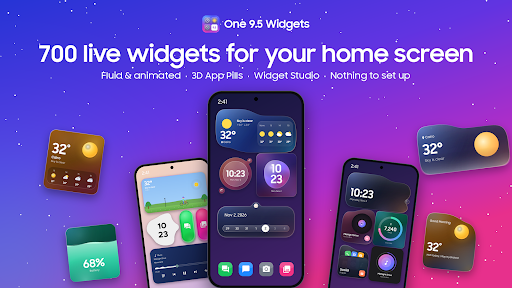
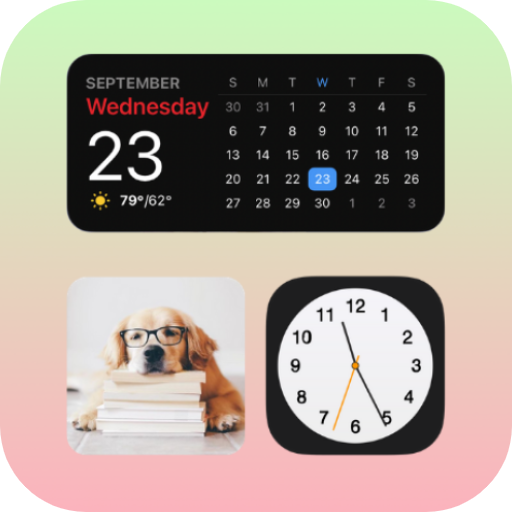
Make your home screen feel brand new. One 9.5 Widgets brings 700 live widgets — clocks, weather, calendar, music, battery, smart and app widgets that update on their own, move gently and look right in light and dark mode. Nothing to set up: just pick a widget and place it.
WHAT'S INSIDE
• 700 live widgets — weather, clocks, calendar, music, device, photos, people, search, notifications and smart widgets
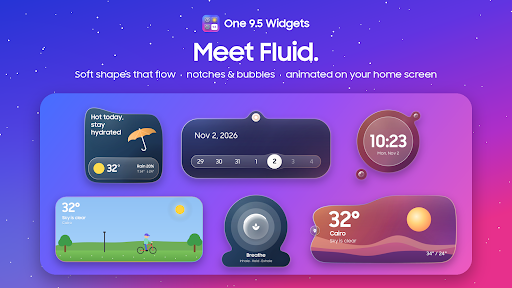
• Fluid — soft shapes that flow, with notches, bubbles and liquid motion played right on your home screen
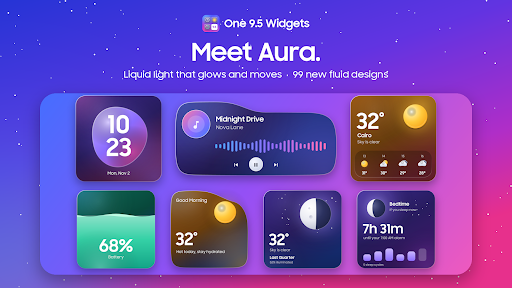
• Aura — 99 fluid designs lit from inside: 3D skies that match the real weather, glowing liquid levels and morphing light
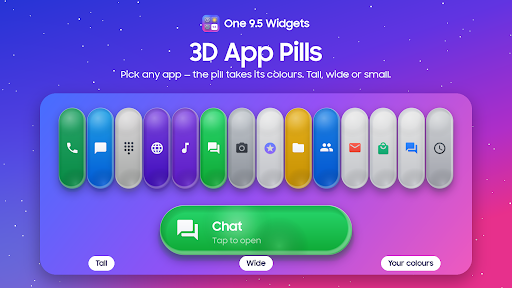
• 3D App Pills — jelly shortcuts that take the colours of any app you pick; make them tall, wide or small
• Widget Studio — design your own widget with shapes, live clock, weather, battery and music, fluid fills and motion. No coding
• Folder widgets — keep your apps in one widget; search for any app and drag it straight into the folder
• Smart widgets — priority notifications, apps for this hour, screen time, water tracker, bedtime and a stack that changes with your day
YOURS, YOUR WAY
• Six materials: Original, Gradient, Glass, Clear, Frosted and Liquid
• Light, dark or follow the system — every widget has both looks
• Change colours, accent, text size and fonts, and move texts by hand
• Resize freely: widgets re-flow to any size on your home screen
• Smart app slots learn which apps you open at each hour
• In 10 languages, now including Italian and Portuguese
LIVE, ACCURATE AND LIGHT ON BATTERY
• Time and date tick on their own; weather, steps, battery, music and calendar update in the background
• Weather "now" blends several forecast models with live readings from the weather stations near you
• Steps count your whole day, even while the app is closed, and can use Health Connect
• Animations are played by your launcher, so they stay smooth without draining the battery
• Works on any launcher that supports widgets
FREE TO START
Many widgets are free. One Pro unlocks every widget, every material and font, and the full Widget Studio — as a yearly plan or a one-time Lifetime purchase.
Permissions are only asked when a widget needs them (for example location for weather, calendar for events, physical activity for steps, notification access for notification widgets) and you can skip any of them. Everything stays on your phone.
Questions or ideas? Write to us at adesign837@gmail.com
Follow Android Tools 4U on X: @AndroidTools3
App names and icons shown in your widgets come from the apps on your own phone and belong to their owners.
Показать больше

1. Скачать инсталлятор MEmu и завершайте установку

2. Запускайте MEmu, затем откройте Google Play на главной странице

3. Ищите One 9.5 Widgets в Google Play
Install
4. Скачайте и установите One 9.5 Widgets
5. При завершении установки, нажмите на значок для старта

6. Наслаждайтесь One 9.5 Widgets на своем компьютере с помощью MEmu.
MEmu Play — лучший бесплатный эмулятор Android, превосходный опыт работы с которым оценили 50 миллионов пользователей. Технология виртуализации MEmu позволяет без проблем запускать тысячи Android-приложений на вашем компьютере, даже самые требовательные.
Большой экран с лучшей графикой; Большая продолжительность, без ограничения батареи или мобильных данных.
Полная поддержка установки клавиш для точного управления клавиатурой и мышью или геймпадом.
Несколько игровых учетных записей или задач на одном компьютере одновременно с менеджером нескольких экземпляров.
Use One 9.5 Widgets on PC by following steps: