Plane Finder - Flight Tracker
Обновлено
Текущая версия
2024.9.0
Продавец

Перестаньте беспокоиться о быстром разряде батареи при использовании Plane Finder - Flight Tracker на вашем телефоне. Освободитесь от крошечного экрана и наслаждайтесь приложением на гораздо большем экране. Теперь вы можете работать с приложением в полноэкранном режиме с удобством клавиатуры и мыши. MEmu предлагает вам все ожидаемые удивительные функции: быструю установку и простую настройку, интуитивно понятное управление и больше никаких забот о времени автономной работы, мобильном трафике или неожиданных звонках. Совершенно новый MEmu 9 — идеальный выбор для использования Plane Finder - Flight Tracker на вашем компьютере. С помощью менеджера нескольких экземпляров MEmu вы можете одновременно использовать два или более аккаунтов. И самое главное, наш эксклюзивный движок эмуляции раскрывает весь потенциал вашего ПК, обеспечивая плавную и приятную работу.
Показать больше
Скачайте Plane Finder - Flight Tracker на ПК с помощью Андроид эмулятора MEmu. Наслаждайтесь на большом экране. Plane Finder is the only app to offer global live flight tracking plus fast and accurate flight status notifications in a single app.
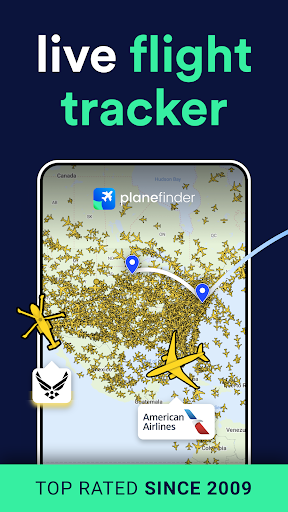
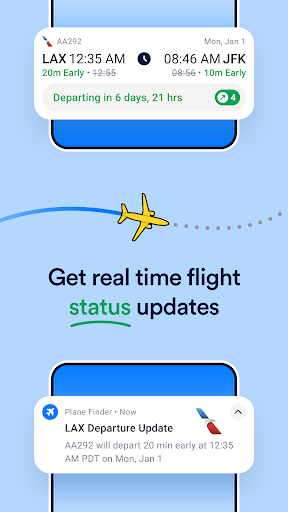
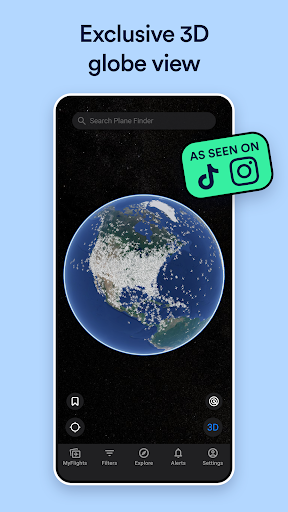
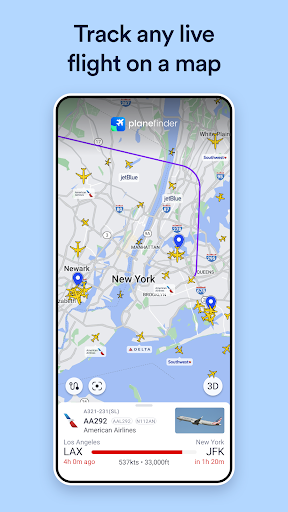
Plane Finder is the only app to offer global live flight tracking plus fast and accurate flight status notifications in a single app.
Whether you're a seasoned aviation enthusiast who wants to know it all, or a curious traveler simply interested in the key moments of a specific flight, we’ve got you covered.
Aviation enthusiasts tell us they can’t live without our exclusive map focus mode used to quickly show military or other traffic types live on the map.
Social media content creators can’t get enough of our 3D globe view combined with playback mode.
No specific flight in mind? No problem! Discover trending and exciting live aviation events via our Explore feature.
Download now and embark on a journey of discovery with the most immersive flight tracking experience available.
Exclusive features:
* Live Notifications - Stay ahead with home screen notifications on delays, diversions, departures and arrivals
* 3D globe view - Follow flights in 3D and explore the beauty of live air traffic patterns for both live and historic flights
* Powerful filters - including filter (or highlight) by traffic type and the ability to combine multiple filter criteria
* Timeline - see past and future flights presented in an easy to understand calendar view
* Airport Performance - weekly and hourly industry level data
* Light and Dark modes
* Customizable map markers and labels
Top ranking since 2009, Plane Finder is trusted by friends and families of travellers, aviation enthusiasts, pilots, cabin crew and aviation professionals alike.
Our small team work tirelessly to bring the latest technology to Plane Finder. We are the only flight tracker to operate our own bespoke network of tracking receivers around the world, maintaining data quality end to end.
Main Features:
* Track live flights on a map
* 3D globe view
* Augmented reality view
* Advanced aircraft and flight data
* Map Focus Mode
* MyFlights status notifications
* Departure and arrival boards
* Powerful multi-criteria filters
* Custom Aircraft Alerts
* Trending flights
* Airport disruptions
* Squawks
* Featured Flights
* Timeline calendar view
* Playback global air traffic
* Playback single flights
* Airport performance analysis and trends
* Airport weather and daylight trends
* Customizable markers and labels
* Bookmarks
* Light and dark modes
* One subscription for Android, web and iOS
Help and Support
Plane Finder is regularly updated with innovative new features. Please email support@planefinder.net with any questions or queries, we are happy to help.
How does Plane Finder work?
Plane Finder receives real time ADS-B and MLAT signals sent by aircraft to transmit their positional data to land based receivers. This technology is faster than traditional radar and is used for air traffic control and navigation. You can check our worldwide flight tracking coverage for free at www.planefinder.net
Disclaimer
The use of the information presented using Plane Finder is strictly limited to pursuing enthusiast activities (i.e. for entertainment purposes), which specifically exclude any activities that might endanger yourself or the lives of others. Under no circumstances will the developer of this application be held responsible for incidents resulting from the use of the data or its interpretation or its use contrary to this agreement.
Privacy Policy: https://planefinder.net/legal/privacy-policy
Terms of Use: https://planefinder.net/legal/terms-and-conditions
Показать больше

1. Скачать инсталлятор MEmu и завершайте установку

2. Запускайте MEmu, затем откройте Google Play на главной странице

3. Ищите Plane Finder - Flight Tracker в Google Play
Install
4. Скачайте и установите Plane Finder - Flight Tracker
5. При завершении установки, нажмите на значок для старта

6. Наслаждайтесь Plane Finder - Flight Tracker на своем компьютере с помощью MEmu.
MEmu Play — лучший бесплатный эмулятор Android, превосходный опыт работы с которым оценили 50 миллионов пользователей. Технология виртуализации MEmu позволяет без проблем запускать тысячи Android-приложений на вашем компьютере, даже самые требовательные.
Большой экран с лучшей графикой; Большая продолжительность, без ограничения батареи или мобильных данных.
Полная поддержка установки клавиш для точного управления клавиатурой и мышью или геймпадом.
Несколько игровых учетных записей или задач на одном компьютере одновременно с менеджером нескольких экземпляров.
Use Plane Finder - Flight Tracker on PC by following steps: