POIZON - Online Authentication
Обновлено
Текущая версия
5.57.500
Продавец

Перестаньте беспокоиться о быстром разряде батареи при использовании POIZON - Online Authentication на вашем телефоне. Освободитесь от крошечного экрана и наслаждайтесь приложением на гораздо большем экране. Теперь вы можете работать с приложением в полноэкранном режиме с удобством клавиатуры и мыши. MEmu предлагает вам все ожидаемые удивительные функции: быструю установку и простую настройку, интуитивно понятное управление и больше никаких забот о времени автономной работы, мобильном трафике или неожиданных звонках. Совершенно новый MEmu 9 — идеальный выбор для использования POIZON - Online Authentication на вашем компьютере. С помощью менеджера нескольких экземпляров MEmu вы можете одновременно использовать два или более аккаунтов. И самое главное, наш эксклюзивный движок эмуляции раскрывает весь потенциал вашего ПК, обеспечивая плавную и приятную работу.
Показать больше
Скачайте POIZON - Online Authentication на ПК с помощью Андроид эмулятора MEmu. Наслаждайтесь на большом экране. POIZON Online Authentication .
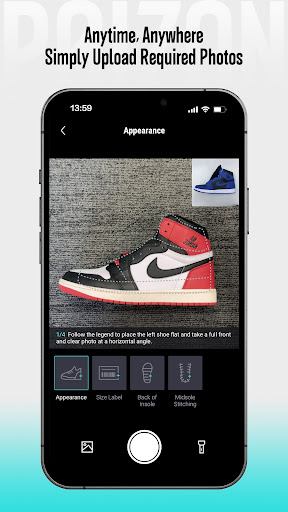
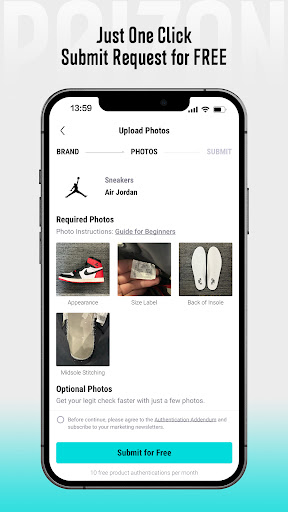
POIZON Online Authentication
With 12 years of authentication experience, POIZON provides the go-to platform for collectors, resellers, and enthusiasts who are seeking confidence in their fashion investments. Over these years, we have helped 6.4 million users avoid counterfeiting. By offering a limited-time free online authentication service, POIZON guarantees the authenticity of items, including sneakers, bags, apparel, watches, and accessories.
HOW IT WORKS:
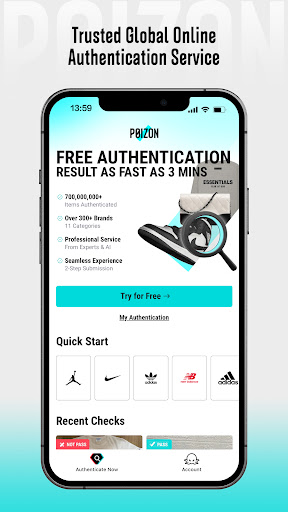
Start with free trials and explore various categories, from sneakers and luxury shoes to streetwear. Snap a photo of your item, and POIZON will identify it within seconds. Follow the simple steps to submit your authentication request, advanced AI technology and expert reviews ensure accurate and reliable authentication in as little as three minutes. Trust POIZON to verify authenticity with ease and confidence.
WHY POIZON:
(A)Professional Service: POIZON has cumulatively authenticated over 600,000,000 items. By combining dual-layer authentication with advanced AI technology, POIZON ensures the most reliable results.
(B)Efficiency & Accuracy: Enjoy the convenience of 24/7 customer service, and you can get the authentication results in as fast as 3 minutes.
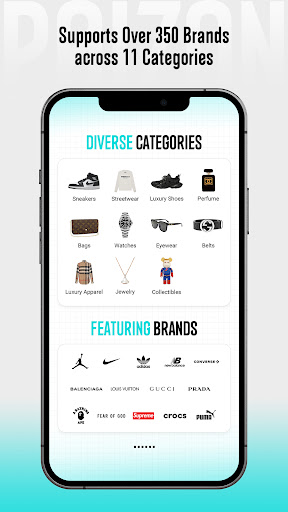
(C)Wide coverage: POIZON Authentication Service supports users in 130+ countries and regions. We offer service across 11 categories and 350+ brands
ITEMS YOU CAN AUTHENTICATE:
Sneakers & Shoes: A wide selection featuring popular brands like Jordan, Nike, Adidas, New Balance, and many others.
Apparel: Supreme, Fear of God, The North Face, and more, covering a wide range of items including hoodies, sweatshirts, jackets, and pants.
Bags: Louis Vuitton, Balenciaga, Gucci, and numerous luxury brands, with a diverse range of styles including shoulder bags, backpacks, clutch bags, wallets, and pouches.
Accessories: A variety of items, such as belts, eyewear, scarves, and hats, with brands including Hermès, Burberry, and more.
Watches: Over 40 luxury brands, including Longines, Cartier, Omega, Rolex, and more.
Jewelry: Includes categories such as necklaces, bracelets, and rings, featuring well-known brands like Tiffany and Vivienne Westwood.
Perfume: Authentication for iconic perfumes from brands such as Chanel, Dior, Creed, and more.
Collectibles: A diverse range of renowned brands such as Bearbrick, Kaws, Bandai, and many more.
Contact us:
URL:www.poizon.com/authentication/home
Instagram:www.instagram.com/poizon_authentication
Email:authenticate@poizon.com
Показать больше

1. Скачать инсталлятор MEmu и завершайте установку

2. Запускайте MEmu, затем откройте Google Play на главной странице

3. Ищите POIZON - Online Authentication в Google Play
Install
4. Скачайте и установите POIZON - Online Authentication
5. При завершении установки, нажмите на значок для старта

6. Наслаждайтесь POIZON - Online Authentication на своем компьютере с помощью MEmu.
MEmu Play — лучший бесплатный эмулятор Android, превосходный опыт работы с которым оценили 50 миллионов пользователей. Технология виртуализации MEmu позволяет без проблем запускать тысячи Android-приложений на вашем компьютере, даже самые требовательные.
Большой экран с лучшей графикой; Большая продолжительность, без ограничения батареи или мобильных данных.
Полная поддержка установки клавиш для точного управления клавиатурой и мышью или геймпадом.
Несколько игровых учетных записей или задач на одном компьютере одновременно с менеджером нескольких экземпляров.
Use POIZON - Online Authentication on PC by following steps: