
POWER TUNER
Обновлено
Текущая версия
2.3.1
Продавец

Перестаньте беспокоиться о быстром разряде батареи при использовании POWER TUNER на вашем телефоне. Освободитесь от крошечного экрана и наслаждайтесь приложением на гораздо большем экране. Теперь вы можете работать с приложением в полноэкранном режиме с удобством клавиатуры и мыши. MEmu предлагает вам все ожидаемые удивительные функции: быструю установку и простую настройку, интуитивно понятное управление и больше никаких забот о времени автономной работы, мобильном трафике или неожиданных звонках. Совершенно новый MEmu 9 — идеальный выбор для использования POWER TUNER на вашем компьютере. С помощью менеджера нескольких экземпляров MEmu вы можете одновременно использовать два или более аккаунтов. И самое главное, наш эксклюзивный движок эмуляции раскрывает весь потенциал вашего ПК, обеспечивая плавную и приятную работу.
Показать больше
Скачайте POWER TUNER на ПК с помощью Андроид эмулятора MEmu. Наслаждайтесь на большом экране. ■ Introduction.
■ Introduction
To win races, it is absolutely essential to set up your machine to best suit both you and the track conditions.
To facilitate this, Yamaha Motors has developed the PowerTuner app for the Yamaha YZ series and WR series (*1).
You can now quickly and easily adjust engine and suspension settings using the app to best suit every rider and any conditions.
In PowerTuner, all features are available at no additional cost!
Want to set up the machine to run faster?
⇒ Intuitive and easy settings. More detailed settings are also available. Make settings as per your choice by referring to the setup guide!
Want to check the recorded usage information such as speed, throttle opening, engine speed, fuel consumption?
⇒ You can now use your smartphone as a machine information monitor!
Want to check how much your lap time improves after customizing the machine settings in the app?
⇒ Measure your times lap-by-lap with the connected button on the machine!
(*1) Depending on the machine, some functions may not be available.
■ Description
・Mapping
There are three setting types:
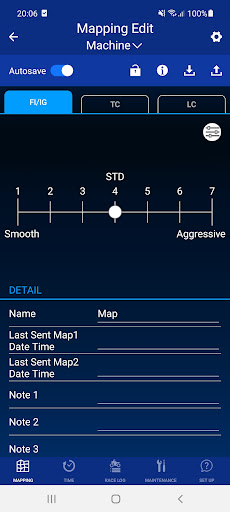
(1) Fuel Injection (FI) and Ignition (IG)
Intuitive and easy adjustment by selecting "Smooth ⇔ Aggressive". If you want more detailed settings, you can adjust each with 16 points (4 x 4) according to the engine speed / throttle opening.
(2) Traction Control
Adjust the level of intervention in 3 levels.
(3) Launch Control
Set the "Rev limit" for launches.
・Monitor
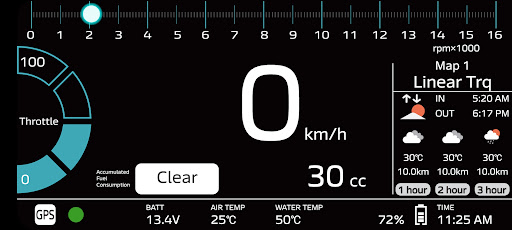
The race log, failure diagnostics, machine status, vehicle speed, throttle opening, engine speed, fuel consumption, water temperature, intake air temperature, and battery voltage are displayed on the smartphone.
・Lap timer (Time)
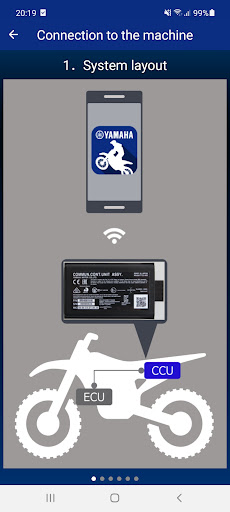
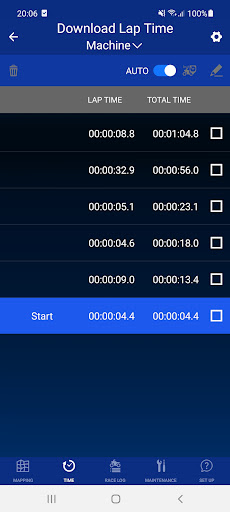
Measure lap times with “Multi-function Button” on the left handlebar. After, check the data recorded by the machine's CCU on your smartphone. Since lap-by-lap measurement is available, you can numerically check the settings effect and lap time discrepancies in actual races.
・Set Up
A FAQ-style setup guide is available for engine and suspension settings. Since it is easy to check the setting instructions on your smartphone, anyone can easily setup the engine and suspension.
■ Supported environment OS: Android 6.0 or higher / iOS12 or higher
・This app requires a smartphone.
・It is not guaranteed that the app will work with all devices.
■ Precautions:
・Use this app safely in compliance with all traffic rules and regulations.
・Only use it when the machine is parked in a safe place.
・It is not guaranteed that this app will work with all machines. CCU installation location and installation method may affect accuracy, sensitivity, and operation of the CCU.
・Some functions of this app require an internet connection through mobile data communication or wireless LAN.
・It is not guaranteed that the figures displayed on this app are accurate.
■ Inquiries
・This app can be used with some Yamaha machines. For inquiries, contact Yamaha dealer.
Показать больше

1. Скачать инсталлятор MEmu и завершайте установку

2. Запускайте MEmu, затем откройте Google Play на главной странице

3. Ищите POWER TUNER в Google Play
Install
4. Скачайте и установите POWER TUNER
5. При завершении установки, нажмите на значок для старта

6. Наслаждайтесь POWER TUNER на своем компьютере с помощью MEmu.
MEmu Play — лучший бесплатный эмулятор Android, превосходный опыт работы с которым оценили 50 миллионов пользователей. Технология виртуализации MEmu позволяет без проблем запускать тысячи Android-приложений на вашем компьютере, даже самые требовательные.
Большой экран с лучшей графикой; Большая продолжительность, без ограничения батареи или мобильных данных.
Полная поддержка установки клавиш для точного управления клавиатурой и мышью или геймпадом.
Несколько игровых учетных записей или задач на одном компьютере одновременно с менеджером нескольких экземпляров.
Use POWER TUNER on PC by following steps: