Reading Eggs - Learn to Read
Обновлено
Текущая версия
v2.5.2+72
Продавец

Перестаньте беспокоиться о быстром разряде батареи при использовании Reading Eggs - Learn to Read на вашем телефоне. Освободитесь от крошечного экрана и наслаждайтесь приложением на гораздо большем экране. Теперь вы можете работать с приложением в полноэкранном режиме с удобством клавиатуры и мыши. MEmu предлагает вам все ожидаемые удивительные функции: быструю установку и простую настройку, интуитивно понятное управление и больше никаких забот о времени автономной работы, мобильном трафике или неожиданных звонках. Совершенно новый MEmu 9 — идеальный выбор для использования Reading Eggs - Learn to Read на вашем компьютере. С помощью менеджера нескольких экземпляров MEmu вы можете одновременно использовать два или более аккаунтов. И самое главное, наш эксклюзивный движок эмуляции раскрывает весь потенциал вашего ПК, обеспечивая плавную и приятную работу.
Показать больше
Скачайте Reading Eggs - Learn to Read на ПК с помощью Андроид эмулятора MEmu. Наслаждайтесь на большом экране. Reading Eggs is the multi-award winning learning program that helps children learn to read.
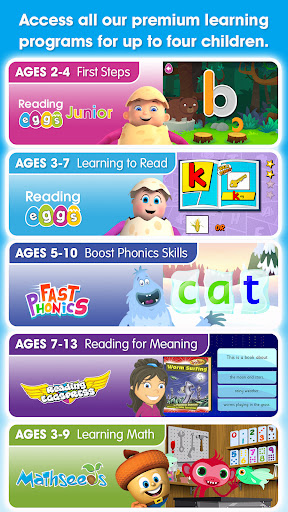
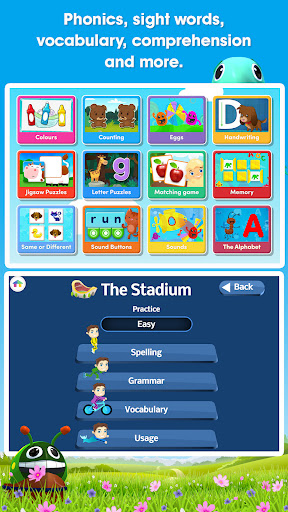
Reading Eggs is the multi-award winning learning program that helps children learn to read. Based on scientific research and designed by experienced elementary teachers, it’s proven to help kids learn to read using interactive reading games, guided reading lessons, fun activities, and over 3,500 digital story books.
Reading Eggs has already helped over 20 million children worldwide learn to read. Each subscription includes full access to:
• Reading Eggs Junior (ages 2–4): Toddlers build pre-reading skills such as phonemic awareness and alphabet knowledge with fun activities, games, videos, and read-aloud books.
• Reading Eggs (ages 3-7): Children take their first steps in learning to read, covering phonics, sight words, spelling, vocabulary, and comprehension.
• Fast Phonics (ages 5–10): A systematic, synthetic phonics program to help emergent and struggling readers build key phonics skills.
• Reading Eggspress (ages 7-13): Continues the learning journey by helping children learn to read for meaning and enjoyment.
• Mathseeds (ages 3–9): Develops essential early numeracy skills, covering numbers, measurement, shapes, patterns, and more.
ABOUT THE READING EGGS LEARN TO READ APP
TRUSTED: used in over 12,000 schools and trusted by elementary educators.
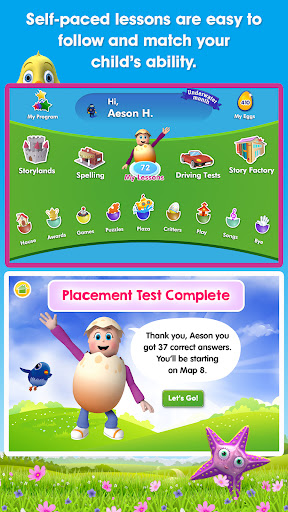
SELF-PACED: children are matched to the perfect level and progress with self-paced, one-on-one lessons.
HIGHLY MOTIVATING: the reward system consists of golden eggs, collectable pets, and games, motivating children to keep learning.
RESEARCH-BASED: based on scientific research and the most up-to-date learning principles on the most effective way children learn to read.
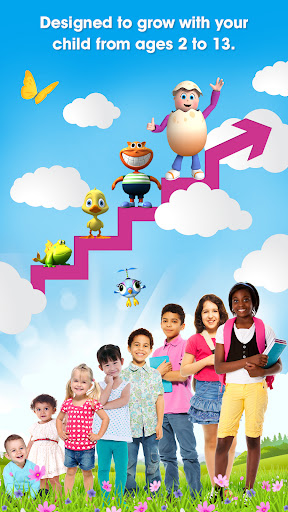
COMPREHENSIVE: Reading Eggs is a complete learn to read system for children aged 2–13 and covers the five essential components of reading: phonics, phonemic awareness, vocabulary, fluency, and comprehension.
PROVEN RESULTS: 91% of parents report a noticeable improvement within weeks!
SEE REAL PROGRESS: see instant results and receive detailed progress reports, which show you exactly how your child is improving.
Users must log in with their account details to access Reading Eggs.
Min requirements:
• Wireless internet connection
• An active trial or subscription
Not recommended for low-performance tablets. Also, not recommended for Leapfrog, Thomson or Pendo tablets.
Note: Teacher accounts are currently supported on desktop only. Go to www.readingeggs.com/schools.
For assistance or feedback email: info@readingeggs.com
MORE INFO
• Each subscription provides access to Reading Eggs Junior, Reading Eggs, Fast Phonics, Reading Eggspress and Mathseeds
• The first month of a monthly subscription is free
• Subscriptions renew automatically; your Google Play Store account will be charged unless you cancel at least 24 hours before the end of the current period
• Cancel anytime in your Google Play Store account settings
Privacy Policy: https://readingeggs.com/privacy/
Terms and Conditions: https://readingeggs.com/terms/
Показать больше

1. Скачать инсталлятор MEmu и завершайте установку

2. Запускайте MEmu, затем откройте Google Play на главной странице

3. Ищите Reading Eggs - Learn to Read в Google Play
Install
4. Скачайте и установите Reading Eggs - Learn to Read
5. При завершении установки, нажмите на значок для старта

6. Наслаждайтесь Reading Eggs - Learn to Read на своем компьютере с помощью MEmu.
MEmu Play — лучший бесплатный эмулятор Android, превосходный опыт работы с которым оценили 50 миллионов пользователей. Технология виртуализации MEmu позволяет без проблем запускать тысячи Android-приложений на вашем компьютере, даже самые требовательные.
Большой экран с лучшей графикой; Большая продолжительность, без ограничения батареи или мобильных данных.
Полная поддержка установки клавиш для точного управления клавиатурой и мышью или геймпадом.
Несколько игровых учетных записей или задач на одном компьютере одновременно с менеджером нескольких экземпляров.
Use Reading Eggs - Learn to Read on PC by following steps: