
SoundCloud: Play Music & Songs
Обновлено
Текущая версия
1783087952
Продавец

Перестаньте беспокоиться о быстром разряде батареи при использовании SoundCloud: Play Music & Songs на вашем телефоне. Освободитесь от крошечного экрана и наслаждайтесь приложением на гораздо большем экране. Теперь вы можете работать с приложением в полноэкранном режиме с удобством клавиатуры и мыши. MEmu предлагает вам все ожидаемые удивительные функции: быструю установку и простую настройку, интуитивно понятное управление и больше никаких забот о времени автономной работы, мобильном трафике или неожиданных звонках. Совершенно новый MEmu 9 — идеальный выбор для использования SoundCloud: Play Music & Songs на вашем компьютере. С помощью менеджера нескольких экземпляров MEmu вы можете одновременно использовать два или более аккаунтов. И самое главное, наш эксклюзивный движок эмуляции раскрывает весь потенциал вашего ПК, обеспечивая плавную и приятную работу.
Показать больше
Скачайте SoundCloud: Play Music & Songs на ПК с помощью Андроид эмулятора MEmu. Наслаждайтесь на большом экране. Новая музыка всегда на SoundCloud.
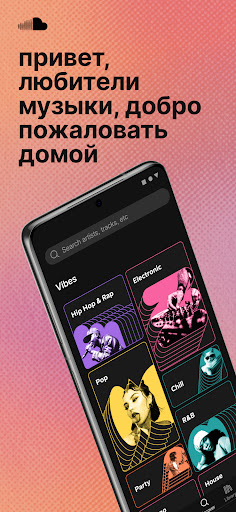
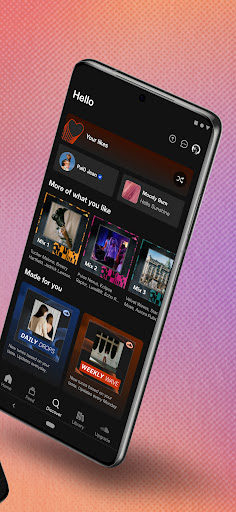
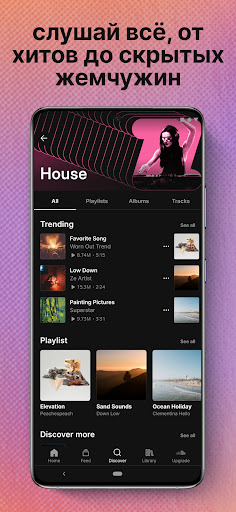
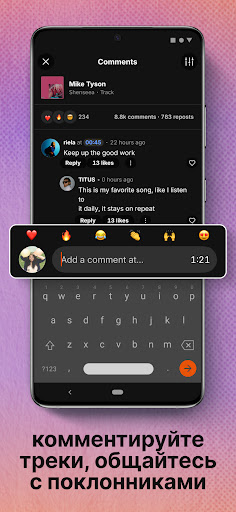
Новая музыка всегда на SoundCloud.
Находи новую музыку среди первых. Открой для себя популярных исполнителей, слушайте песни и делись любимыми плейлистами.
Получи доступ к крупнейшей в мире платформе поиска музыки
- Это 300+ млн треков от 30+ млн исполнителей из 193 стран
Новая и модная музыка подбирается специально для тебя
- Слушай миксы и плейлисты, специально отобранные с учетом твоих любимых песен
Находи эксклюзивную музыку на SoundCloud
- Слушай песни, диджейские сеты и ремиксы, которые не удается найти на любой другой платформе потоковой музыки
Расширь свою музыкальную коллекцию
- Находи и сохраняй трендовые хиты, андеграундные ремиксы, дип-каты и многое другое.
- Создавай плейлисты с любимыми песнями.
Находи подходящее музыкальное сообщество и общайся с его участниками
- Подписывайся на любимых исполнителей, общайся с поклонниками музыки напрямую и знакомься с их плейлистами.
- Ставь лайки, репости и комментируй любой трек, прямо в музыкальном плеере.
- Делись песнями и популярными плейлистами в приложении и соцсетях.
Загружай собственные треки
- Загружай собственную музыку прямо в приложении, чтобы подключиться к глобальной фан-базе с миллионами участниками и стать основателем тренда.
Помогай зарабатывать независимым артистам.
- Твои стримы с поддержкой от поклонников позволяют заработать артистам, которых ТЫ хочешь поддержать.
Наслаждайся бесплатным прослушиванием потоковой музыки с SoundCloud FREE или перейди на SoundCloud Go или SoundCloud Go+, чтобы удалить рекламу, слушать песни без подключения к Интернету и использовать другие премиум-функции.
SOUNDCLOUD FREE:
- Слушай музыку независимых и уже известных исполнителей (с рекламой).
- Слушай альбомы и плейлисты с неограниченным количеством пропусков треков.
- Отправляй музыку в потоковом режиме на смарт-часы Wear OS.
SOUNDCLOUD Go:
- Слушай музыку без рекламы.
- Сохраняй треки для прослушивания без доступа к Интернету — слушай любимые песни и плейлисты в любое время, в любом месте.
- Поддерживай любимых независимых артистов с помощью функции «Роялти от поклонников».
SOUNDCLOUD Go+:
- Разблокируй премиум-треки Go+.
- Получи доступ к высококачественному потоковому аудио.
- Обновляй свои диджейские сеты с помощью эксклюзивных интеграций приложений.
- Слушай музыку без рекламы.
- Сохраняй треки для прослушивания в автономном режиме — слушай любимые песни и плейлисты в любое время и в любом месте
- Поддерживай любимых независимых артистов с помощью функции «Роялти от поклонников».
SoundCloud Go+ предоставляет возможность без доступа к Интернету и без рекламы слушать все, от популярных песен до трендовых диджейских сетов и ремиксов.
Находите новых исполнителей раньше других с приложением SoundCloud на Android TV + Wear OS.
Нужна помощь? Свяжись с нами:
https://soundcloudcommunity.com
https://help.soundcloud.com
https://twitter.com/SCsupport
SoundCloud доступно на английском, бразильском португальском, голландском, французском, немецком, итальянском и испанском языках.
Политика конфиденциальности: https://soundcloud.com/pages/privacy
Условия использования: https://soundcloud.com/terms-of-use
Показать больше

1. Скачать инсталлятор MEmu и завершайте установку

2. Запускайте MEmu, затем откройте Google Play на главной странице

3. Ищите SoundCloud: Play Music & Songs в Google Play
Install
4. Скачайте и установите SoundCloud: Play Music & Songs
5. При завершении установки, нажмите на значок для старта

6. Наслаждайтесь SoundCloud: Play Music & Songs на своем компьютере с помощью MEmu.
MEmu Play — лучший бесплатный эмулятор Android, превосходный опыт работы с которым оценили 50 миллионов пользователей. Технология виртуализации MEmu позволяет без проблем запускать тысячи Android-приложений на вашем компьютере, даже самые требовательные.
Большой экран с лучшей графикой; Большая продолжительность, без ограничения батареи или мобильных данных.
Полная поддержка установки клавиш для точного управления клавиатурой и мышью или геймпадом.
Несколько игровых учетных записей или задач на одном компьютере одновременно с менеджером нескольких экземпляров.
Use SoundCloud: Play Music & Songs on PC by following steps: