Tourney - Tournament Maker App
Обновлено
Текущая версия
2.3.1
Продавец

Перестаньте беспокоиться о быстром разряде батареи при использовании Tourney - Tournament Maker App на вашем телефоне. Освободитесь от крошечного экрана и наслаждайтесь приложением на гораздо большем экране. Теперь вы можете работать с приложением в полноэкранном режиме с удобством клавиатуры и мыши. MEmu предлагает вам все ожидаемые удивительные функции: быструю установку и простую настройку, интуитивно понятное управление и больше никаких забот о времени автономной работы, мобильном трафике или неожиданных звонках. Совершенно новый MEmu 9 — идеальный выбор для использования Tourney - Tournament Maker App на вашем компьютере. С помощью менеджера нескольких экземпляров MEmu вы можете одновременно использовать два или более аккаунтов. И самое главное, наш эксклюзивный движок эмуляции раскрывает весь потенциал вашего ПК, обеспечивая плавную и приятную работу.
Показать больше
Скачайте Tourney - Tournament Maker App на ПК с помощью Андроид эмулятора MEmu. Наслаждайтесь на большом экране. Introducing Tourney, the versatile, user-friendly tournament management tool suitable for everyone.
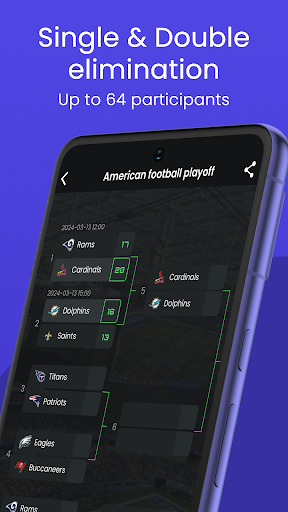
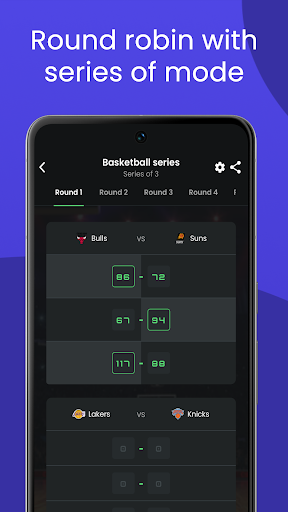
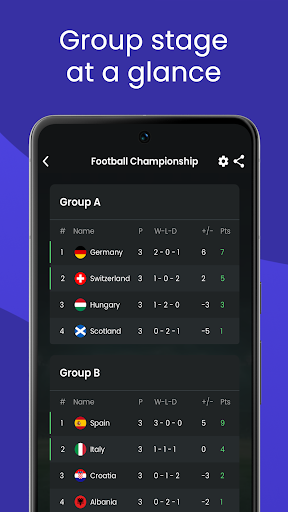
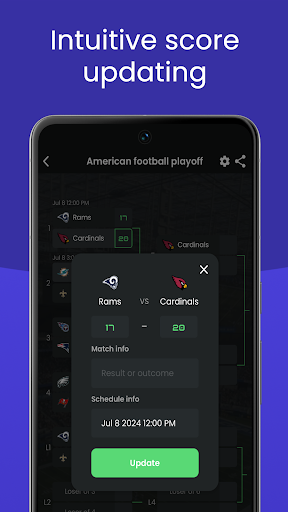
Introducing Tourney, the versatile, user-friendly tournament management tool suitable for everyone. Designed for sports, gaming, and board game enthusiasts. Whether you’re coordinating a local soccer match, an eSports tournament, or any casual competition, Tourney has got you covered.
Versatile formats:
• Create clear, visual tournament structures suitable for various sports. You can choose from Single Elimination, Double Elimination, and Round-Robin formats.
• Customize group stages, qualifiers, and participant flow according to your needs.
• Accommodate up to 64 participants, complete with personalized graphics, names, and avatars.
• Multiple Seeding methods: Standard bracket (1st vs 16th), Pot system (like Champions League), or Sequential order. Drag & drop adjustments available
• Organize leagues and share them effortlessly.
Sharable instances:
• Collaborate with friends, colleagues, and participants by sharing tournament instances.
• Real-time updates and collaborative editing ensure that everyone stays informed about scores, match results, and overall progress.
• Spectators can also view matches in a read-only mode.
Management setup:
• Overview for sharing essential details in one place.
• Participant registration with two modes: Invite specific players/teams or allow open signups before tournament start and verification codes.
• Set dates, times, and locations for matches across all tournament types.
• Follow specific participants and automatically receive calendar invites to your default calendar app for any changes.
Premium note:
While Tourney offers a free version without usage limits or ads, some advanced features require in-app purchases. Certain tournament formats, advanced sharing options, and premium functionalities are available through optional paid upgrades.
User-friendly interface:
• Tourney features an intuitive, minimalist design that caters to both beginners and seasoned organizers.
• Ai-powered text scanning to import participants from images. Works with handwritten lists, photos, and also text or csv file reader.
• Update the match results, score and match details with just a tap. Store players/teams to create even more, save time and merge them together.
No-nonsense approach:
• Get started instantly—no user registration required.
• Essential features are free to use, with no advertisements.
Upcoming features:
• Improved editing and more settings for for each type
• Scoreboard tournament type
• Adaptation for sports with different point systems
• Skill based tournament type
• Social functions to shared instances.
This app is still in the making with more to come, and I'm open to feedback and ideas.
Ideal for sports and esports including:
Soccer, Basketball, Tennis, Baseball, Softball, American Football, Ice Hockey, Table Tennis, Ping Pong, Padel, Volleyball, Badminton, Rugby, Cricket, Handball, Pool 8 Ball, Cornhole, Pickleball, Spikeball,Bocce, Made Hoops, FIFA, PES, Chess, CS2 Counter-Strike, Valorant, Dota, League of Legends, Battle Royale games, Fortnite, PUBG, Call of Duty, Overwatch, Rocket League, Tekken, Madden NFL, NBA, NCAA 2K, F1 23, and more.
https://tourneymaker.app/terms-of-use
Показать больше

1. Скачать инсталлятор MEmu и завершайте установку

2. Запускайте MEmu, затем откройте Google Play на главной странице

3. Ищите Tourney - Tournament Maker App в Google Play
Install
4. Скачайте и установите Tourney - Tournament Maker App
5. При завершении установки, нажмите на значок для старта

6. Наслаждайтесь Tourney - Tournament Maker App на своем компьютере с помощью MEmu.
MEmu Play — лучший бесплатный эмулятор Android, превосходный опыт работы с которым оценили 50 миллионов пользователей. Технология виртуализации MEmu позволяет без проблем запускать тысячи Android-приложений на вашем компьютере, даже самые требовательные.
Большой экран с лучшей графикой; Большая продолжительность, без ограничения батареи или мобильных данных.
Полная поддержка установки клавиш для точного управления клавиатурой и мышью или геймпадом.
Несколько игровых учетных записей или задач на одном компьютере одновременно с менеджером нескольких экземпляров.
Use Tourney - Tournament Maker App on PC by following steps: