
VLC for Android
Обновлено
Текущая версия
1778481821
Продавец

Перестаньте беспокоиться о быстром разряде батареи при использовании VLC for Android на вашем телефоне. Освободитесь от крошечного экрана и наслаждайтесь приложением на гораздо большем экране. Теперь вы можете работать с приложением в полноэкранном режиме с удобством клавиатуры и мыши. MEmu предлагает вам все ожидаемые удивительные функции: быструю установку и простую настройку, интуитивно понятное управление и больше никаких забот о времени автономной работы, мобильном трафике или неожиданных звонках. Совершенно новый MEmu 9 — идеальный выбор для использования VLC for Android на вашем компьютере. С помощью менеджера нескольких экземпляров MEmu вы можете одновременно использовать два или более аккаунтов. И самое главное, наш эксклюзивный движок эмуляции раскрывает весь потенциал вашего ПК, обеспечивая плавную и приятную работу.
Показать больше
Скачайте VLC for Android на ПК с помощью Андроид эмулятора MEmu. Наслаждайтесь на большом экране. Медиаплеер VLC — бесплатный и свободный кросс-платформенный проигрыватель мультимедиа, способный воспроизводить большинство видов медиафайлов, а также сетевые потоки и медиаконтент с дисков и устройств.
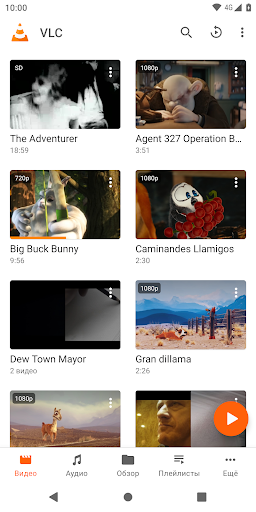
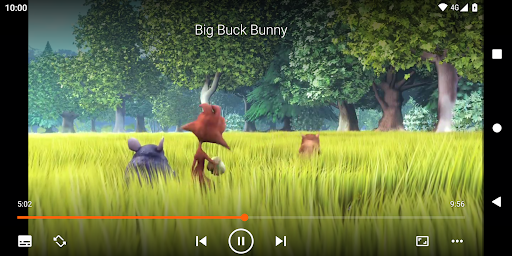
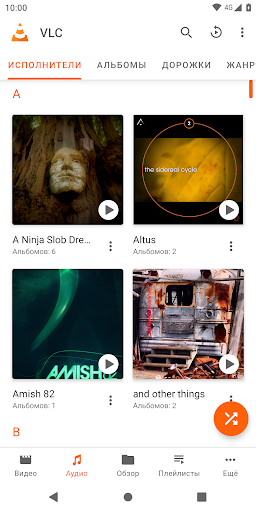
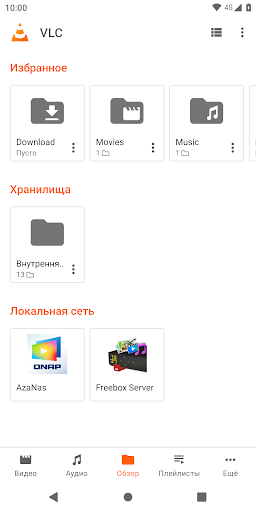
Медиаплеер VLC — бесплатный и свободный кросс-платформенный проигрыватель мультимедиа, способный воспроизводить большинство видов медиафайлов, а также сетевые потоки и медиаконтент с дисков и устройств.
Это вариация медиаплеера VLC для платформы Android™. VLC для Android умеет воспроизводить любые аудио- и видеофайлы, а также сетевые потоки и ISO-образы DVD, способен работать с внешними устройствами и сетевыми общими дисками, как и настольная версия VLC.
VLC для Android — полноценный аудиоплеер с собственной базой данных, эквалайзером и фильтрами, способный воспроизводить даже самые странные аудиоформаты.
VLC предназначен для всех, абсолютно бесплатен, не содержит рекламу и не предлагает покупок в приложений, не шпионит за вами и разработан увлечёнными энтузиастами. Весь исходный код VLC полностью открыт.
Характеристики
––––––––
VLC для Android™ воспроизводит большинство видов локальных аудио- и видеофайлов, а также сетевых потоков (включая адаптивные трансляции), ISO-образы DVD, как и настольная версия VLC. Он также поддерживает сетевые общие диски.
Поддерживаются все форматы, включая MKV, MP4, AVI, MOV, Ogg, FLAC, TS, M2TS, Wv и AAC. Все кодеки встроены, дополнительно загружать ничего не нужно. Он поддерживает субтитры, телетекст и скрытые субтитры (CC).
VLC для Android организует свою медиатеку для аудио- и видеофайлов и может просматривать папки непосредственно.
VLC поддерживает несколько аудидорожек и субтитры, а также автоповорот, изменение соотношения сторон, управление жестами (изменение громкости, яркости и перемотка).
Также в нём есть виджет для управления звуком, поддержка управления с наушников, отображение обложек и полноценная аудиотека.
Разрешения
––––––––––––
Приложению VLC для Android требуется следующий доступ:
• "Фото/Медиа/Файлы" для чтения ваших медиафайлов :)
• "Хранилище" для чтения всех ваших медиафайлов на SD-картах :)
• "Другое" для проверки сетевых подключений, изменения громкости, установки звука звонка, запуска на Android TV и отображения всплывающего окна; подробнее об этом ниже.
Подробнее о разрешениях:
• Ему требуется "читать содержимое вашего USB-хранилища", чтобы считывать с него медиафайлы.
• Ему требуется "модифицировать или удалять содержимое вашего USB-хранилища", чтобы удалять с него файлы и сохранять субтитры.
• Ему требуется "полный сетевой доступ" для получения сетевых потоков.
• Ему требуется "не допускать переход в спящий режим", чтобы ваше устройство не "засыпало" при воспроизведении видео.
• Ему требуется "изменять параметры звука" для изменения громкости звука.
• Ему требуется "изменять параметры системы" для изменения звука звонка.
• Ему требуется "просматривать сетевые соединения" для отслеживания отключения устройства от сети с целью выключения потоковых компонентов.
• Ему требуется "рисовать поверх других приложений" для вызова всплывающего меню.
• Ему требуется "управлять вибрацией" для обеспечения реакции на действия.
• Ему требуется "запускаться при загрузке" для помещения рекомендаций на экран запуска Android TV (используется только в версией для Android TV).
• Ему требуется "записывать звук" для поддержки голосового поиска на устройствах Android TV (используется только в версии для Android TV).
Показать больше

1. Скачать инсталлятор MEmu и завершайте установку

2. Запускайте MEmu, затем откройте Google Play на главной странице

3. Ищите VLC for Android в Google Play
Install
4. Скачайте и установите VLC for Android
5. При завершении установки, нажмите на значок для старта

6. Наслаждайтесь VLC for Android на своем компьютере с помощью MEmu.
MEmu Play — лучший бесплатный эмулятор Android, превосходный опыт работы с которым оценили 50 миллионов пользователей. Технология виртуализации MEmu позволяет без проблем запускать тысячи Android-приложений на вашем компьютере, даже самые требовательные.
Большой экран с лучшей графикой; Большая продолжительность, без ограничения батареи или мобильных данных.
Полная поддержка установки клавиш для точного управления клавиатурой и мышью или геймпадом.
Несколько игровых учетных записей или задач на одном компьютере одновременно с менеджером нескольких экземпляров.
Use VLC for Android on PC by following steps: