VoidLauncher
Обновлено
Текущая версия
Продавец

Перестаньте беспокоиться о быстром разряде батареи при использовании VoidLauncher на вашем телефоне. Освободитесь от крошечного экрана и наслаждайтесь приложением на гораздо большем экране. Теперь вы можете работать с приложением в полноэкранном режиме с удобством клавиатуры и мыши. MEmu предлагает вам все ожидаемые удивительные функции: быструю установку и простую настройку, интуитивно понятное управление и больше никаких забот о времени автономной работы, мобильном трафике или неожиданных звонках. Совершенно новый MEmu 9 — идеальный выбор для использования VoidLauncher на вашем компьютере. С помощью менеджера нескольких экземпляров MEmu вы можете одновременно использовать два или более аккаунтов. И самое главное, наш эксклюзивный движок эмуляции раскрывает весь потенциал вашего ПК, обеспечивая плавную и приятную работу.
Показать больше
Наслаждайтесь превосходным опытом использования VoidLauncher на ПК с MEmu Play. Это мощный бесплатный эмулятор Android, который предлагает тысячи приложений для настольных компьютеров. Наслаждайтесь общением с друзьями и совершенствуйте свою работу ещё эффективнее! Void Launcher is a meticulous reimagining of the Android home screen.
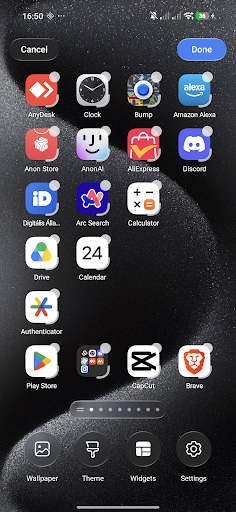
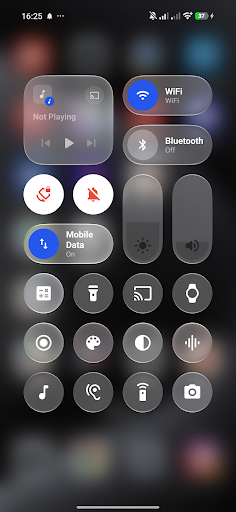
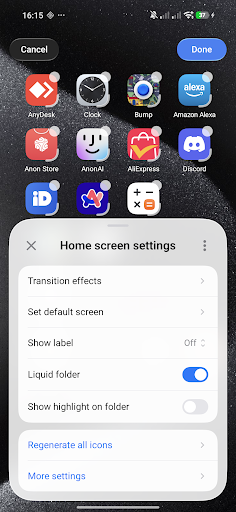
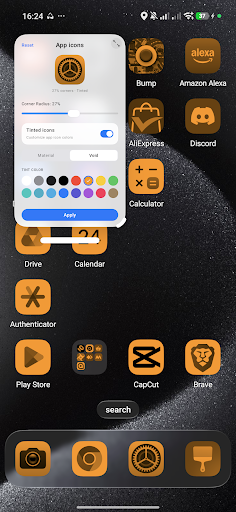
Void Launcher is a meticulous reimagining of the Android home screen. Designed with a profound focus on craftsmanship, materiality, and the behavior of light, it transforms your device into a living, tactile canvas.
Designed for the Senses.
At the heart of Void Launcher is a custom-engineered liquid-glass interface. We studied how light filters through frosted glass, how layers interact in physical space, and how motion can feel entirely organic. The result is a layout defined by depth, subtle translucent layers, and high-fidelity graphics that elevate every interaction.
A Symphony of Fluid Motion.
Every gesture feels natural and responsive. Powered by custom AGSL physics engines, a gentle tap sends liquid ripples flowing across your wallpaper, while transitioning between screens feels weightless. It is not just about moving from page to page; it is about the poetry of motion.
The Beauty of Materiality.
Experience custom-crafted Monarch shapes that adapt harmoniously to your display. The interface behaves like a physical material—refracting light, shifting dynamically based on your wallpaper, and creating a sense of clean, structured space. It is quiet, elegant, and entirely focused on what matters most to you.
Intelligent Simplicity.
A highly refined home screen that respects your focus. Organize your workspace with precise grid adjustments, seamless icon pack integration, and custom blur parameters. It is an experience that stays out of your way, letting your content shine.
Integrated Voice Control.
For moments when you need it, a minimalist, built-in Voice and keyboard assistant rests quietly at the bottom of the screen. Available with a simple gesture, it allows you to effortlessly navigate pages or adjust launcher settings with natural command input.
ACCESSIBILITY SERVICE DISCLOSURE:
VoidLauncher uses the Android Accessibility Service API to provide its Control Center functionality while you are using other applications. The Accessibility Service allows VoidLauncher to display and control the Control Center overlay over other apps.
The Accessibility Service is used exclusively for this Control Center functionality. VoidLauncher does not collect, store, or share personal or sensitive user data through the Accessibility Service.
Показать больше

1. Скачать инсталлятор MEmu и завершайте установку

2. Запускайте MEmu, затем откройте Google Play на главной странице

3. Ищите VoidLauncher в Google Play
Install
4. Скачайте и установите VoidLauncher
5. При завершении установки, нажмите на значок для старта

6. Наслаждайтесь VoidLauncher на своем компьютере с помощью MEmu.
MEmu Play — лучший бесплатный эмулятор Android, превосходный опыт работы с которым оценили 50 миллионов пользователей. Технология виртуализации MEmu позволяет без проблем запускать тысячи Android-приложений на вашем компьютере, даже самые требовательные.
Большой экран с лучшей графикой; Большая продолжительность, без ограничения батареи или мобильных данных.
Полная поддержка установки клавиш для точного управления клавиатурой и мышью или геймпадом.
Несколько игровых учетных записей или задач на одном компьютере одновременно с менеджером нескольких экземпляров.
Use VoidLauncher on PC by following steps: